This is a sanitized public setup guide for running WireGuard with a reverse proxy and a web UI.
- Public DNS: yourvpndns.com
- VPN user: user
- Private IPs: generic RFC1918 examples only
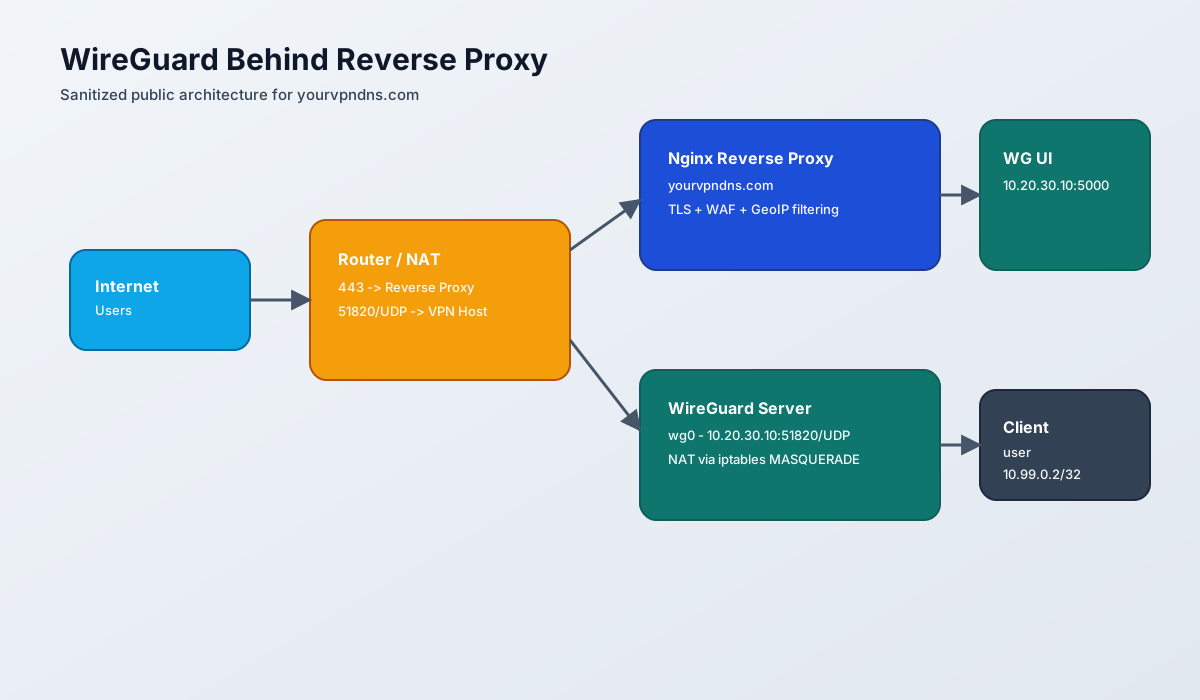
Architecture
flowchart TB
    A[Internet Users] --> B[Router NAT\n443 -> Reverse Proxy\n51820/UDP -> VPN Host]
    B --> C[Nginx Reverse Proxy\nyourvpndns.com\nTLS + WAF + GeoIP block]
    C --> D[WireGuard UI\n10.20.30.10:5000]
    B --> E[WireGuard Server wg0\n10.20.30.10:51820/UDP]
    E --> F[VPN Client user\n10.99.0.2/32]
    E --> G[Internet via NAT\niptables MASQUERADE]
Topology (Sanitized)
- Reverse proxy host: 10.20.30.20
- WireGuard host: 10.20.30.10
- WireGuard interface subnet: 10.99.0.0/24
- Server tunnel IP: 10.99.0.1
- Client tunnel IP: 10.99.0.2
- Public endpoint: yourvpndns.com:51820 (UDP)
1. Install WireGuard and UI on VPN host
sudo apt update
sudo apt install -y wireguard wireguard-tools
Install WireGuard UI using your preferred method (binary or container), then bind it internally on port 5000.
2. WireGuard server config (example)
[Interface]
Address = 10.99.0.1/24
ListenPort = 51820
PrivateKey = <server_private_key>
MTU = 1450

[Peer]
PublicKey = <client_public_key>
PresharedKey = <client_psk>
AllowedIPs = 10.99.0.2/32
PersistentKeepalive = 15
3. NAT and forwarding on VPN host
sudo sysctl -w net.ipv4.ip_forward=1
sudo iptables -A FORWARD -i wg0 -j ACCEPT
sudo iptables -A FORWARD -o wg0 -j ACCEPT
sudo iptables -t nat -A POSTROUTING -o eth0 -j MASQUERADE
Persist rules using your preferred method (systemd one-shot service, iptables-persistent, or nftables equivalent).
4. Nginx reverse proxy for UI
server {
    listen 443 ssl;
    server_name yourvpndns.com;

    ssl_certificate /etc/letsencrypt/live/yourvpndns.com/fullchain.pem;
    ssl_certificate_key /etc/letsencrypt/live/yourvpndns.com/privkey.pem;

    include /etc/nginx/snippets/ip-blocklist.conf;
    include /etc/nginx/snippets/geoip-country-block.conf;
    include /etc/nginx/snippets/security-headers.conf;

    modsecurity on;
    modsecurity_rules_file /etc/nginx/modsec/modsecurity.conf;

    location / {
        proxy_pass http://10.20.30.10:5000;
        proxy_set_header Host $host;
        proxy_set_header X-Real-IP $remote_addr;
        proxy_set_header X-Forwarded-For $proxy_add_x_forwarded_for;
        proxy_set_header X-Forwarded-Proto $scheme;
    }
}
5. Router/NAT rules (critical)
- Forward TCP 443 -> reverse proxy host
- Forward UDP 51820 -> WireGuard host
Important: WireGuard uses UDP only. A TCP forward on 51820 will break handshakes.
6. Client profile (sanitized)
[Interface]
PrivateKey = <client_private_key>
Address = 10.99.0.2/32
DNS = 1.1.1.1
MTU = 1450

[Peer]
PublicKey = <server_public_key>
PresharedKey = <client_psk>
Endpoint = yourvpndns.com:51820
AllowedIPs = 0.0.0.0/0
PersistentKeepalive = 15
7. Validation checklist
wg showdisplays recent handshake timestamps- RX/TX counters increase during traffic
- Client reaches internet through VPN egress
- DNS resolves normally through configured resolver
Security hardening used
- TLS with Let's Encrypt
- ModSecurity enabled on reverse proxy
- Country/IP filtering in nginx snippets
- Strict forwarding and NAT only for required interface paths
This guide is intentionally anonymized for safe public sharing.