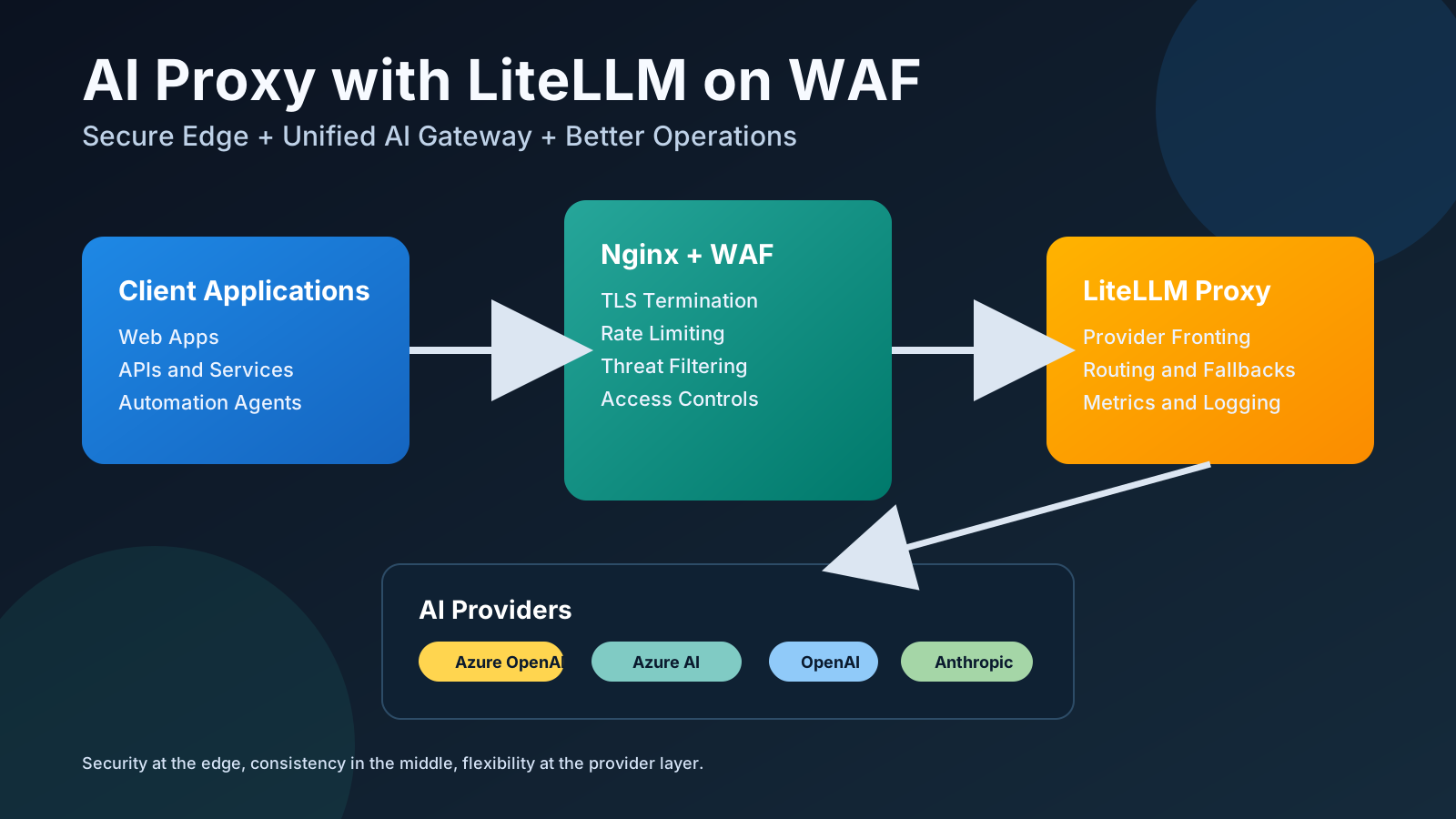
Why Put LiteLLM Behind Nginx + WAF
Running LiteLLM as a central AI gateway is already useful, but adding an Nginx reverse proxy with WAF in front of it gives a stronger production setup:
- Better security posture (WAF filtering, controlled entrypoint, request limits)
- Cleaner operations (single API surface for many model providers)
- Better reliability (timeouts, upstream controls, health handling)
- Better observability (centralized access logs and metrics)
In short: Nginx + WAF protects the edge, while LiteLLM standardizes AI access and routing behind it.
Reference Architecture
Client Apps
   |
   v
Nginx + WAF (TLS termination, filtering, rate limiting)
   |
   v
LiteLLM Proxy (OpenAI-compatible endpoint, routing, fallbacks)
   |
   v
AI Providers (Azure OpenAI, Azure AI Studio, OpenAI, Anthropic, etc.)
1. Install and Run LiteLLM as a Service
Use your existing installation flow:
cd ~/litellm
sudo bash install_litellm.sh
Typical service unit:
[Unit]
Description=LiteLLM Proxy Server
After=network.target

[Service]
Type=simple
User=demouser
Group=demouser
WorkingDirectory=/opt/litellm
Environment="PATH=/opt/litellm/venv/bin"
EnvironmentFile=/opt/litellm/.env
ExecStart=/opt/litellm/venv/bin/litellm --config /opt/litellm/config/litellm_config.yaml --port 4000 --host 127.0.0.1
Restart=always
RestartSec=10
StandardOutput=journal
StandardError=journal
SyslogIdentifier=litellm

[Install]
WantedBy=multi-user.target
Important hardening point: bind LiteLLM to 127.0.0.1 and expose it only through Nginx.
2. Environment Variables (No Secrets in Files)
Create /opt/litellm/.env and keep real values out of git:
# Provider endpoints
AZURE_AI_STUDIO_API_BASE=https://your-ai-studio-resource.services.ai.azure.com/
AZURE_OPENAI_API_BASE=https://your-openai-resource.openai.azure.com/

# Provider keys (set real values on server only)
AZURE_AI_API_KEY=replace_me
OPENAI_API_KEY=replace_me
ANTHROPIC_API_KEY=replace_me

# Deployment names / model aliases
AZURE_AI_MODEL_1=DeepSeek-V3.2
AZURE_AI_MODEL_2=gpt-4.1
AZURE_AI_MODEL_3=gpt-5-mini

# API versions
AZURE_AI_API_VERSION_OF_AZURE_AI_MODEL_1=2024-05-01-preview
AZURE_AI_API_VERSION_OF_AZURE_AI_MODEL_2=2025-01-01-preview
AZURE_AI_API_VERSION_OF_AZURE_AI_MODEL_3=2025-04-01-preview

# LiteLLM gateway key used by clients
LITELLM_MASTER_KEY=replace_with_long_random_value
3. LiteLLM Configuration with Routing and Fallback
Example /opt/litellm/config/litellm_config.yaml without secrets:
model_list:
  - model_name: gpt-4.1
    litellm_params:
      model: azure/gpt-4.1
      api_base: os.environ/AZURE_OPENAI_API_BASE
      api_key: os.environ/AZURE_AI_API_KEY
      api_version: os.environ/AZURE_AI_API_VERSION_OF_AZURE_AI_MODEL_2

  - model_name: gpt-5-mini
    litellm_params:
      model: azure/gpt-5-mini
      api_base: os.environ/AZURE_OPENAI_API_BASE
      api_key: os.environ/AZURE_AI_API_KEY
      api_version: os.environ/AZURE_AI_API_VERSION_OF_AZURE_AI_MODEL_3

  - model_name: deepseek-v3.2
    litellm_params:
      model: azure_ai/DeepSeek-V3.2
      api_base: os.environ/AZURE_AI_STUDIO_API_BASE
      api_key: os.environ/AZURE_AI_API_KEY
      api_version: os.environ/AZURE_AI_API_VERSION_OF_AZURE_AI_MODEL_1

litellm_settings:
  drop_params: true
  set_verbose: false
  request_timeout: 120
  json_logs: true

general_settings:
  master_key: os.environ/LITELLM_MASTER_KEY

# Optional routing strategies
router_settings:
  routing_strategy: "least-busy"
  num_retries: 2
  timeout: 120

# Example fallback chain
fallbacks:
  - gpt-4.1: ["gpt-5-mini", "deepseek-v3.2"]
What this gives you operationally:
- Front one API contract for many providers
- Route traffic across model backends
- Apply retries and fallbacks during provider issues
- Keep client apps independent from provider-specific SDK changes
4. Nginx Reverse Proxy + WAF Fronting LiteLLM
Example secure Nginx site:
server {
    listen 443 ssl http2;
    server_name ai.example.com;

    # TLS certificates
    ssl_certificate     /etc/letsencrypt/live/ai.example.com/fullchain.pem;
    ssl_certificate_key /etc/letsencrypt/live/ai.example.com/privkey.pem;

    # ModSecurity WAF
    modsecurity on;
    modsecurity_rules_file /etc/nginx/modsec/modsecurity.conf;

    # Basic request protections
    client_max_body_size 10m;
    limit_req_zone $binary_remote_addr zone=ai_ratelimit:10m rate=20r/s;

    location /v1/ {
        limit_req zone=ai_ratelimit burst=40 nodelay;

        proxy_pass http://127.0.0.1:4000;
        proxy_http_version 1.1;

        proxy_set_header Host $host;
        proxy_set_header X-Real-IP $remote_addr;
        proxy_set_header X-Forwarded-For $proxy_add_x_forwarded_for;
        proxy_set_header X-Forwarded-Proto $scheme;

        proxy_connect_timeout 15s;
        proxy_send_timeout 120s;
        proxy_read_timeout 120s;

        # Optional: forward request ID for tracing
        add_header X-Request-ID $request_id;
        proxy_set_header X-Request-ID $request_id;
    }
}
Why this matters:
- WAF blocks malicious payload patterns before they hit LiteLLM
- Rate limiting reduces abuse and accidental traffic spikes
- Nginx timeouts and controls protect backend stability
- Central TLS termination simplifies certificate operations
5. Monitoring and Performance Operations
For day-2 operations, LiteLLM plus Nginx gives useful telemetry:
- LiteLLM logs: model usage, response times, errors, retry/fallback behavior
- Nginx logs: client-level traffic volume, status codes, WAF events
- Service health: systemd status, restart behavior, memory trends
Useful commands:
sudo systemctl status litellm
journalctl -u litellm -f
sudo nginx -t
sudo systemctl reload nginx
If you already have helper scripts like status.sh, enhanced_monitor.sh, and analyze_logs.sh, keep using them as your quick operational dashboard.
6. Test Through the Protected Endpoint
Use the public AI endpoint (through Nginx), not the local LiteLLM port:
curl https://ai.example.com/v1/chat/completions \
  -H "Authorization: Bearer sk-your-litellm-gateway-key" \
  -H "Content-Type: application/json" \
  -d '{
    "model": "gpt-4.1",
    "messages": [{"role": "user", "content": "Hello from secured LiteLLM"}],
    "max_tokens": 120
  }'
7. Security Checklist
Before production rollout:
- Keep all provider keys and gateway keys in environment variables
- Do not commit
.envor key-bearing files - Restrict LiteLLM binding to localhost/private network
- Enforce HTTPS and WAF at the Nginx edge
- Apply API rate limits and request size limits
- Rotate keys periodically and monitor unusual usage patterns
Final Takeaway
Using Nginx + WAF in front of LiteLLM creates a practical AI gateway pattern:
- More secure edge exposure
- Cleaner multi-provider abstraction for applications
- Better reliability with retries/fallbacks
- Improved monitoring for performance and incident response
That combination helps teams scale AI operations without exposing provider complexity directly to every application.