Azure Landing Zone with Terraform Modules
The LZv2 repository demonstrates a production-grade Azure Landing Zone (ALZ) implementation using Infrastructure as Code. It provides a complete, modular Terraform-based foundation for deploying enterprise-scale cloud infrastructure across multiple Azure subscriptions with centralized governance, security, and compliance.
A Landing Zone is a well-architected, pre-provisioned environment that enables rapid, secure, and compliant workload deployment in Azure while maintaining consistency across your cloud estate.
Architecture Overview
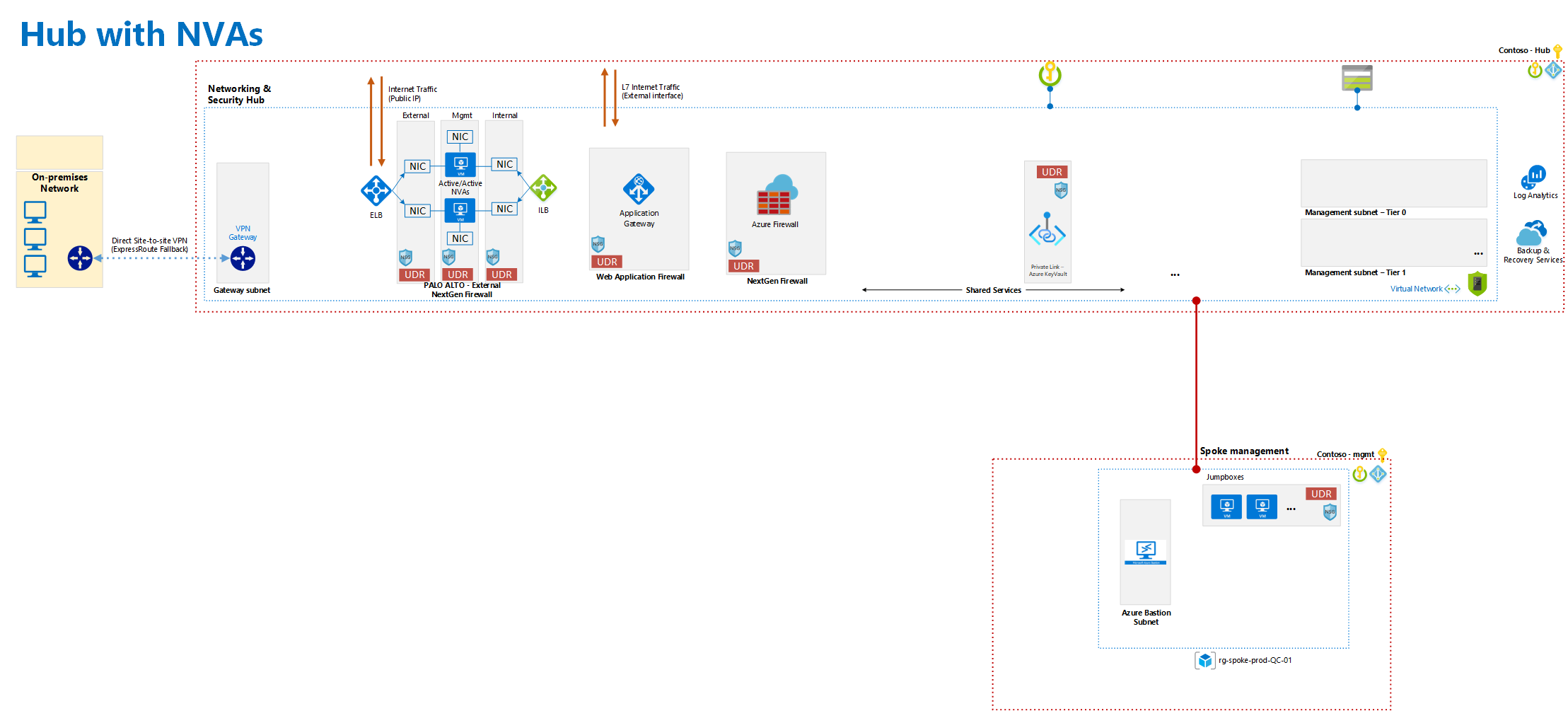
The LZv2 implementation provides:
- Management Groups: Hierarchical organization and governance
- Multi-subscription topology: Hub + Management + Backup subscriptions
- Centralized networking: Hub VNet with Security and Routing
- Security controls: DDoS Protection, Azure Firewall, Application Gateway
- Monitoring & Logging: Centralized Log Analytics and Storage
- Connectivity: Site-to-Site VPN to on-premises
- Advanced features: Palo Alto Networks autoscaling, Azure Bastion
- Modular design: Reusable Terraform modules for each component
Part 1: Multi-Subscription Architecture
Subscription Organization
The LZv2 uses 4 main Azure subscriptions with specific purposes:
# Default subscription (administrative)
variable "azure-default-subscription-id" {
  description = "Administrative subscription for common services"
}

# Hub subscription (networking core)
variable "azure-AJN-Hub-subscription-id" {
  description = "Hub subscription for core networking and security"
}

# Management subscription (operations)
variable "azure-AJN-Management-subscription-id" {
  description = "Management subscription for operational tools"
}

# Backup subscription (disaster recovery)
variable "azure-AJN-Backup-subscription-id" {
  description = "Backup subscription for BCDR services"
}
Each subscription is configured with its own Service Principal credentials:
provider "azurerm" {
  alias           = "AJN-Hub"
  version         = "3.59.0"
  subscription_id = var.azure-AJN-Hub-subscription-id
  client_id       = var.azure-AJN-Hub-client-app-id
  client_secret   = var.azure-AJN-Hub-client-secret-password
  tenant_id       = var.azure-AJN-Hub-tenant-id
  features {}
}

provider "azurerm" {
  alias           = "AJN-Management"
  version         = "3.59.0"
  subscription_id = var.azure-AJN-Management-subscription-id
  client_id       = var.azure-AJN-Management-client-app-id
  client_secret   = var.azure-AJN-Management-client-secret-password
  tenant_id       = var.azure-AJN-Management-tenant-id
  features {}
}

provider "azurerm" {
  alias           = "AJN-Backup"
  version         = "3.59.0"
  subscription_id = var.azure-AJN-Backup-subscription-id
  client_id       = var.azure-AJN-Backup-client-app-id
  client_secret   = var.azure-AJN-Backup-client-secret-password
  tenant_id       = var.azure-AJN-Backup-tenant-id
  features {}
}
Part 2: Hub Infrastructure Components
Management Groups
Establishes hierarchical governance structure:
module "management-groups" {
  source = "./modules/management-groups"
}
Networking Layer
The Hub Virtual Network provides centralized network segmentation:
module "hub-network" {
  source                      = "./modules/network"
  providers                   = {azurerm = azurerm.AJN-Hub}
  current-vnet-space          = var.current-vnet-space
  name-vnet-module            = var.current-vnet-name
  ip-range-GatewaySubnet      = var.current-GatewaySubnet-space
  ip-range-AzureRouteServer   = var.current-AzureRouteServer-space
  ip-range-AzureFirewall      = var.current-AzureFirewall-space
  ip-range-AzureAppGW         = var.current-AzureAppGW-space
  ip-range-SharedServices     = var.current-SharedServices-space
}
Hub Subnets:
- GatewaySubnet: VPN and ExpressRoute connectivity
- AzureRouteServer: Advanced routing capabilities
- AzureFirewall: Network security perimeter
- Application Gateway: Load balancing and WAF
- SharedServices: Internal shared services
Security Infrastructure
Azure DDoS Protection
module "AzureDDOS" {
  source                           = "./modules/ddos"
  providers                        = {azurerm = azurerm.AJN-Hub}
  module-resource-module-rg        = "security-${var.current-name-convention-core-main}-rg"
  tags-ddos-logging-module = {
    environment = "production"
    type_1      = "network"
    type_2      = "security"
  }
}
Azure Firewall
Central firewall for all Hub traffic:
module "Azurefirewall" {
  source                    = "./modules/firewall"
  providers                 = {azurerm = azurerm.AJN-Hub}
  fw-subnet-id              = module.hub-network.Azure_firewall_subnet_id
  ip-range-vnet-module      = var.current-vnet-space
  tags-fw-logging-module = {
    type_1 = "network"
    type_2 = "security"
  }
}
Firewall Rules Handle:
- North-South traffic (external ingress/egress)
- East-West traffic (internal routing)
- Application-level filtering
- DDoS protection integration
Application Gateway (WAF)
module "Azure-AppGW" {
  source              = "./modules/application-gateway"
  providers           = {azurerm = azurerm.AJN-Hub}
  appgw-subnet-id     = module.hub-network.Azure_AppGW_subnet_id
}
Provides Web Application Firewall capabilities for layer 7 protection.
Private DNS Zone
Centralized DNS resolution:
module "Azure-Private-DNS-Hub" {
  source                              = "./modules/private-dns-zone"
  hub-vnet-id                         = module.hub-network.Azure_HUB_vnet_id
  module-domain-private-dns-domain    = var.domain-private-dns-domain-for-vnet-main
}
Azure Key Vault
Secrets management:
module "akv-lz" {
  source              = "./modules/akv"
  providers           = {azurerm = azurerm.AJN-Hub}
  module-resource-module-rg  = "security-${var.current-name-convention-core-main}-rg"
}
Part 3: Monitoring and Governance
Logging Module
Centralized logs repository:
module "logging" {
  source                      = "./modules/logging"
  providers                   = {azurerm = azurerm.AJN-Hub}
  module-resource-module-rg   = "monitoring-${var.current-name-convention-core-main}-rg"
  tags-sto-logging-module = {
    environment = "production"
    type_1      = "system"
    type_2      = "monitoring"
  }
}
Captures:
- VNet flow logs
- NSG flow logs
- Firewall logs
- Application Gateway logs
- Azure AD audit logs
Backup Module
BCDR services in dedicated subscription:
module "backup-rg" {
  source                = "./modules/rg"
  providers             = {azurerm = azurerm.AJN-Backup}
  current-name-convention-core-module = "backup-${var.current-name-convention-core-main}"
}

module "Azure-BCDR" {
  source              = "./modules/backup"
  providers           = {azurerm = azurerm.AJN-Backup}
  module-resource-module-rg = "backup-${var.current-name-convention-core-main}-rg"
}
Part 4: Connectivity
Site-to-Site VPN
Connection to on-premises infrastructure:
module "vpn-onprem" {
  source                          = "./modules/vpn-onprem-cloud"
  providers                       = {azurerm = azurerm.AJN-Hub}
  iprange-onprem-module           = var.VPN-Session-IPRange-onprem-local-router
  ipaddress-routeur-onprem-1      = var.publicIP-onprem-local-router
  s2s-connection-pass             = var.s2ssharedPassconnectionKey
}
Part 5: Spoke Infrastructure
Management Spoke
Dedicated spoke for operational tools:
module "mgmt-spoke" {
  source                      = "./modules/spoke_default"
  providers                   = {azurerm = azurerm.AJN-Management}
  name-vnet-spoke-module      = var.current-vnet-spoke-name
  ip-range-vnet-spoke-module  = var.current-vnet-spoke-space
  ip-range-default-subnet-spoke = var.current-spoke-subnet-1-space
}
Azure Bastion
Secure remote access without public IPs:
module "Azure-bastion" {
  source                    = "./modules/bastion"
  providers                 = {azurerm = azurerm.AJN-Management}
  bastion-subnet-id         = module.mgmt-spoke.Azure_Bastion_subnet_id
}
Jumpboxes
Administrative access points:
module "default-jumpboxes" {
  source                    = "./modules/vm-win-existing-vnet"
  module-vm-jmbx-size       = var.vm-jmbx-1-size-current
  module-vm-jmbx-password   = var.vm-jmbx-1-password-current
  module-vm-jmbx-user       = var.vm-jmbx-1-user-current
}
Part 6: Advanced Networking
User-Defined Routes (UDR)
Traffic steering through firewall:
module "Generic-UDR-GateWaySubnet" {
  source                        = "./modules/generic-udr"
  providers                     = {azurerm = azurerm.AJN-Hub}
  fw-private-ip                 = module.Azurefirewall.firewall_private_ip
  target-subnet-range           = var.current-spoke-subnet-1-space
  target-subnet-name            = "to-spoke-Mgmt"
}
Forces all traffic through the firewall for inspection and logging.
Palo Alto Networks Integration
Optional advanced threat protection:
module "PA-FW" {
  source                = "./modules/paloalto-autoscale/vmseries_scaleset"
  providers             = {azurerm = azurerm.AJN-Hub}
  hub-vnet-id           = module.hub-network.Azure_HUB_vnet_id
  inbound_count_minimum = 1
  inbound_count_maximum = 5
  scaleout_threshold    = 75  # CPU %
  scalein_threshold     = 25  # CPU %
}
Provides advanced threat protection with auto-scaling capabilities.
Deployment Workflow
Prerequisites
✓ Multiple Azure subscriptions ✓ Service Principals with Owner/Contributor role ✓ Terraform 0.13+ ✓ Azure CLI configured
Deployment Steps
# 1. Clone the repository
git clone https://github.com/MourIdri/LZv2.git
cd LZv2

# 2. Configure credentials in variables.tfvars
terraform init

# 3. Review the plan (shows all 15+ modules)
terraform plan -var-file="variables.tfvars" -out=plan.tfplan

# 4. Apply the landing zone
terraform apply plan.tfplan

# 5. Estimated deployment time: 30-45 minutes
Key Variables
# Network configuration
current-vnet-space              = "10.1.0.0/16"
current-vnet-name               = "hub-vnet"
current-GatewaySubnet-space     = "10.1.0.0/28"
current-AzureFirewall-space     = "10.1.1.0/28"
current-SharedServices-space    = "10.1.2.0/28"

# Naming convention
current-name-convention-core-main           = "ajn-prod"
current-name-convention-core-public-main    = "ajnprod"

# Spoke networks
current-vnet-spoke-space    = "10.2.0.0/16"
current-spoke-subnet-1-space = "10.2.1.0/24"

# VPN connectivity
VPN-Session-IPRange-onprem-local-router = "192.168.0.0/16"
publicIP-onprem-local-router            = "203.0.113.1"
LZv2 Module Catalog
| Module | Purpose | Subscription |
|---|---|---|
management-groups |
Governance hierarchy | Default |
network |
Hub VNet and subnets | Hub |
firewall |
Azure Firewall | Hub |
application-gateway |
Load balancer + WAF | Hub |
private-dns-zone |
Internal DNS | Hub |
ddos |
DDoS Protection | Hub |
akv |
Key Vault secrets | Hub |
logging |
Storage + Log Analytics | Hub |
vpn-onprem-cloud |
VPN connectivity | Hub |
spoke_default |
Spoke VNet | Management |
bastion |
Bastion host | Management |
vm-win-existing-vnet |
Jumpboxes | Management |
generic-udr |
Routing tables | Hub |
backup |
Recovery Services Vault | Backup |
paloalto-autoscale |
PA-VM Series | Hub |
Best Practices Implemented
✓ Separation of duties: Multi-subscription by function ✓ Centralized security: Firewall as ingress/egress point ✓ Scalability: Palo Alto autoscaling for elastic security ✓ Compliance: Comprehensive logging and monitoring ✓ Modularity: Each component independently deployable ✓ Tagging: Consistent metadata for governance ✓ BCDR: Backup in separate subscription ✓ Private connectivity: Private DNS + Bastion without public IPs
Advanced Customization
Adding New Spokes
The modular design supports unlimited spokes:
module "prod-spoke" {
  source                    = "./modules/spoke_default"
  providers                 = {azurerm = azurerm.AJN-Production}
  name-vnet-spoke-module    = "prod-vnet"
  ip-range-vnet-spoke       = "10.3.0.0/16"
}
Integrating with ExpressRoute
The GatewaySubnet supports ExpressRoute alongside VPN for hybrid connectivity.
Custom Security Policies
Extend Firewall rules and NSG policies for workload-specific requirements.
Conclusion
The LZv2 Azure Landing Zone repository provides a complete, production-ready Infrastructure as Code foundation for enterprise Azure deployments. By leveraging Terraform modules and multi-subscription architecture, it enables:
- Rapid deployment of secure, compliant cloud infrastructure
- Centralized governance and security controls
- Scalable operations with BCDR capabilities
- Clear separation of concerns across subscriptions
- Enterprise-grade monitoring and compliance tracking
This architecture aligns with Microsoft's Cloud Adoption Framework and provides the solid foundation every enterprise cloud environment needs.
Repository: https://github.com/MourIdri/LZv2 License: As specified in repository
A Landing Zone is not a single deployment—it's an evolving, governed platform that grows with your organization's cloud capabilities.