Overview
This guide explains how to install OpenVPN Access Server on Ubuntu 24 and publish it safely behind Nginx. It includes a production-style reverse proxy layout with generic hostnames so it can be reused in public documentation.
Reference Architecture
- OpenVPN Access Server backend: private host on LAN
- Public reverse proxy: Nginx
- Edge security device: router and firewall in front of Nginx and backend
- Public FQDN: vpn.example.com
- Backend UI endpoint: https://10.0.0.10:943
- VPN tunnel transport for users: UDP 1194
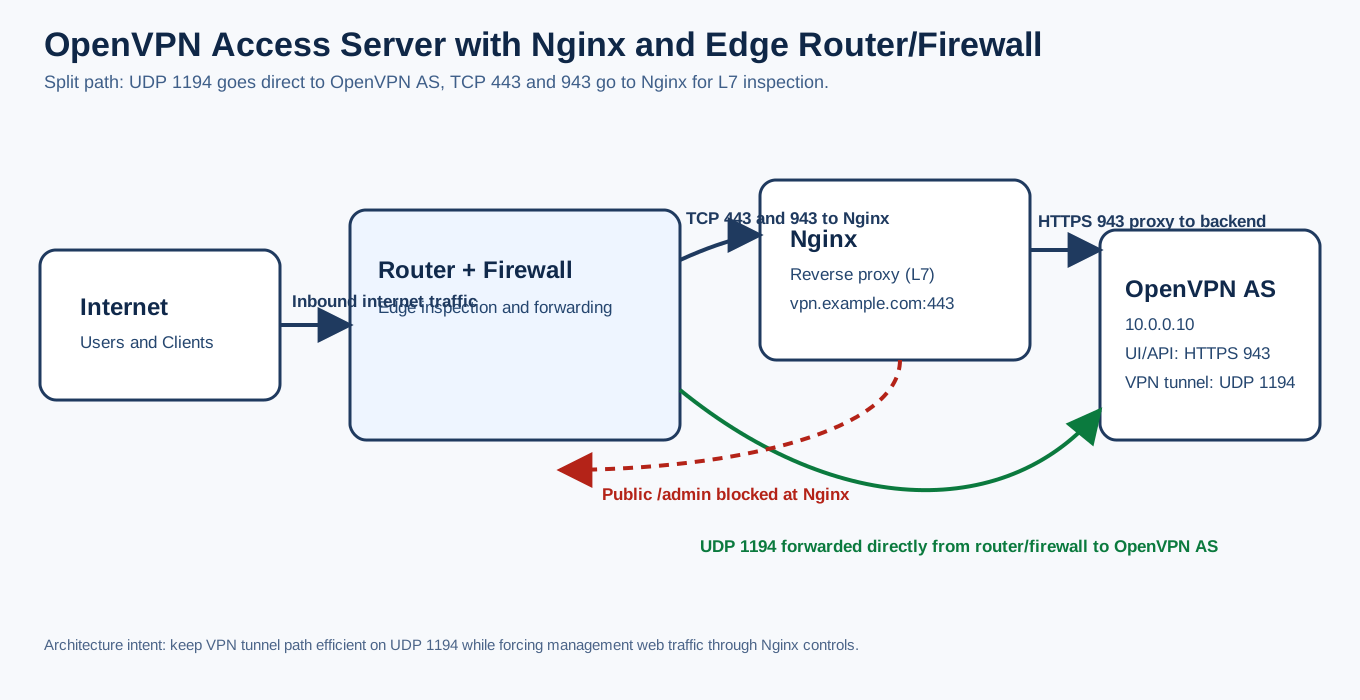
Traffic Flow Model
The deployment separates web management traffic and VPN tunnel traffic:
- UDP 1194 (VPN user tunnel traffic) is forwarded by router and firewall directly to OpenVPN Access Server after inspection.
- HTTPS 443 and 943 (management and portal traffic) are forwarded by router and firewall to Nginx for L7 inspection.
- Nginx proxies the required web UI and API traffic to OpenVPN Access Server on port 943.
This keeps VPN tunnel encapsulation path efficient while preserving application-layer controls for web management endpoints.
1. Install OpenVPN Access Server
sudo apt-get update
sudo apt-get install -y ca-certificates wget gnupg
wget -qO - https://as-repository.openvpn.net/as-repo-public.gpg | gpg --dearmor | sudo tee /etc/apt/trusted.gpg.d/as-repo-public.gpg >/dev/null
echo "deb [arch=amd64 signed-by=/etc/apt/trusted.gpg.d/as-repo-public.gpg] http://as-repository.openvpn.net/as/debian noble main" | sudo tee /etc/apt/sources.list.d/openvpn-as-repo.list >/dev/null
sudo apt-get update
sudo apt-get install -y openvpn-as
Verify service and ports:
sudo systemctl status openvpnas --no-pager
sudo ss -tulpn | grep -E ':(943|443|1194)\\b' || true
2. Prepare DNS and Certificates on Nginx Host
- Point vpn.example.com to your Nginx public IP.
- Install TLS certificate on Nginx, for example with Certbot.
3. Nginx Reverse Proxy Configuration
Create a site file such as /etc/nginx/sites-available/vpn.example.com:
server {
    listen 80;
    server_name vpn.example.com;

    location ^~ /.well-known/acme-challenge/ {
        root /var/www/letsencrypt;
        default_type "text/plain";
        allow all;
    }

    location / {
        return 301 https://$host$request_uri;
    }
}

server {
    listen 443 ssl;
    server_name vpn.example.com;

    ssl_certificate /etc/letsencrypt/live/vpn.example.com/fullchain.pem;
    ssl_certificate_key /etc/letsencrypt/live/vpn.example.com/privkey.pem;
    include /etc/letsencrypt/options-ssl-nginx.conf;
    ssl_dhparam /etc/letsencrypt/ssl-dhparams.pem;

    # Optional: security headers snippet
    # include /etc/nginx/snippets/security-headers.conf;

    # Keep admin UI private from internet via proxy
    location ^~ /admin {
        return 403;
    }

    # API endpoints required by OpenVPN web portal
    location ^~ /api/ {
        # If WAF is enabled globally, avoid false positives on API JSON payloads
        # modsecurity off;

        proxy_pass https://10.0.0.10:943;
        proxy_http_version 1.1;
        proxy_ssl_protocols TLSv1.3;
        proxy_ssl_server_name on;
        proxy_ssl_name vpn.example.com;

        proxy_set_header Host $host;
        proxy_set_header X-Real-IP $remote_addr;
        proxy_set_header X-Forwarded-For $proxy_add_x_forwarded_for;
        proxy_set_header X-Forwarded-Proto $scheme;
        proxy_set_header X-Forwarded-Host $host;
        proxy_read_timeout 60s;
        proxy_send_timeout 60s;
    }

    location / {
        proxy_pass https://10.0.0.10:943;
        proxy_http_version 1.1;
        proxy_ssl_protocols TLSv1.3;
        proxy_ssl_server_name on;
        proxy_ssl_name vpn.example.com;

        proxy_set_header Host $host;
        proxy_set_header X-Real-IP $remote_addr;
        proxy_set_header X-Forwarded-For $proxy_add_x_forwarded_for;
        proxy_set_header X-Forwarded-Proto $scheme;
        proxy_set_header X-Forwarded-Host $host;
        proxy_read_timeout 60s;
        proxy_send_timeout 60s;
    }
}
Enable and validate:
sudo ln -s /etc/nginx/sites-available/vpn.example.com /etc/nginx/sites-enabled/vpn.example.com
sudo nginx -t
sudo systemctl reload nginx
4. Router and Firewall Rules
Recommended forwarding model:
- Forward UDP 1194 directly to OpenVPN Access Server backend.
- Forward TCP 443 and TCP 943 to Nginx reverse proxy.
- Keep backend management ports non-public except through controlled paths.
5. Validation Checklist
- https://vpn.example.com/ loads Client UI
- https://vpn.example.com/admin/ is blocked with 403
- Profile and QR and API actions work from Client UI
- VPN clients connect using UDP 1194 through router and firewall forwarding
- Nginx access and error logs show expected upstream behavior
6. Troubleshooting
- 502 Bad Gateway: verify backend reachability and upstream port 943
- JSON parse errors in portal actions: inspect WAF and ModSecurity for blocked API requests
- VPN client cannot connect: verify UDP 1194 forwarding on router and firewall
- TLS upstream handshake errors: verify backend TLS version compatibility and SNI settings
Final Result
OpenVPN Access Server is installed on Ubuntu 24 and safely published behind Nginx using a generic, reusable reverse proxy pattern suitable for public documentation, with VPN tunnel traffic and web management traffic clearly separated.