Complete Oracle Cloud Infrastructure Setup and Cross-Cloud Connectivity
This comprehensive guide covers the complete setup of Oracle Cloud Infrastructure (OCI) including tenancy governance, network architecture, VM deployment, and hybrid connectivity testing between OCI and Azure environments.
Part 1: Tenancy Setup and Governance
Restored Screenshots (Step 1.1)
Screenshots
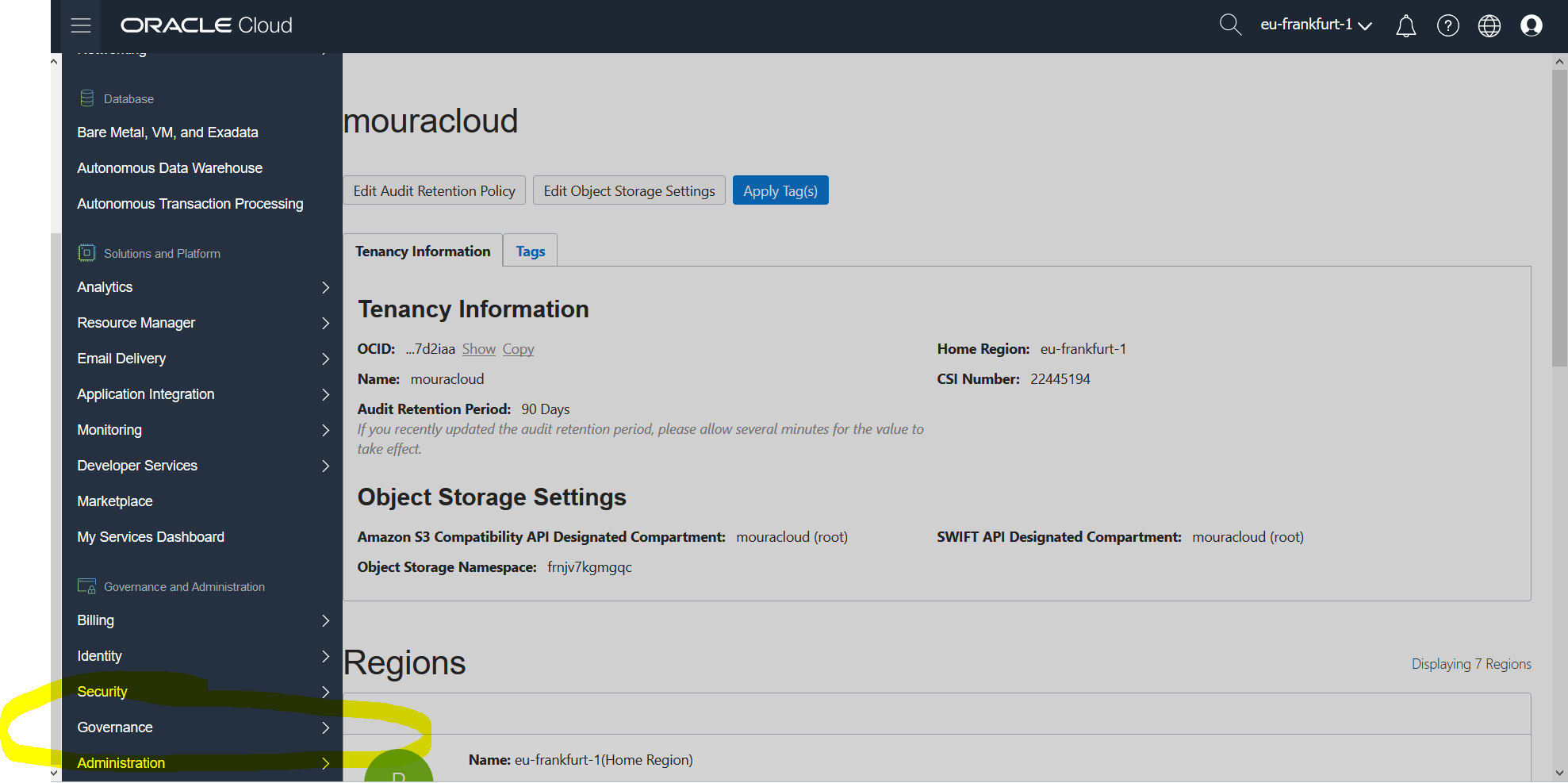
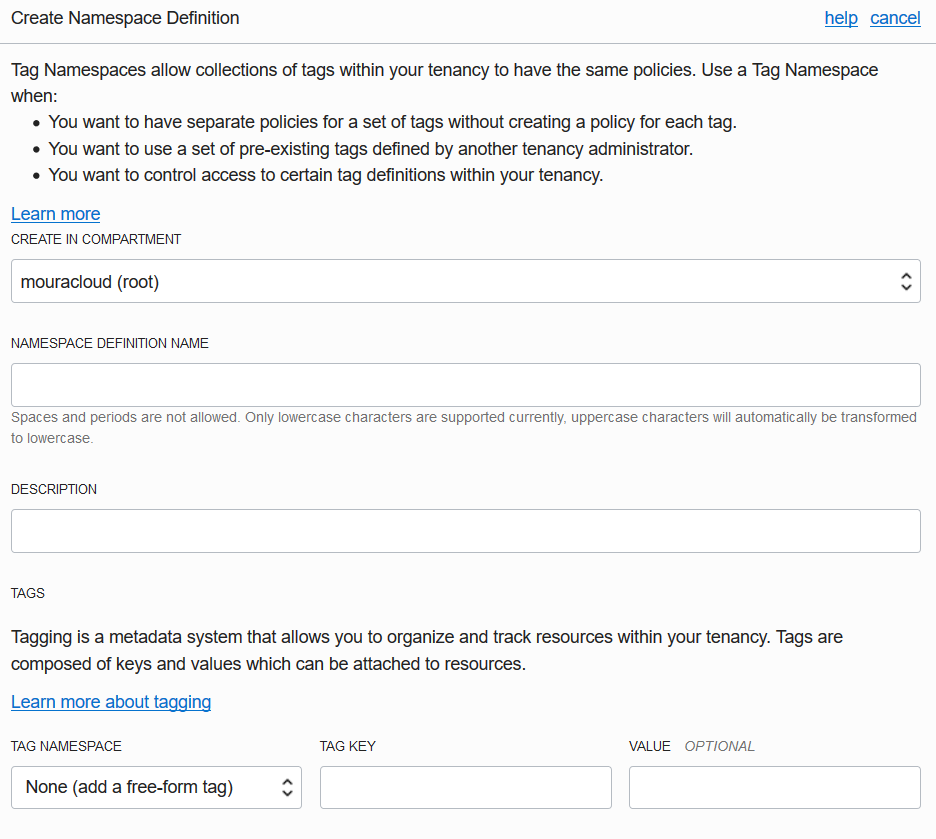
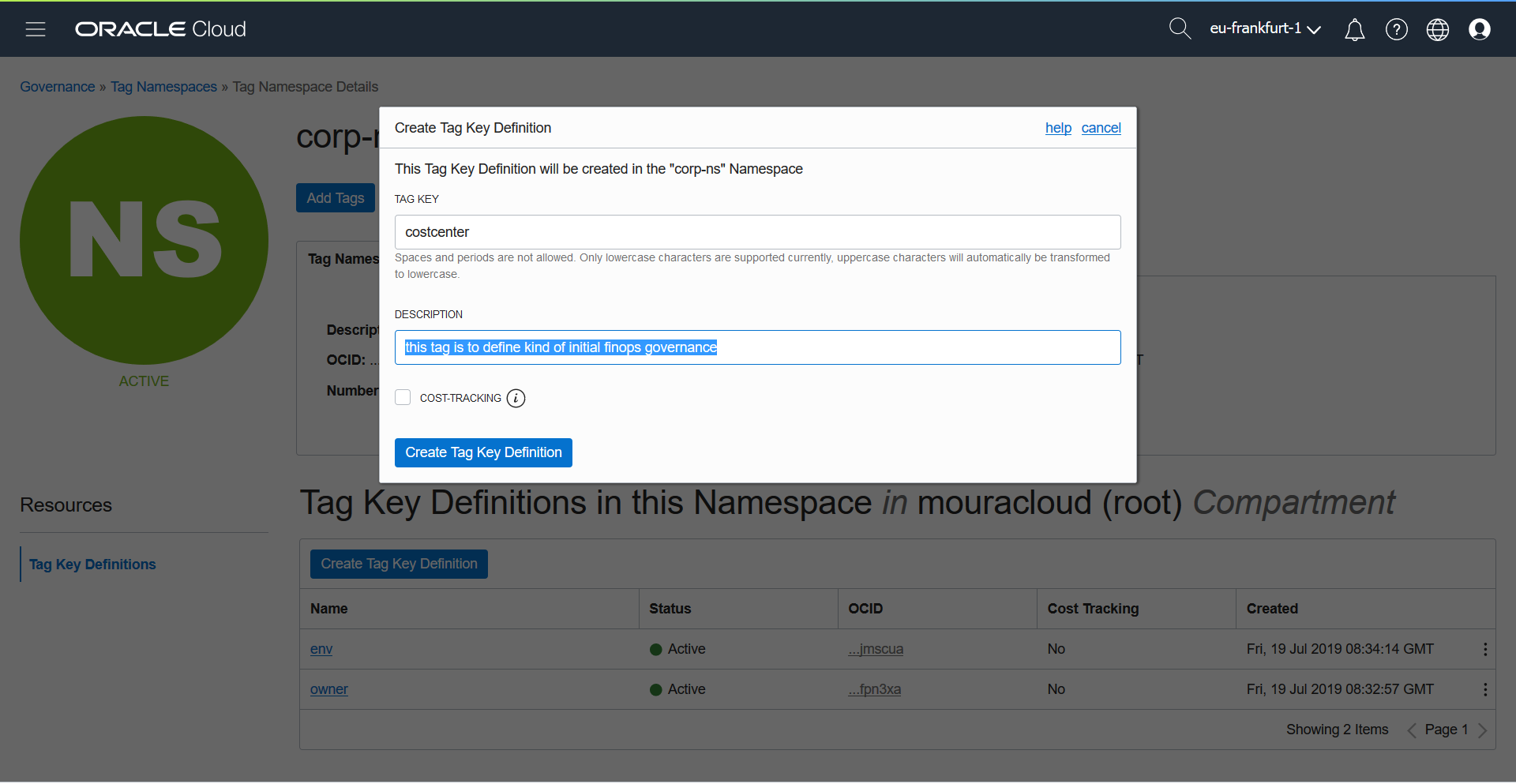
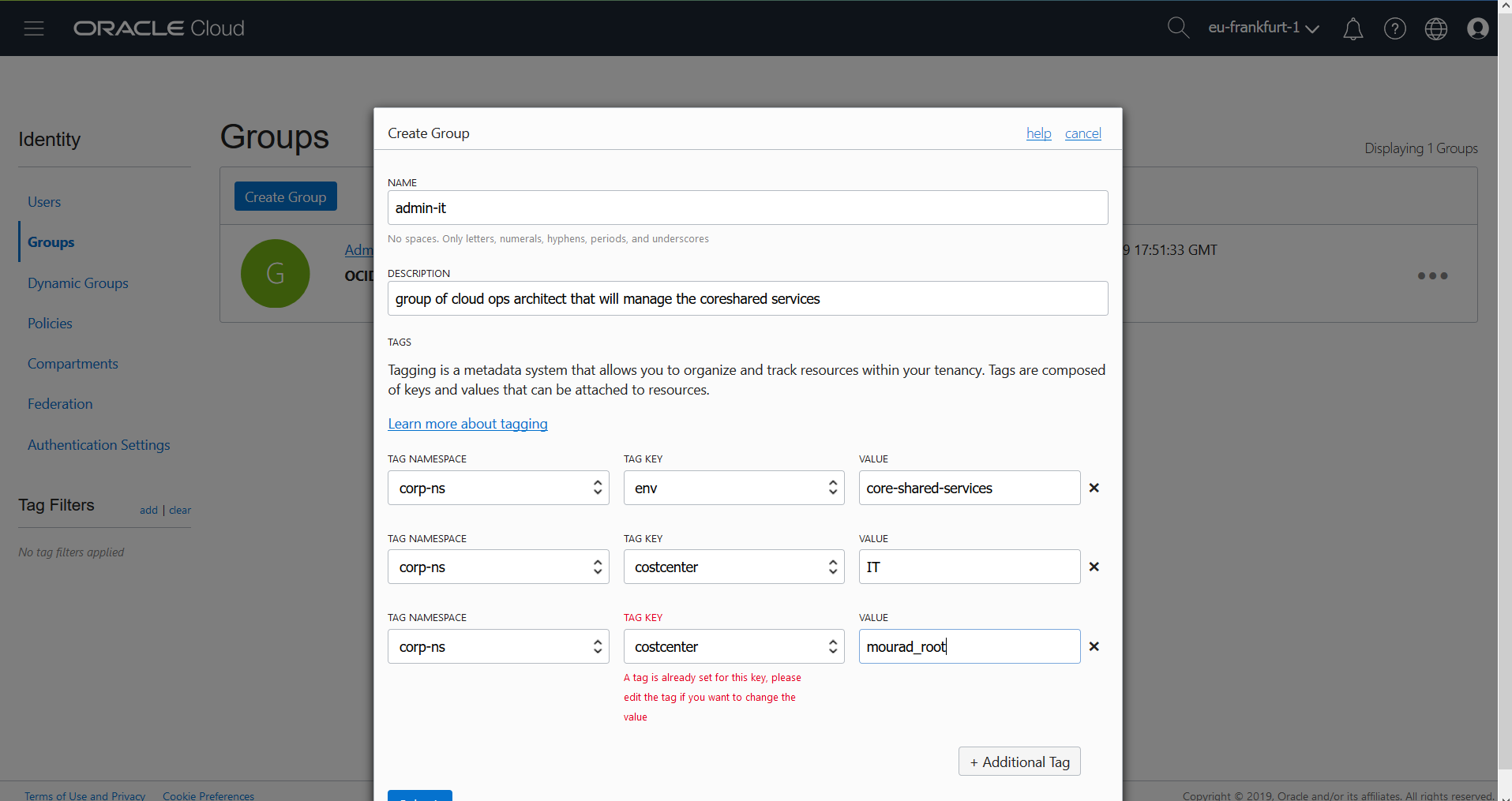
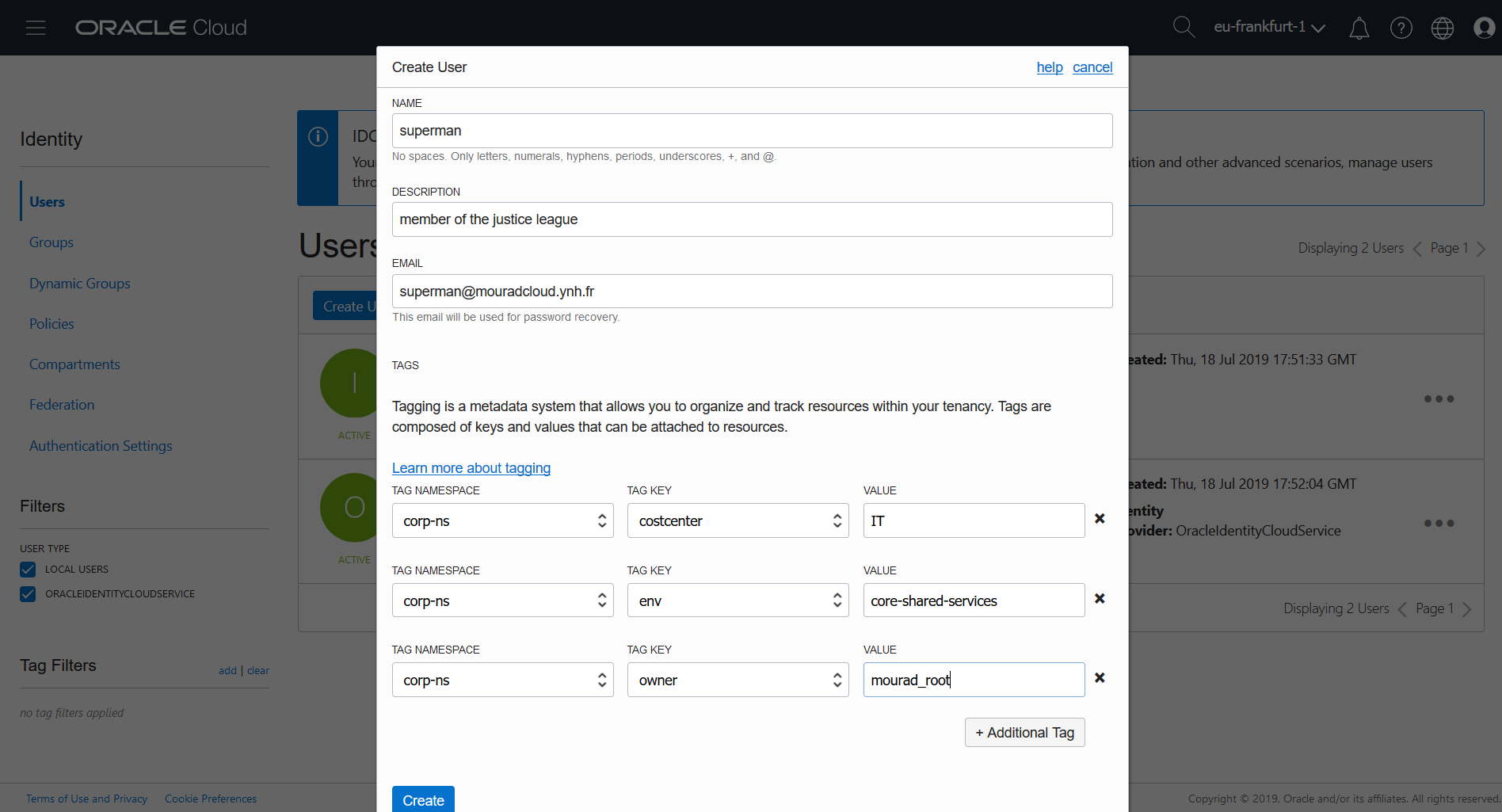
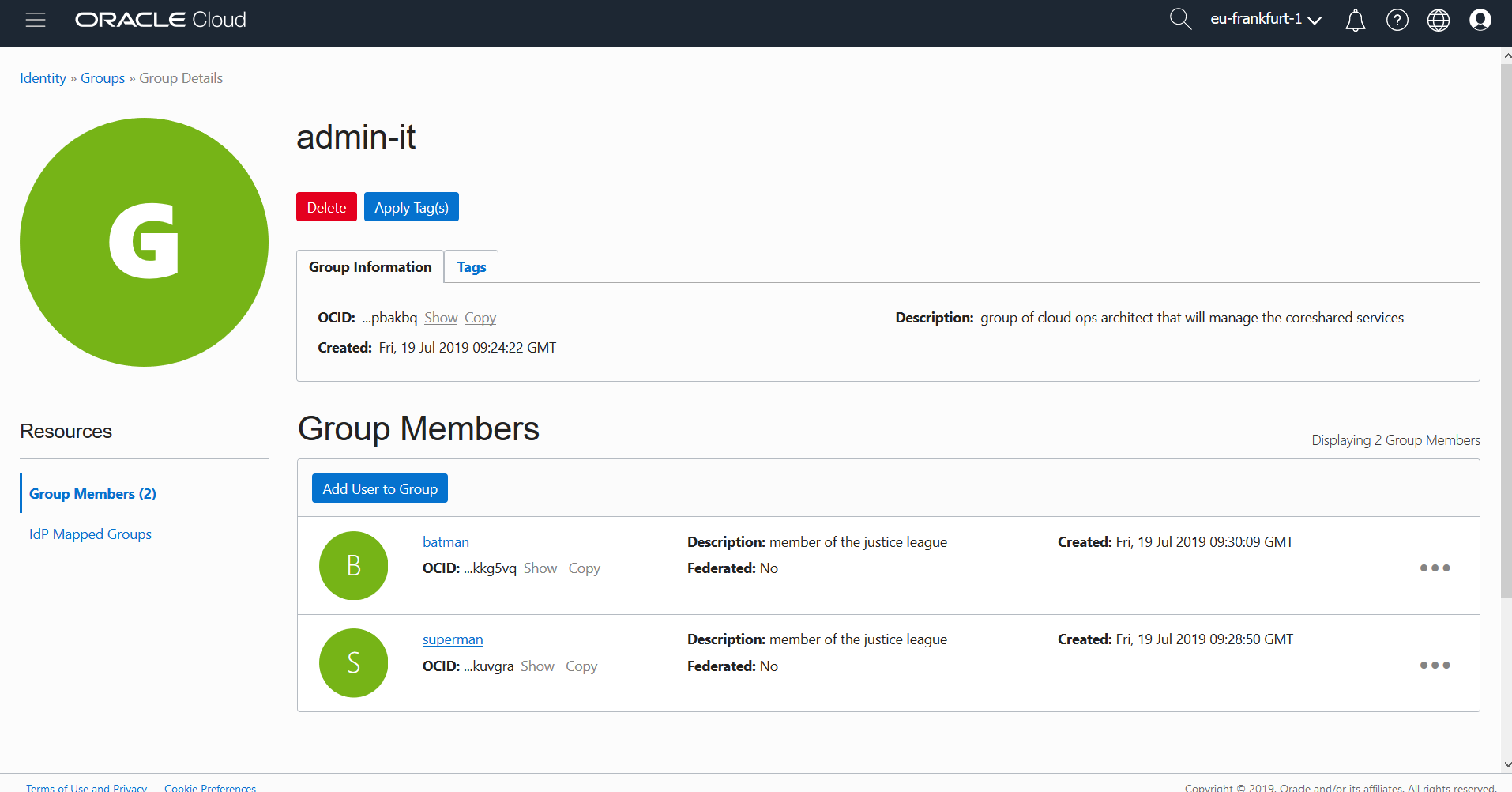
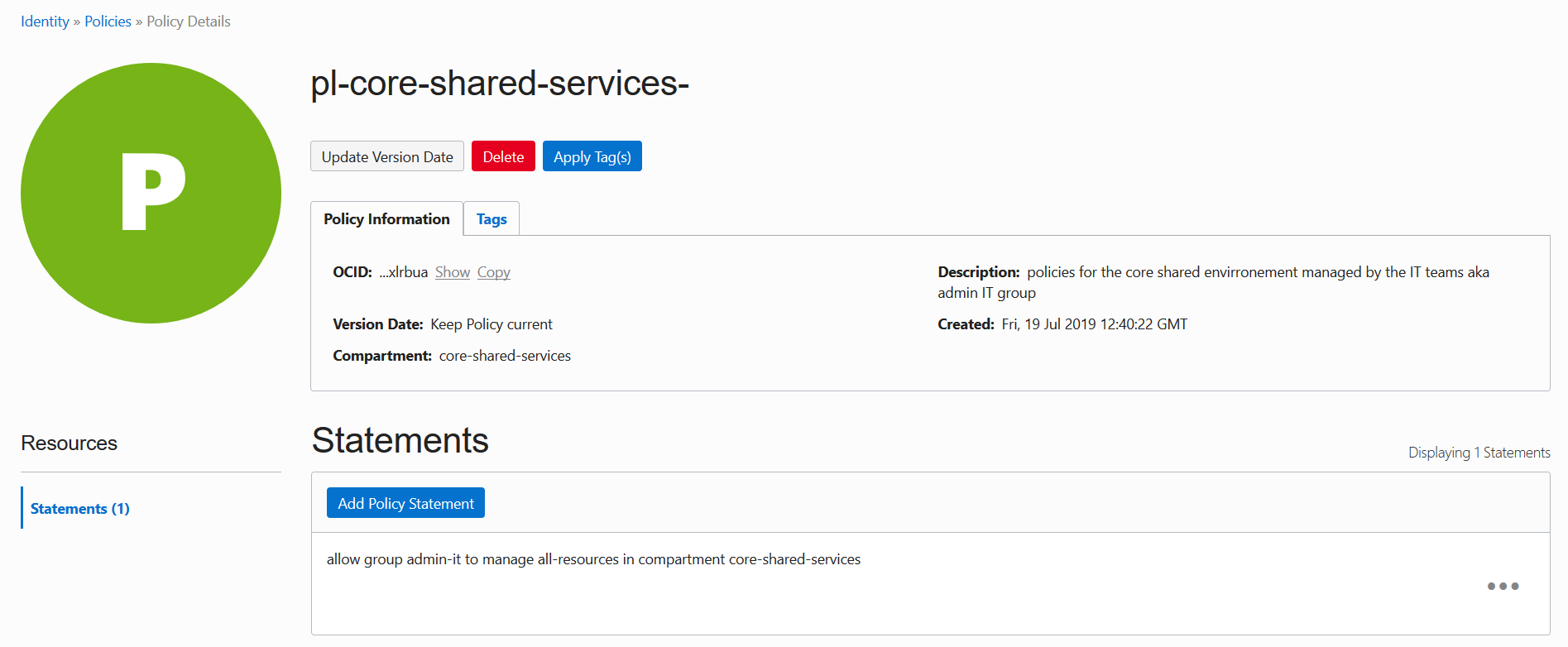
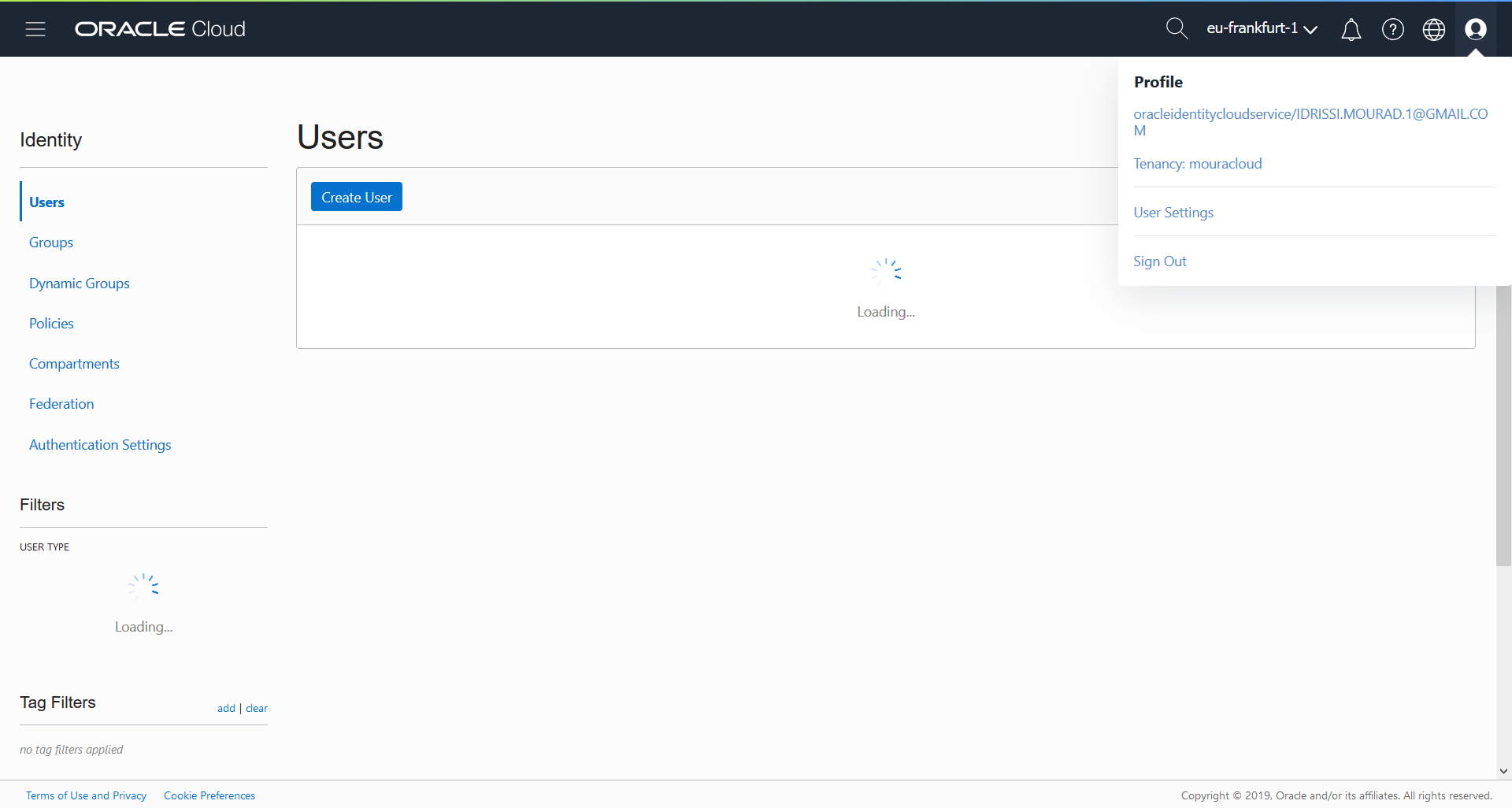
Creating Your OCI Tenancy
After receiving your activation email from Oracle, the first step is to create your tenancy:
- Sign in to the OCI console with your credentials
- Your tenancy name becomes your cloud namespace (e.g., "mouradcloud")
- View your tenancy overview dashboard
Setting Up Governance Policies
Before deploying infrastructure, establish governance frameworks:
Configuring Tags
Navigate to Governance → Tags to define organizational standards:
- Create namespace-level tags (e.g., "department", "environment", "cost-center")
- Define tag values for consistent resource organization
- Enforce tag compliance through policies
Benefits of Tags:
- Resource tracking and cost allocation
- Automated lifecycle management
- Organizational standardization
- Compliance and audit trails
Creating Compartments
The root compartment is powerful but not recommended for operational use:
Create a compartment hierarchy:
Root Compartment
└── core-shared-services (Central IT managed resources)
    ├── IT Ops
    ├── Networking
    ├── Database
    └── Shared Services
Compartment Strategy:
- core-shared-services: Central hub for IT-managed infrastructure
- Department compartments: Separate blast radius per business unit
- Project compartments: Temporary resources for specific initiatives
User and Group Management
Create Administrative Groups
1. Navigate: Identity → Groups
2. Create Groups:
   - admin-it (IT Operations administrators)
   - admin-core (Core infrastructure admins)
   - audit-team (Compliance and audit)
Add Users to Groups
- Create user accounts under Identity → Users
- Set initial passwords or use federation
- Add users to appropriate groups
- Save authentication credentials securely
Define IAM Policies
Oracle uses a powerful matrix-based policy model:
Allow <subject> to <verb> <resource-type> in <location> where <conditions>Example Policies:
# Allow IT ops full resource management in core-shared-services
Allow group admin-it to manage all-resources in compartment core-shared-services

# Allow IT ops to manage VCNs and related networking
Allow group admin-it to manage virtual-network-family in compartment core-shared-services

# Allow IT ops to manage compute resources
Allow group admin-it to manage instance-family in compartment core-shared-services
Allow group admin-it to manage compute-management-family in compartment core-shared-services

# Allow audit team read-only access
Allow group audit-team to read all-resources in compartment core-shared-services
Policy Structure Benefits:
- Matrix-based granular control (more powerful than simple role inheritance)
- Subject/Verb/Resource/Location/Condition separation
- Clear enforcement of least-privilege access
- Easy audit and compliance verification
Part 2: Network Architecture and Setup
Restored Screenshots (Step 1.2)
Screenshots
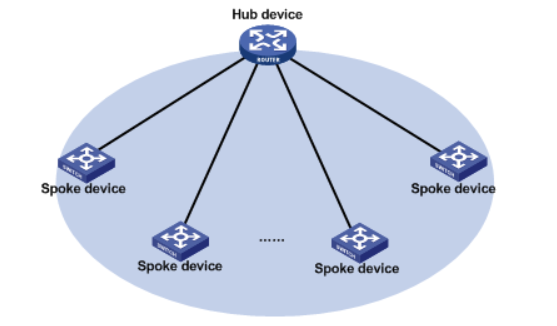
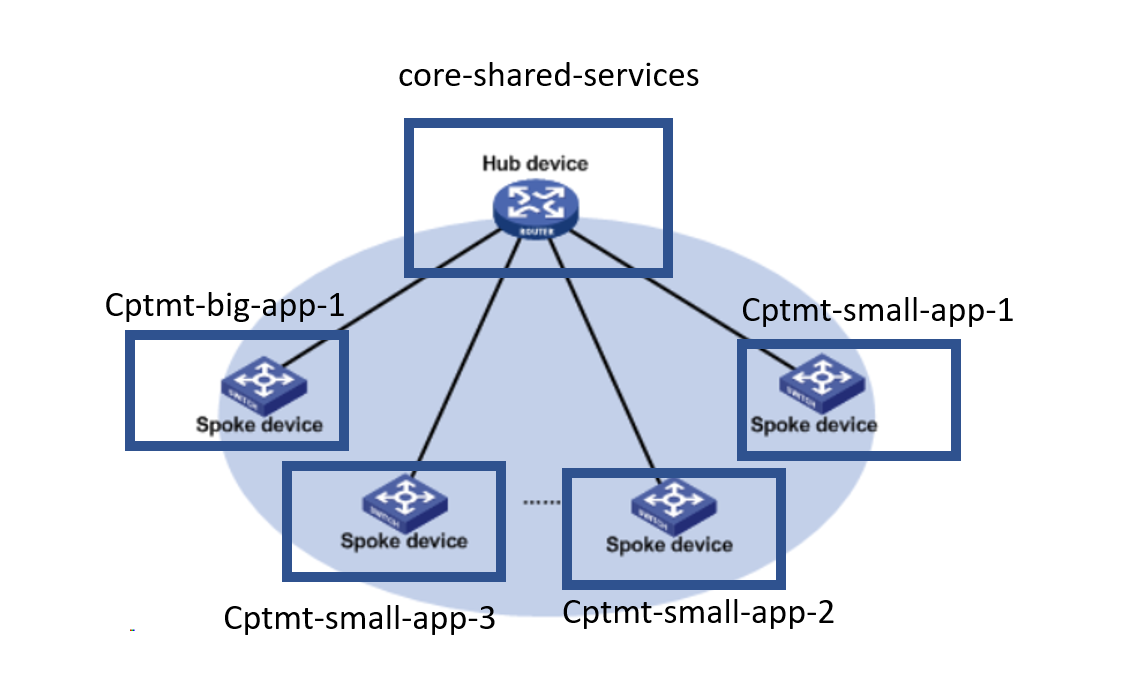
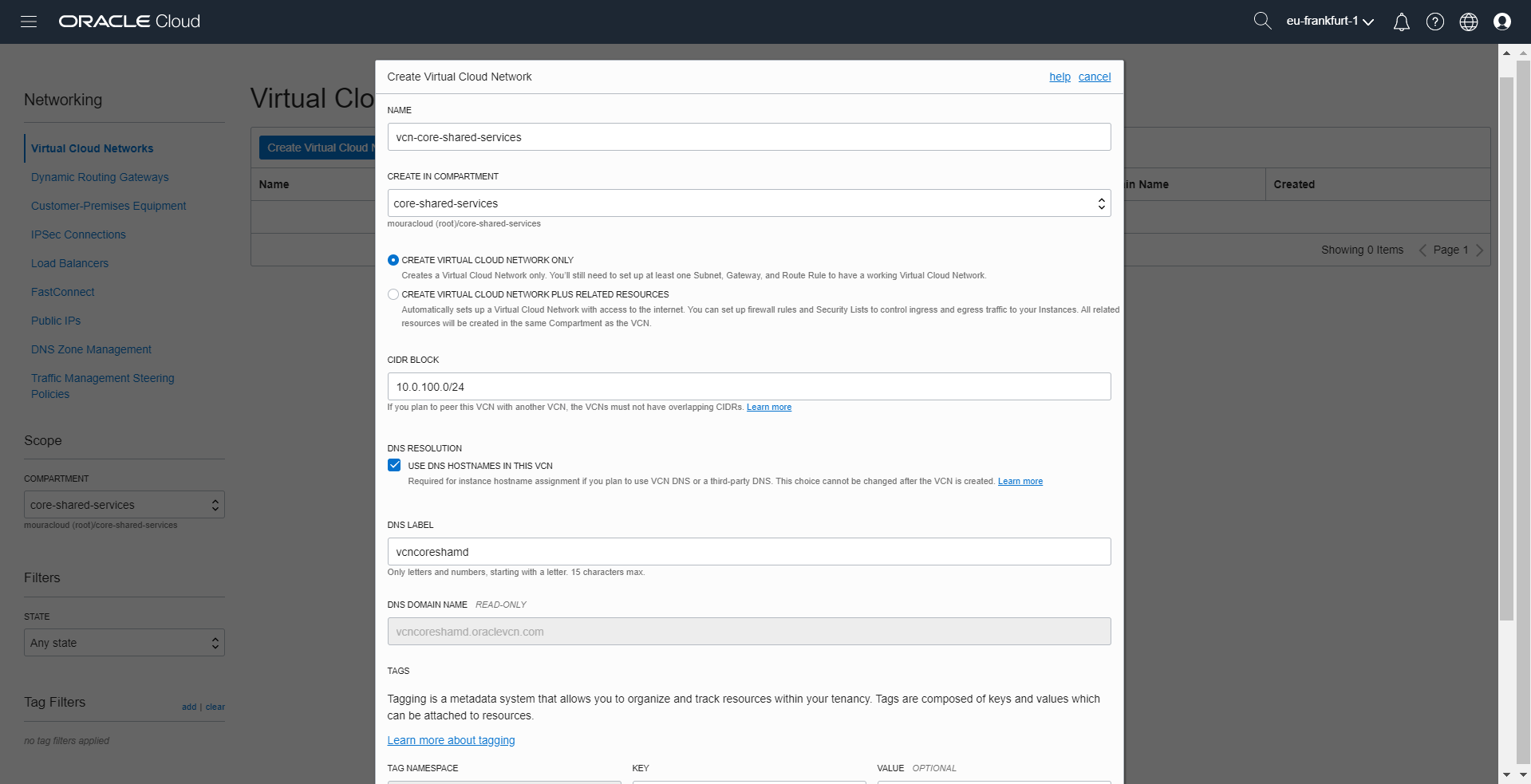
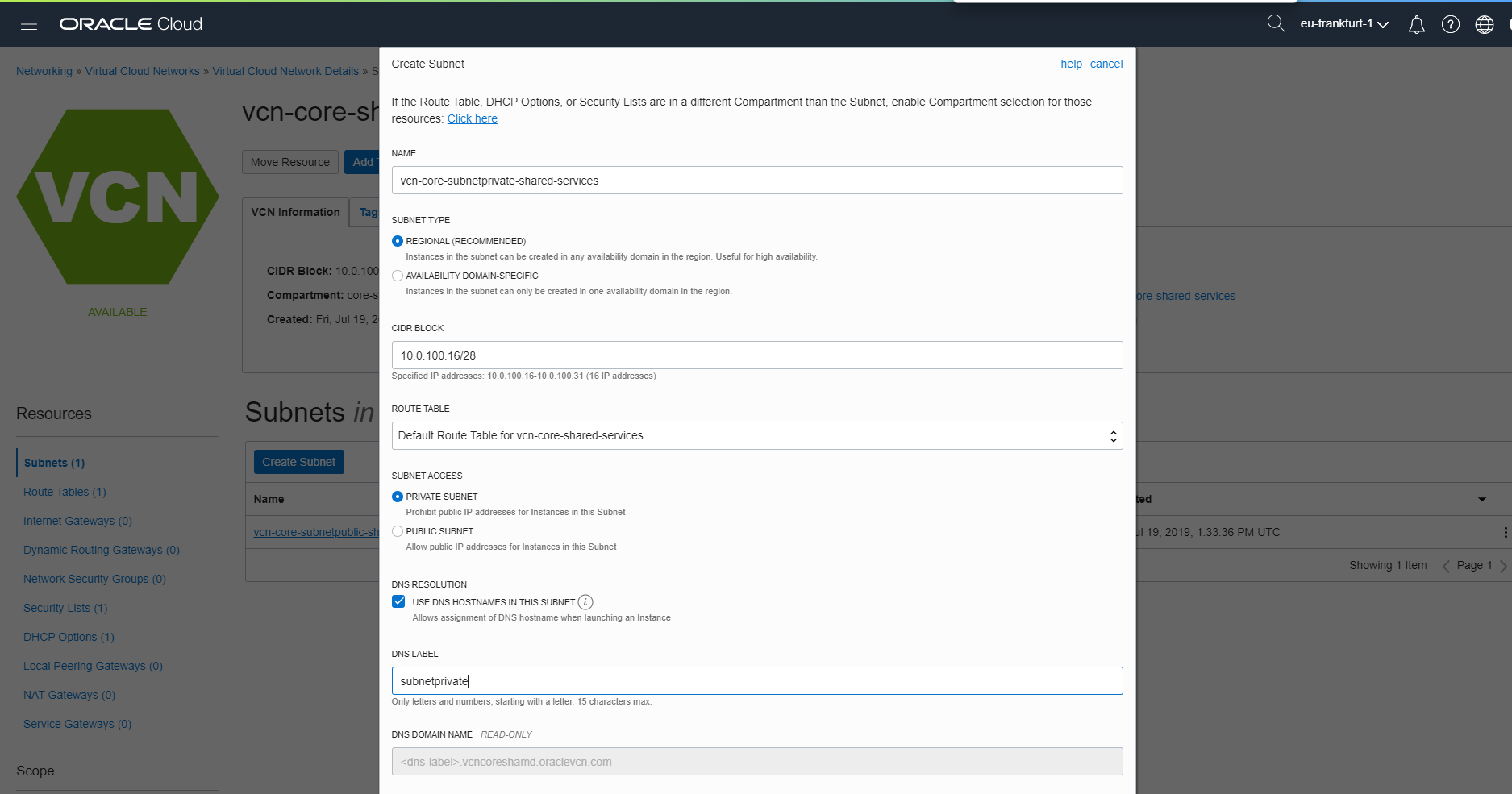
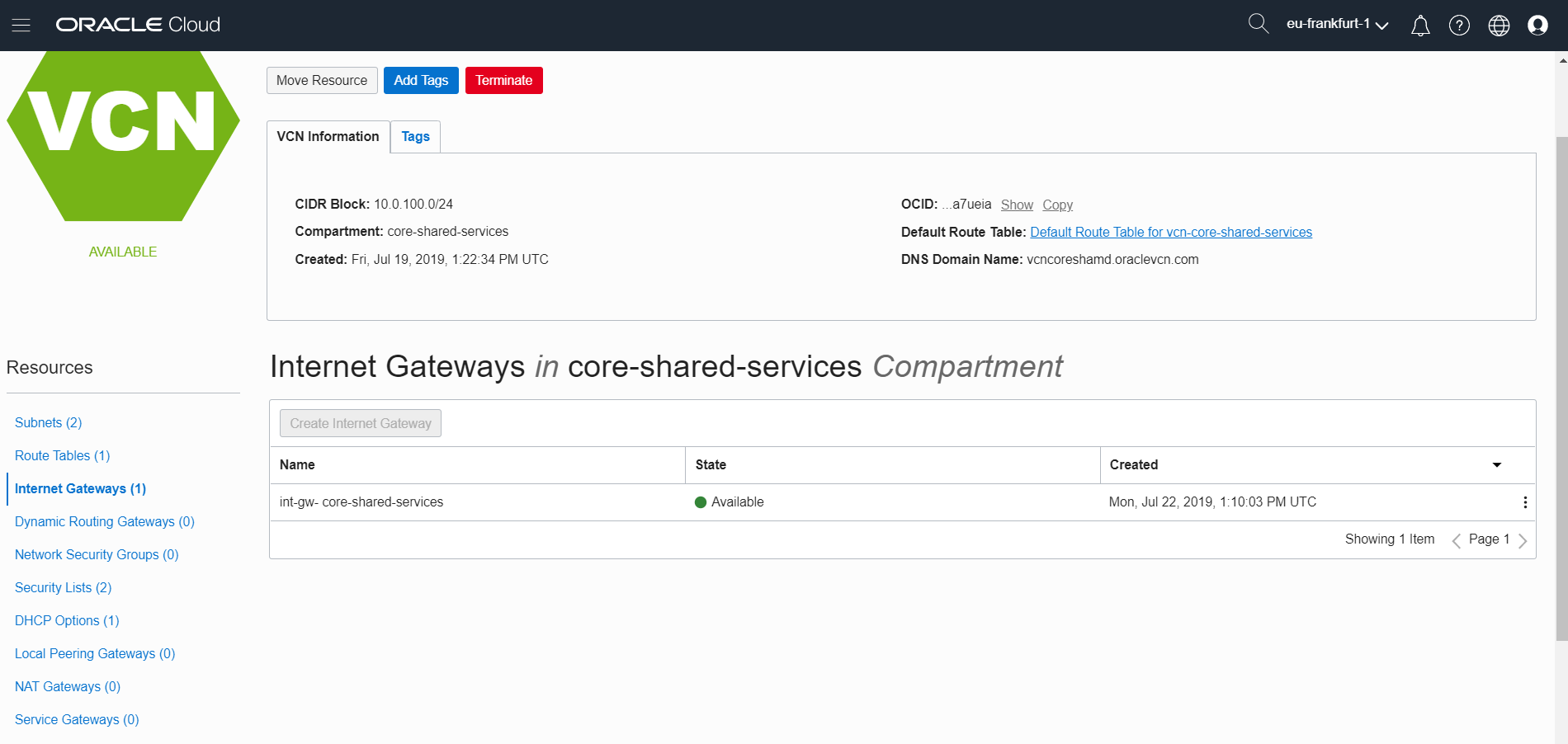
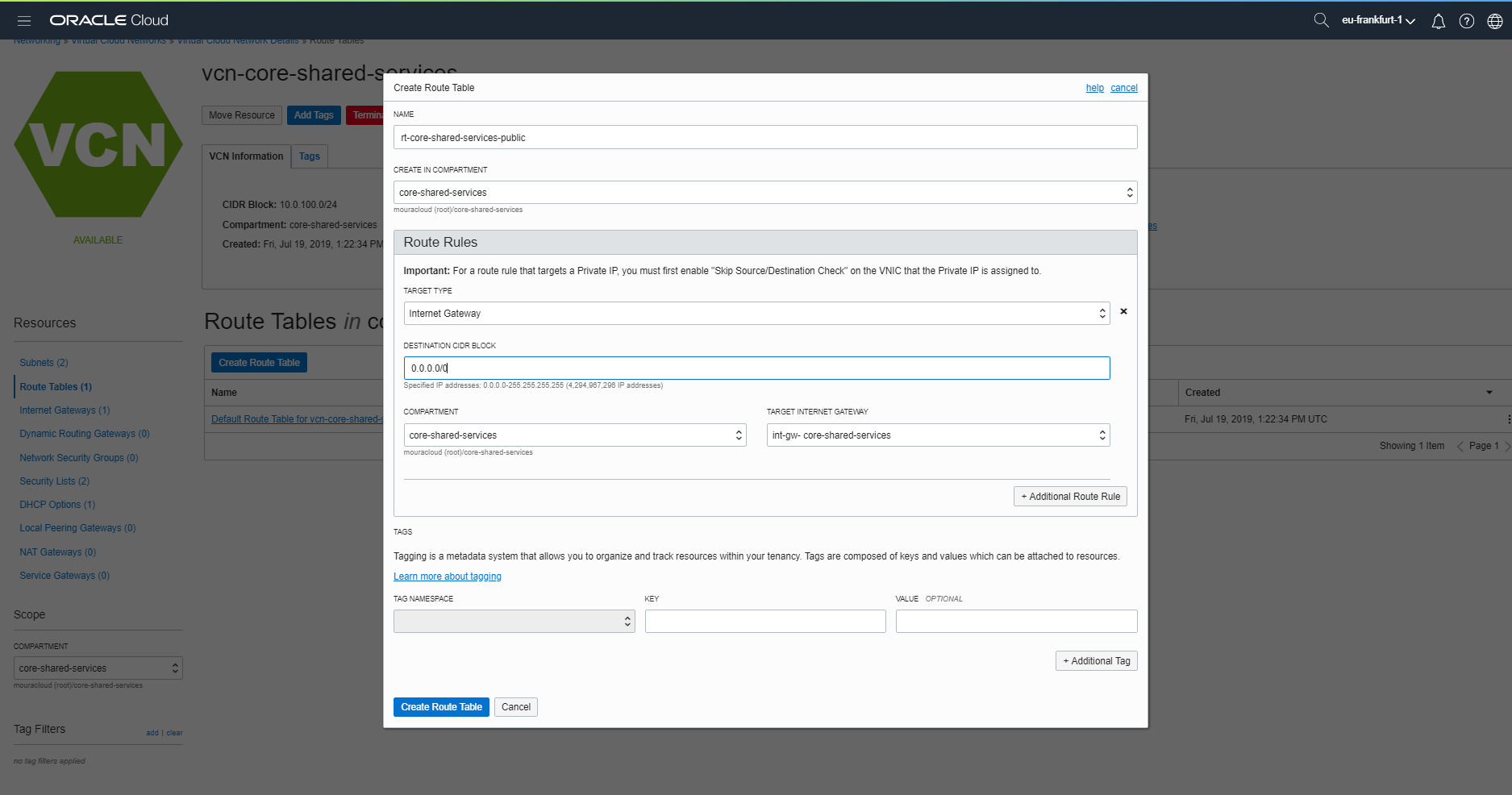
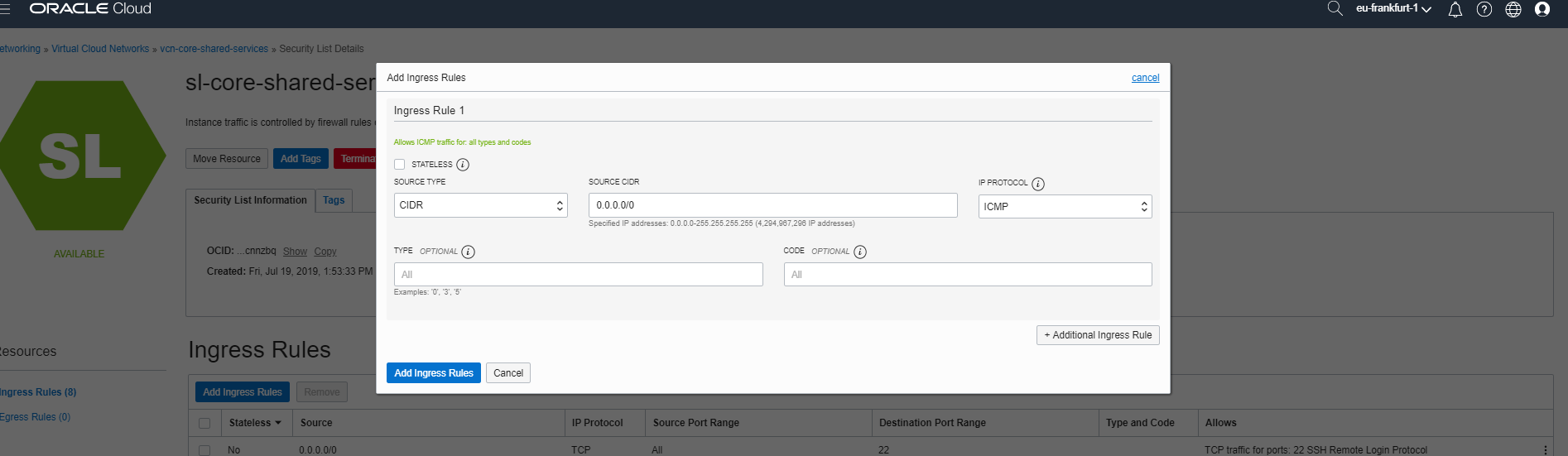
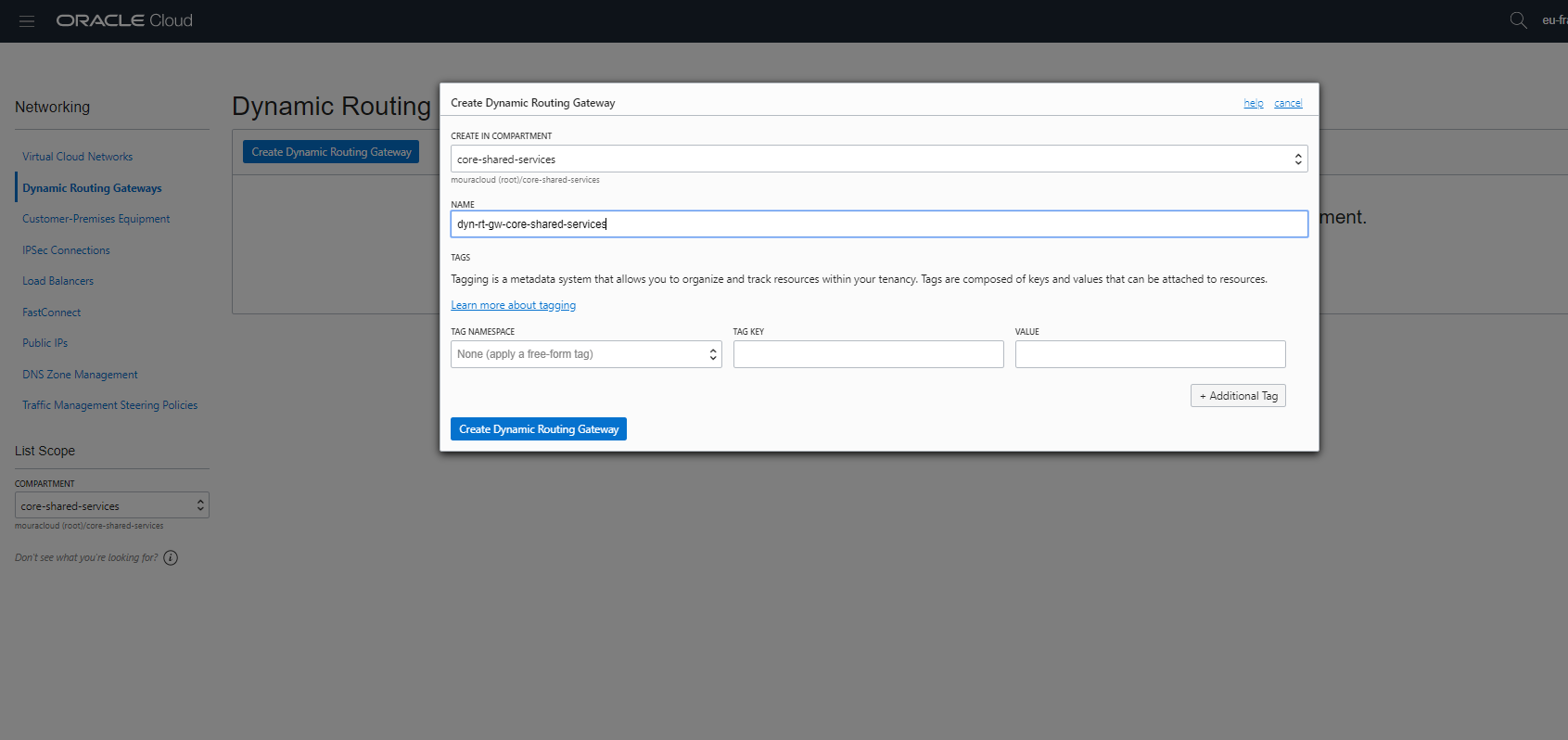
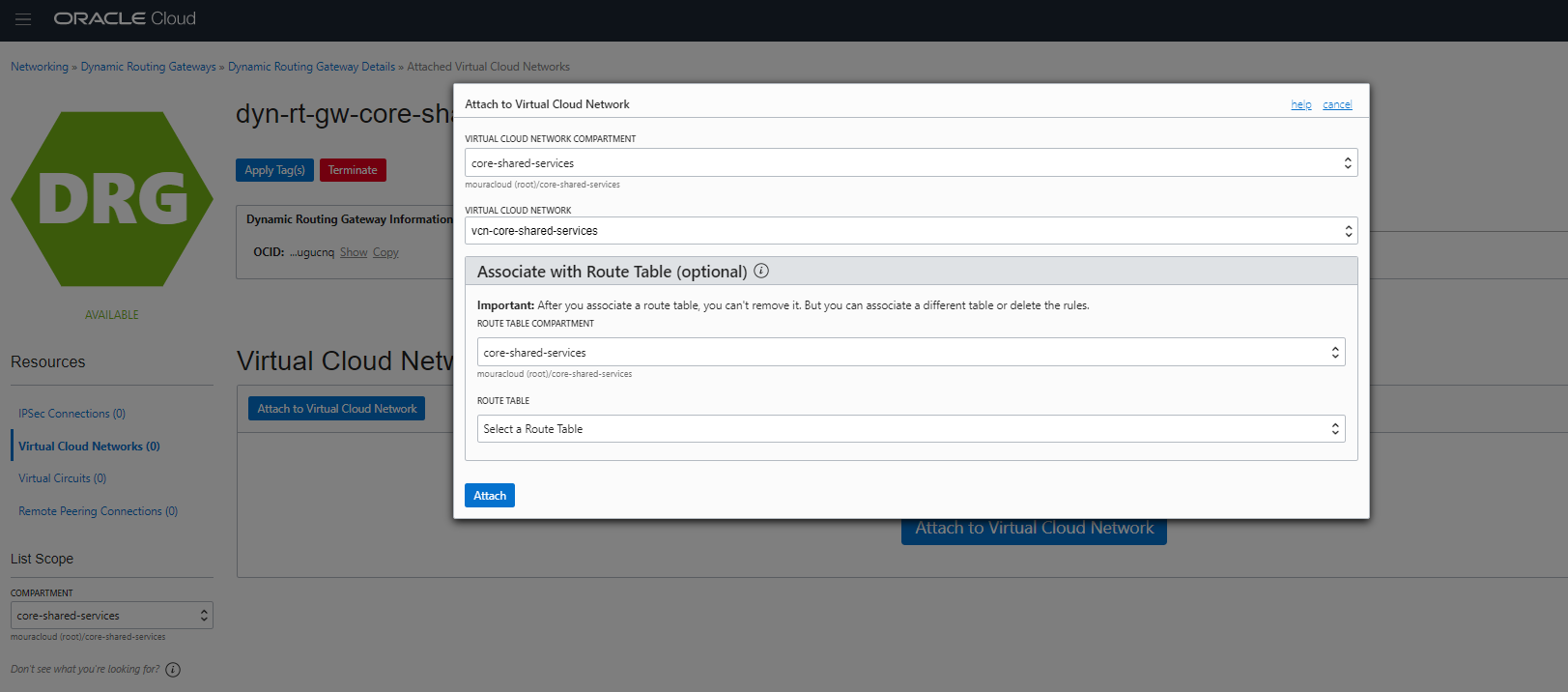
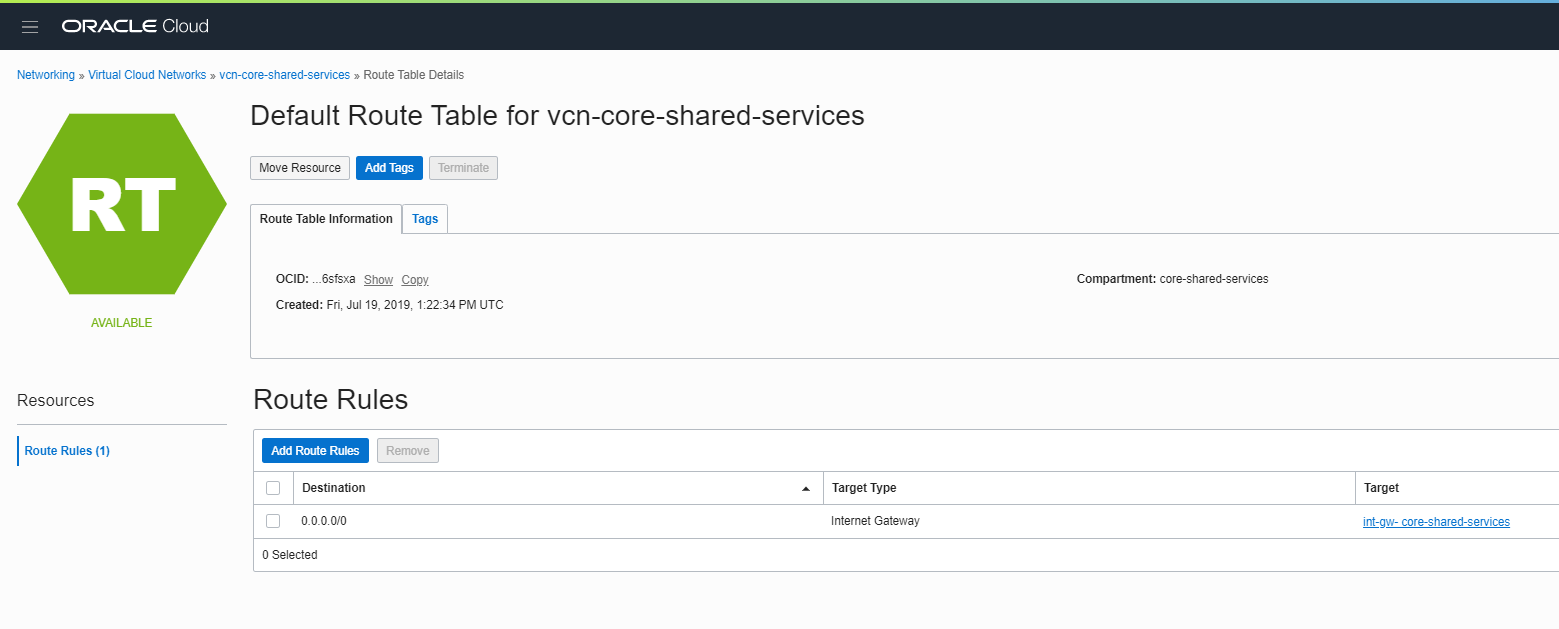
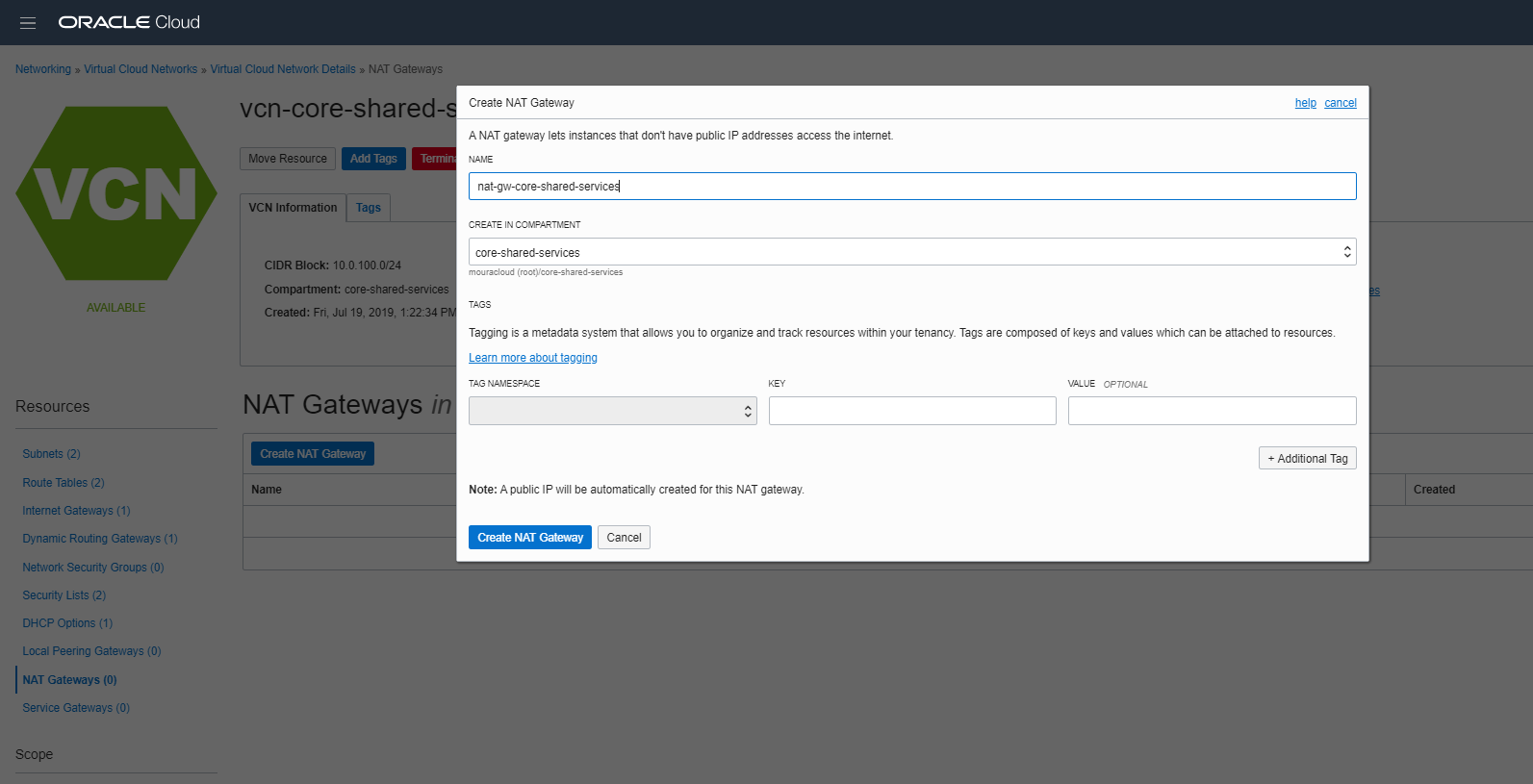
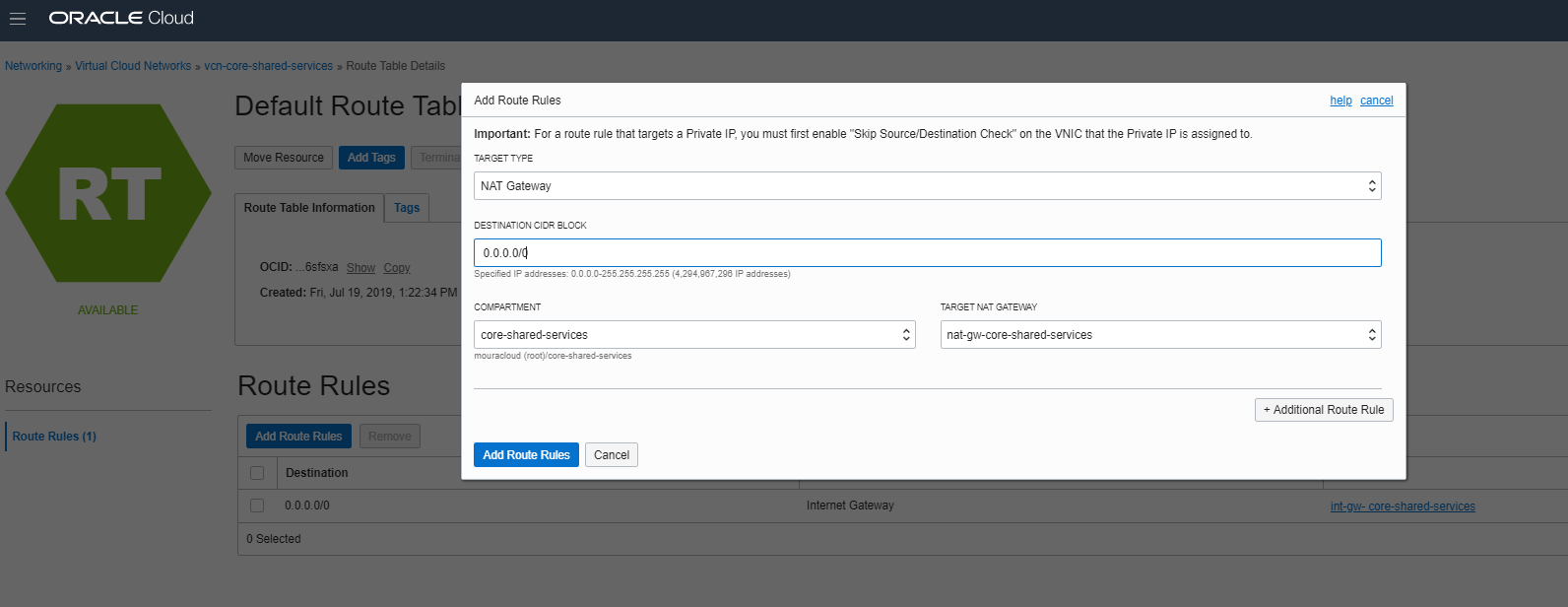
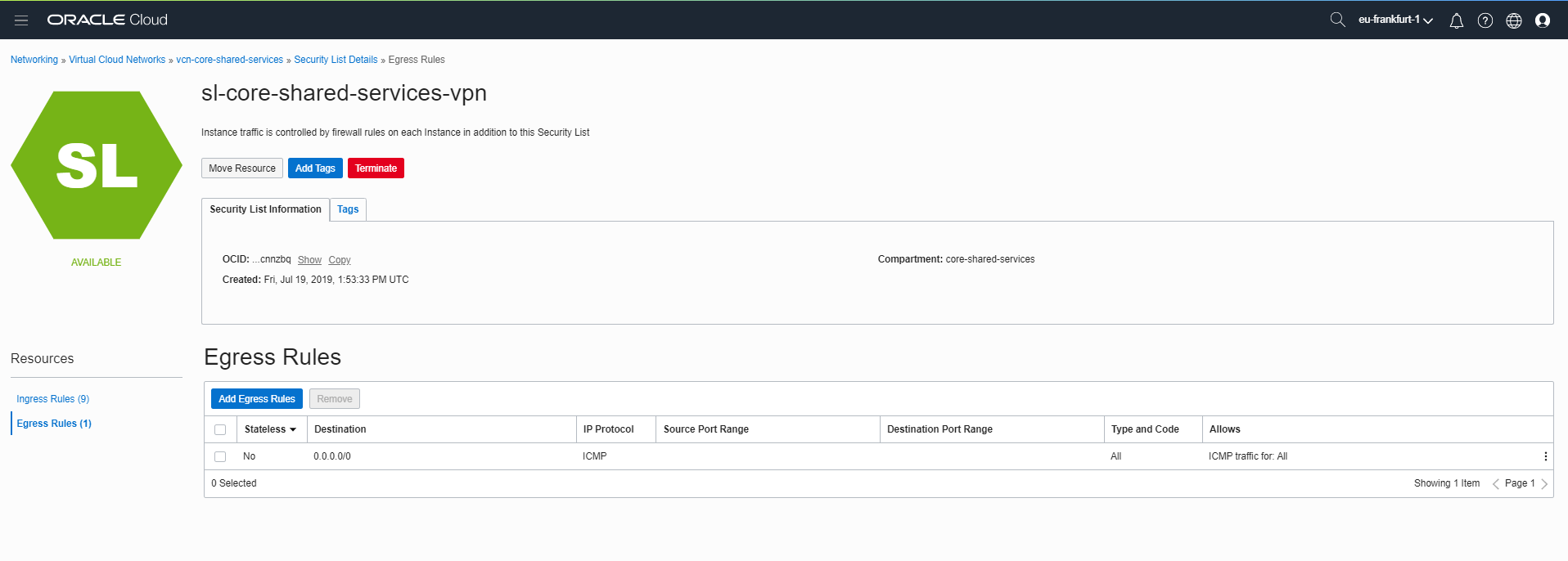
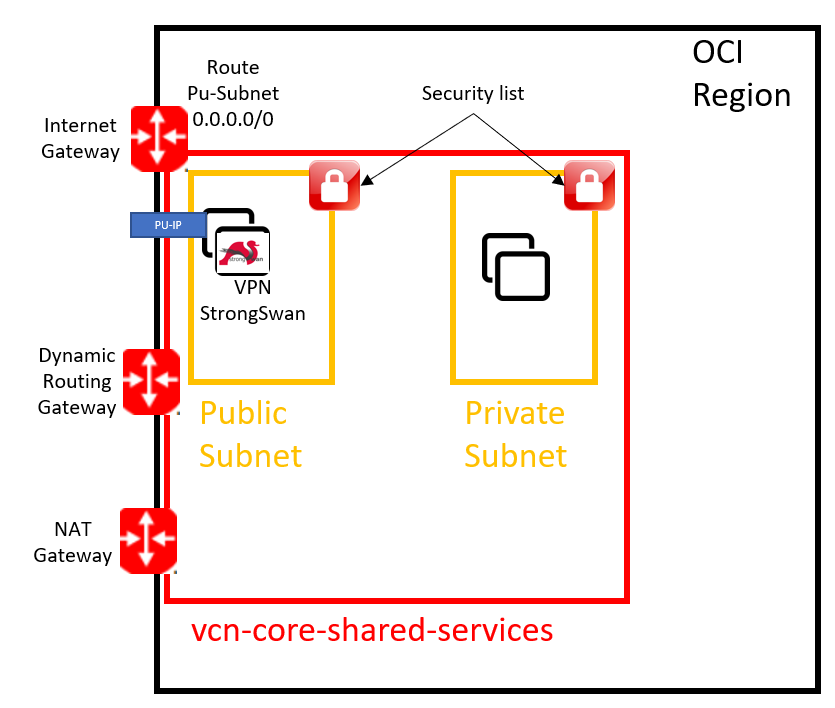
Hub and Spoke Design in OCI
Implement a hub-and-spoke topology for centralized network management:
Architecture Overview:
- Hub (core-shared-services): Central network containing shared services
- Spokes: Departmental or application-specific networks peering to hub
- Benefits: Single point of security policy, centralized routing, controlled access
Creating the Core VCN
Step 1: Create Virtual Cloud Network (VCN)
1. Navigate: Networking → Virtual Cloud Networks
2. Create VCN:
   - Name: vcn-core-hub
   - CIDR: 10.0.100.0/16
   - Compartment: core-shared-services
3. Click "Create VCN"
Step 2: Create Subnets
Public Subnet (DMZ/VPN Gateway):
Name: subnet-public-vpn
VCN: vcn-core-hub
CIDR: 10.0.100.0/28
Subnet Type: Public
Route Table: Public Route Table
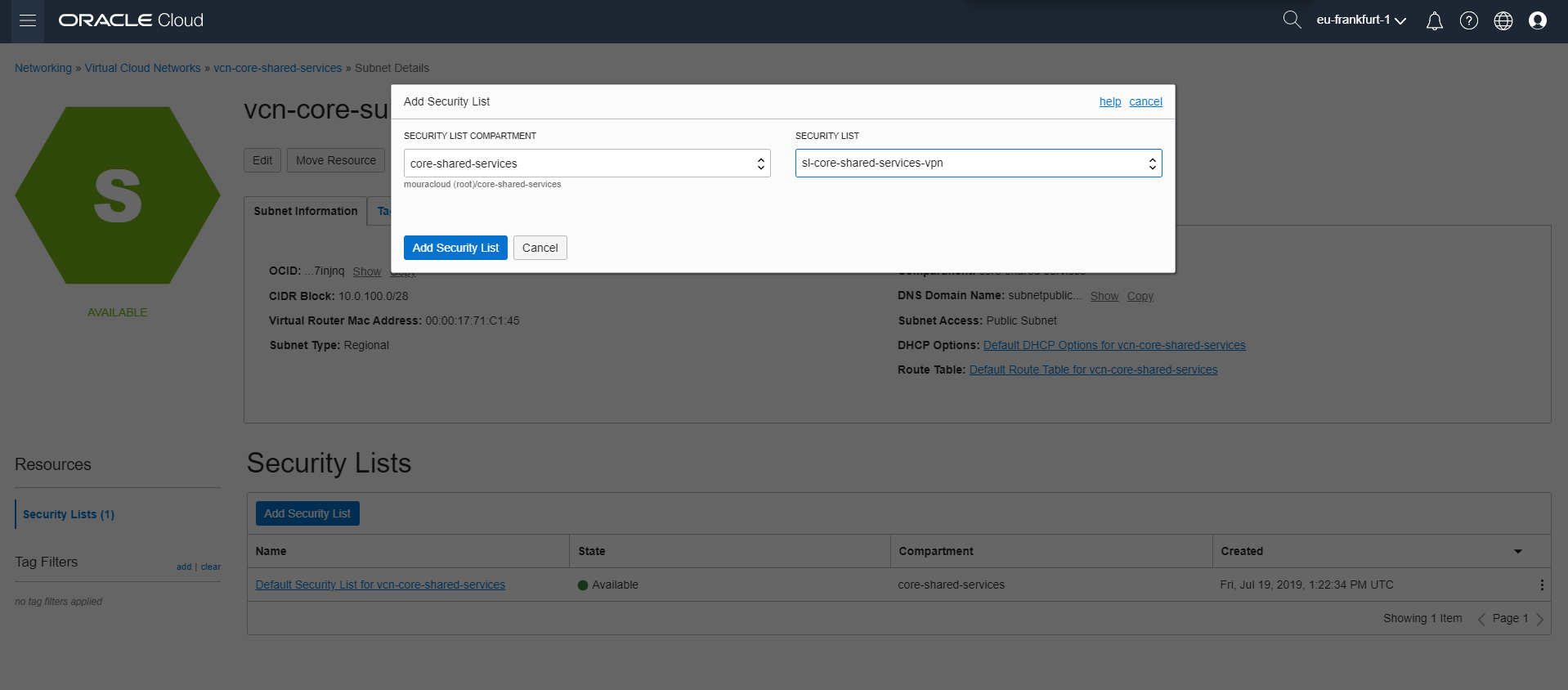
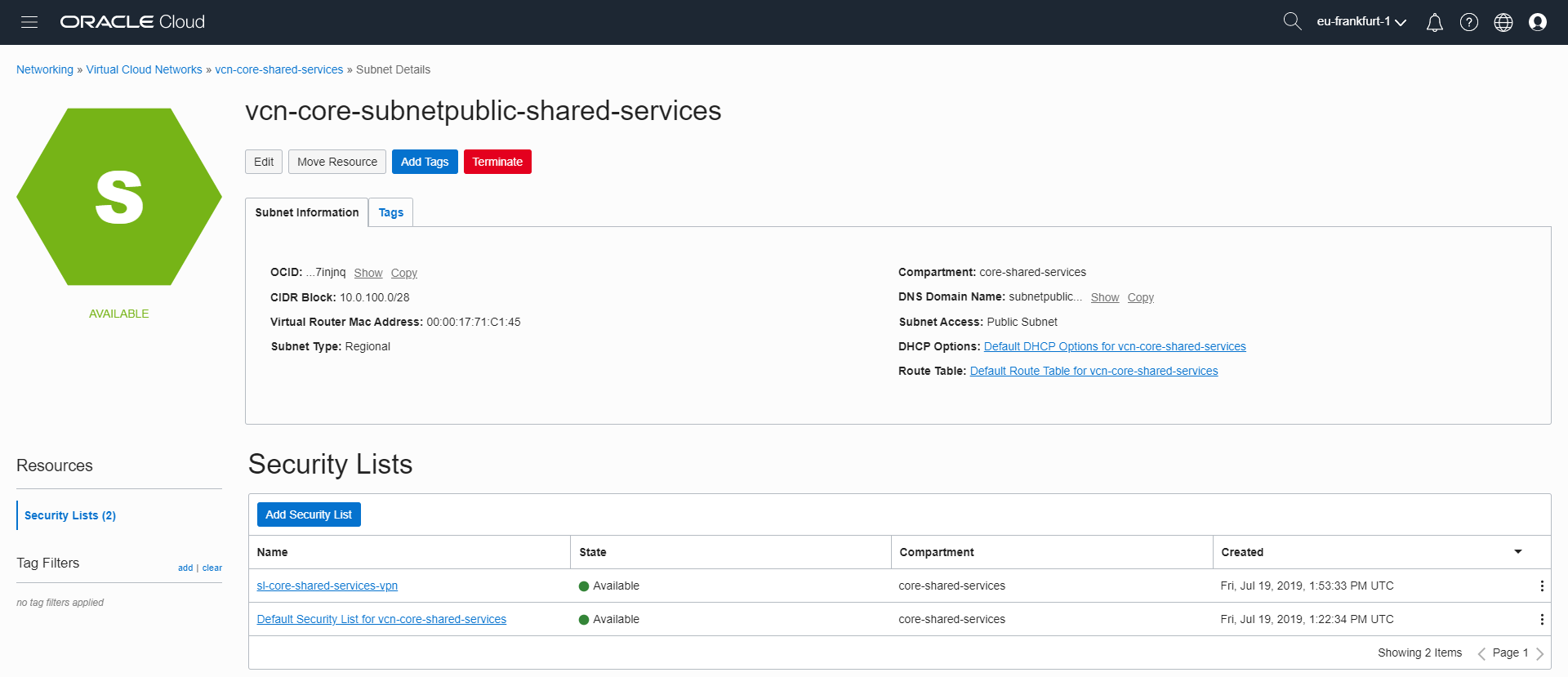
Security List: Public Security List
Private Subnet (Internal Services):
Name: subnet-private-internal
VCN: vcn-core-hub
CIDR: 10.0.100.16/28
Subnet Type: Private
Route Table: Private Route Table
Security List: Private Security List
Security Lists Configuration
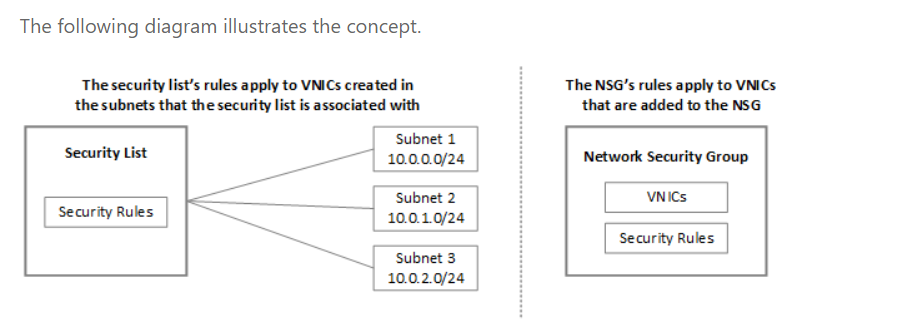
Security Lists in OCI function similarly to Network Security Groups (NSGs) in Azure but are applied at the subnet level.
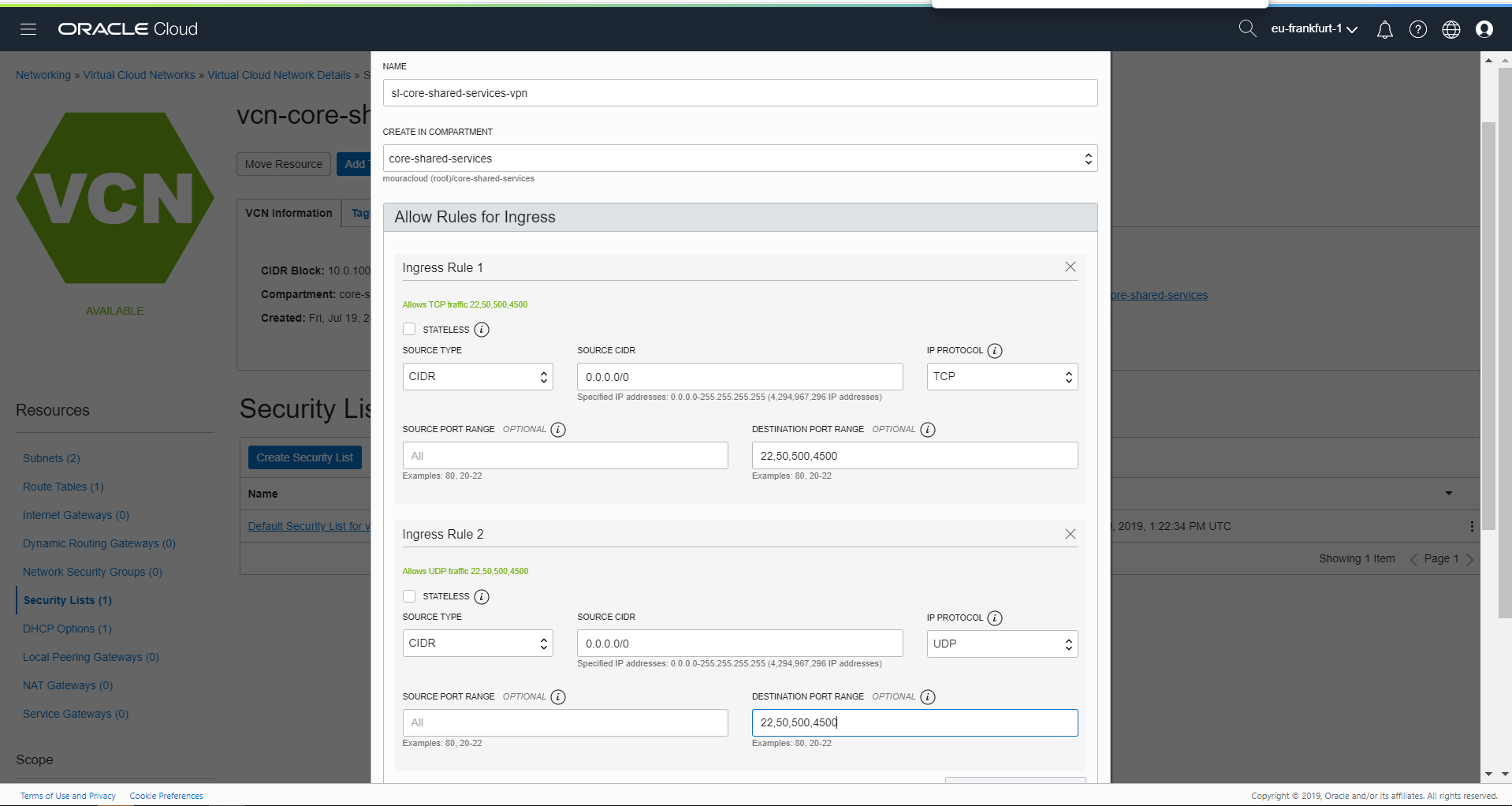
VPN Gateway Security List (Public Subnet)
Ingress Rules:
| Protocol | Source | Port | Purpose |
|---|---|---|---|
| TCP | 0.0.0.0/0 | 22 | SSH management |
| UDP | 0.0.0.0/0 | 500 | IPsec IKE |
| UDP | 0.0.0.0/0 | 4500 | IPsec NAT-T |
| ICMP | 0.0.0.0/0 | All | Ping/troubleshooting |
| TCP | 172.16.0.0/24 | 443 | Azure SSL access |
Egress Rules:
Protocol: All
Destination: 0.0.0.0/0
Allows all outbound traffic from VPN instances
Example Configuration:
Ingress Rule 1:
  Stateless: No
  Protocol: TCP
  Source: 0.0.0.0/0
  Source Port: All
  Destination Port: 22

Ingress Rule 2:
  Stateless: No
  Protocol: UDP
  Source: 0.0.0.0/0
  Source Port: All
  Destination Port: 500

Ingress Rule 3:
  Stateless: No
  Protocol: ICMP
  Source: 0.0.0.0/0
Internal Subnet Security List
Allow internal communication and traffic through VPN gateway:
Ingress:
  - TCP from 10.0.100.0/24 (all ports)
  - UDP from 10.0.100.0/24 (all ports)
  - ICMP from 10.0.100.0/24
  - All from 172.16.0.0/24 (Azure network)

Egress:
  - All traffic to 0.0.0.0/0
Internet and NAT Gateway Setup
Internet Gateway (IGW)
Provides internet access for public-facing resources:
1. Create IGW:
   Navigate: Networking → Internet Gateways
   Name: igw-core
   VCN: vcn-core-hub

2. Create Route Table:
   Name: rt-public
   Add Route:
     Destination: 0.0.0.0/0
     Target: igw-core

3. Associate with public subnet
NAT Gateway
Allows private resources to initiate outbound internet connections:
1. Create NAT Gateway:
   Navigate: Networking → NAT Gateways
   Name: nat-core
   VCN: vcn-core-hub

2. Create Route Table:
   Name: rt-private
   Add Route:
     Destination: 0.0.0.0/0
     Target: nat-core

3. Associate with private subnet
Important Considerations:
- NAT Gateway provides source IP translation (one-way)
- Allows private VMs to access external services
- NAT does NOT allow inbound connections
Dynamic Routing Gateway (DRG)
Essential for VPN and multi-network connectivity:
1. Create DRG:
   Navigate: Networking → Dynamic Routing Gateways
   Name: drg-core
   Compartment: core-shared-services

2. Attach to VCN:
   Select DRG → Attach
   VCN: vcn-core-hub

3. Create Route Table for VPN Traffic:
   Name: rt-drg
   Add Route:
     Destination: 172.16.0.0/24 (Azure network)
     Target: drg-core (IPsec connection)
Network Diagram
┌─────────────────────────────────────────────┐
│         OCI VCN (10.0.100.0/16)             │
│                                             │
│  ┌──────────────┐  ┌──────────────────┐   │
│  │  IGW         │  │  NAT Gateway     │   │
│  │ (Internet)   │  │ (Outbound only)  │   │
│  └──────────────┘  └──────────────────┘   │
│         ▲                   ▲               │
│         │                   │               │
│  ┌──────────────────────────────────────┐ │
│  │  Public Subnet (10.0.100.0/28)      │ │
│  │  - VPN Gateway VM                   │ │
│  │  - Admin/Jumpbox VM                 │ │
│  └──────────────────────────────────────┘ │
│         │                                  │
│         │      ┌──────────┐               │
│         └─────▶│   DRG    │◀──────────┐   │
│                │ (IPsec)  │           │   │
│                └──────────┘       To Azure│
│         │                                  │
│  ┌──────────────────────────────────────┐ │
│  │  Private Subnet (10.0.100.16/28)    │ │
│  │  - Internal Services                │ │
│  │  - Application Servers              │ │
│  └──────────────────────────────────────┘ │
│                                             │
└─────────────────────────────────────────────┘
Part 3: Virtual Machine Deployment
Restored Screenshots (Step 1.3)
Screenshots

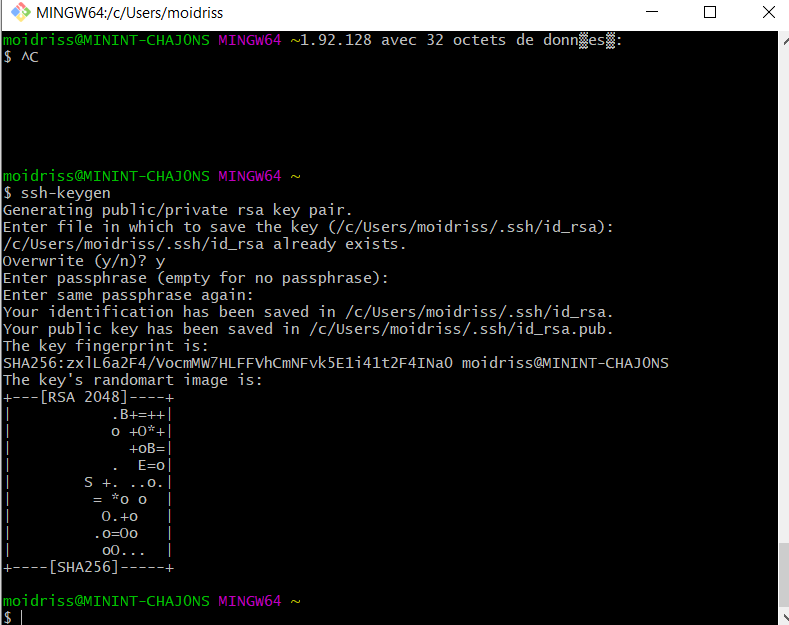
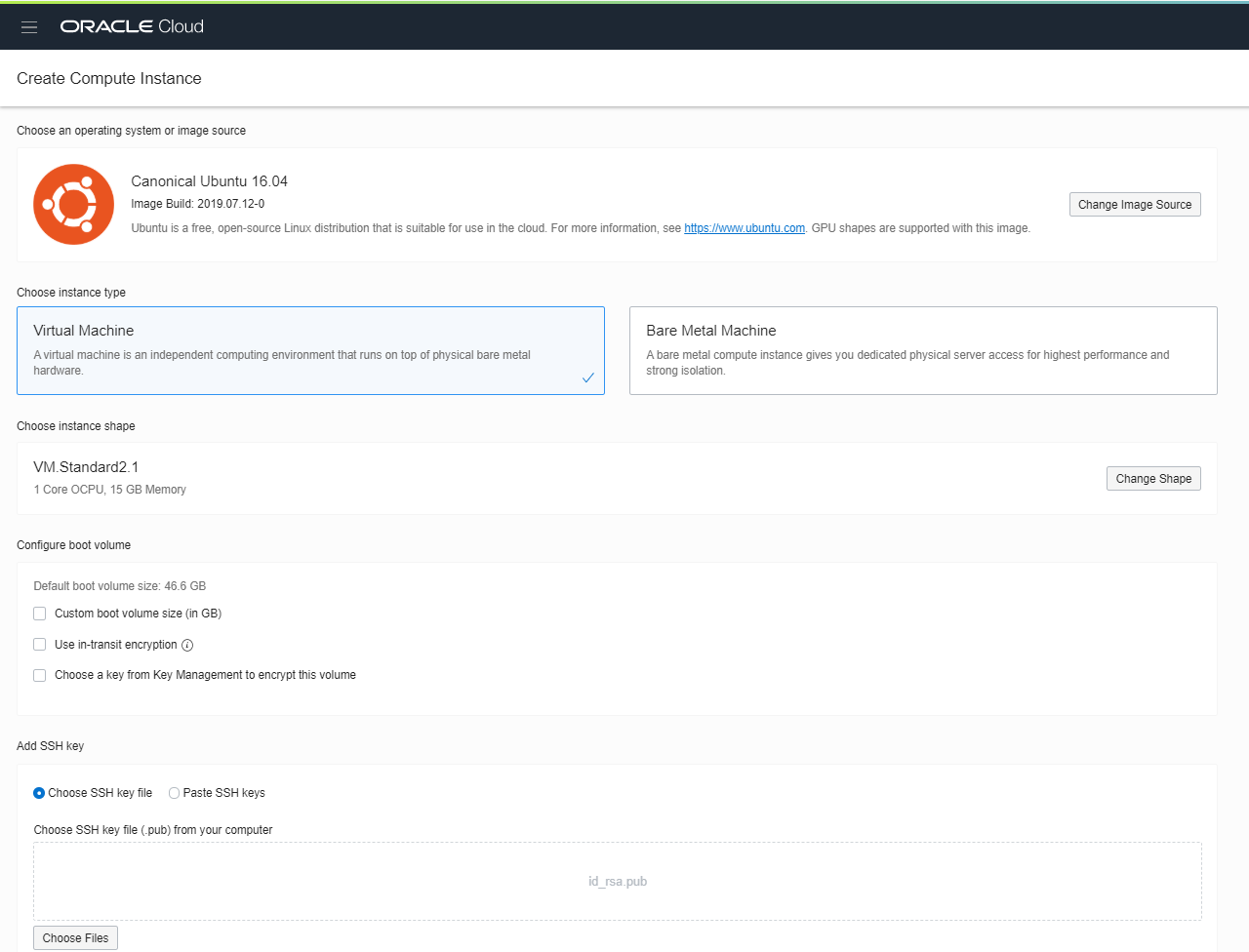
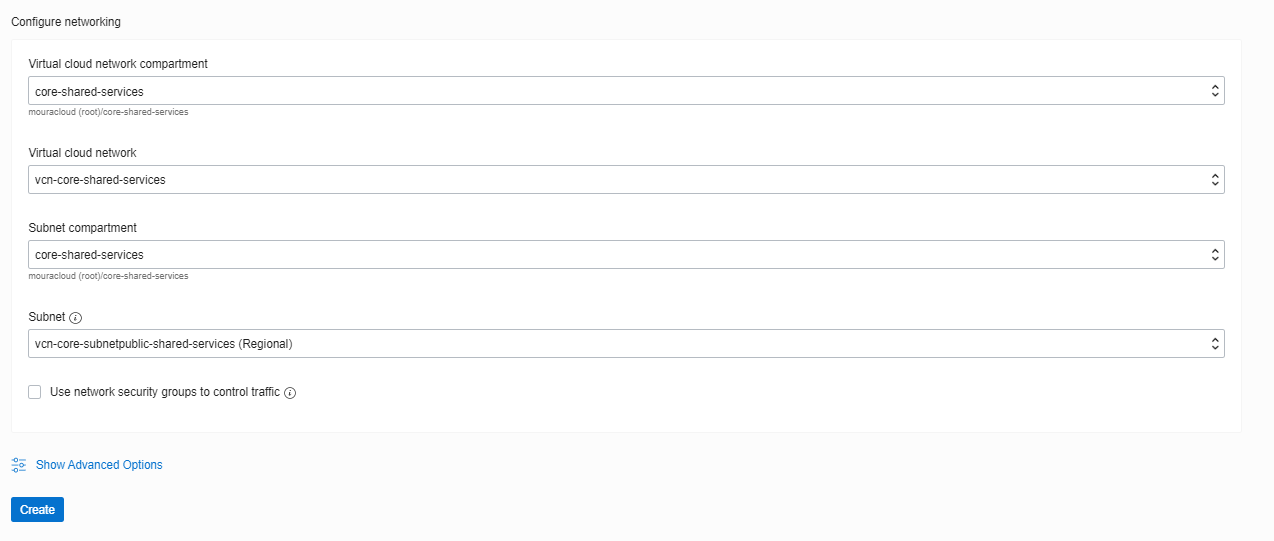
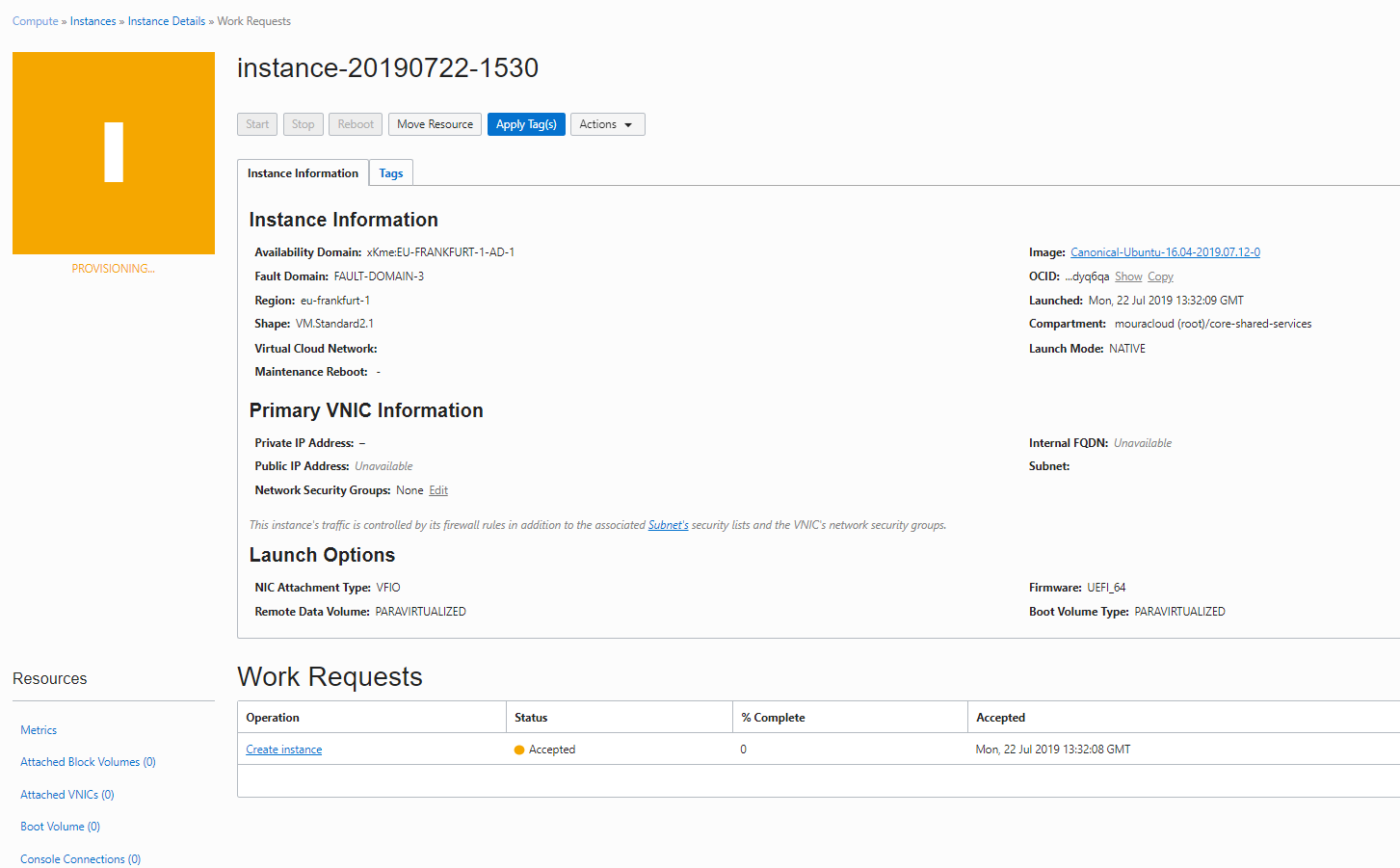
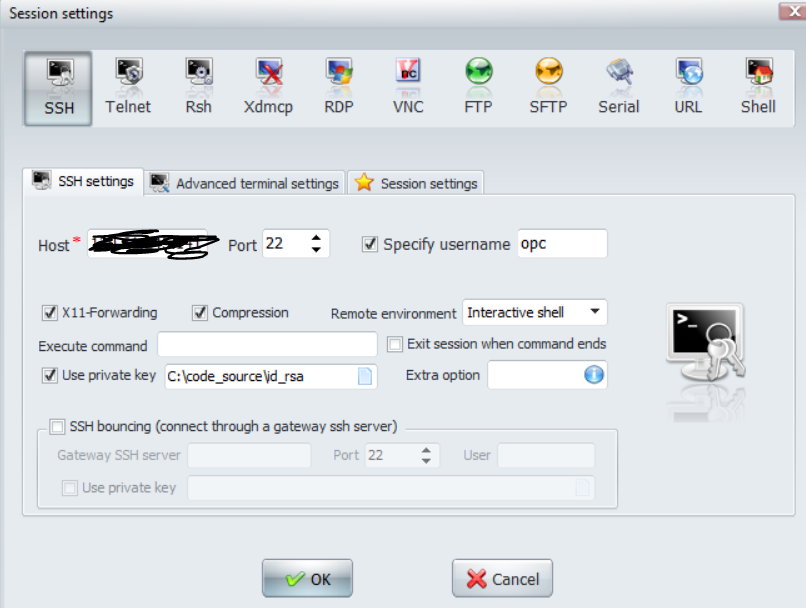

Creating VMs in the Core Network
We need multiple VMs for different purposes:
- VPN Gateway VM: Acts as IPsec endpoint (Ubuntu 16.04)
- Admin/Jumpbox VM: For secure administrative access
- Internal Test VM: For connectivity testing
SSH Key Generation
Before creating instances, generate SSH keys:
On Linux/Mac:
ssh-keygen -t rsa -b 4096 -f ~/.ssh/oci-key
# Save the generated key securely
# You'll need the public key during VM creation
On Windows (using PuTTYgen):
- Generate key pair in PuTTYgen
- Save private key (.ppk format)
- Copy public key for OCI
Creating the VPN Gateway Instance
1. Navigate: Compute → Instances
2. Create Instance:
   Name: vm-vpn-core-shared-services
   Image: Ubuntu 20.04 or 22.04
   Shape: Standard.E2.Micro (free tier eligible)
   Subnet: subnet-public-vpn

3. Add SSH Public Key:
   Paste your public SSH key

4. Click "Create Instance"
Instance Details to Note:
- Public IP (automatically assigned)
- Private IP (within 10.0.100.0/24)
- SSH connection command provided
Accessing the VPN VM
Using SSH:
ssh ubuntu@<public-ip> -i ~/.ssh/oci-keyUsing OCI Console VNC:
- Navigate to instance details
- Click "Console Connections"
- Launch VNC session from browser
Creating Admin/Jumpbox VM
1. Create Instance:
   Name: vm-admin-core-shared-services
   Image: Ubuntu 20.04 or 22.04
   Shape: Standard.E2.Micro
   Subnet: subnet-private-internal

2. Note: Private IP only (accessible through VPN or bastion)
Creating Internal Test VM
1. Create Instance:
   Name: vm-internal-test
   Image: Ubuntu 20.04 or 22.04
   Shape: Standard.E2.Micro
   Subnet: subnet-private-internal

2. This VM will verify internal routing and VPN connectivity
Part 4: Cross-Cloud VPN Connectivity (OCI to Azure)
Restored Screenshots (Step 1.4)
Screenshots
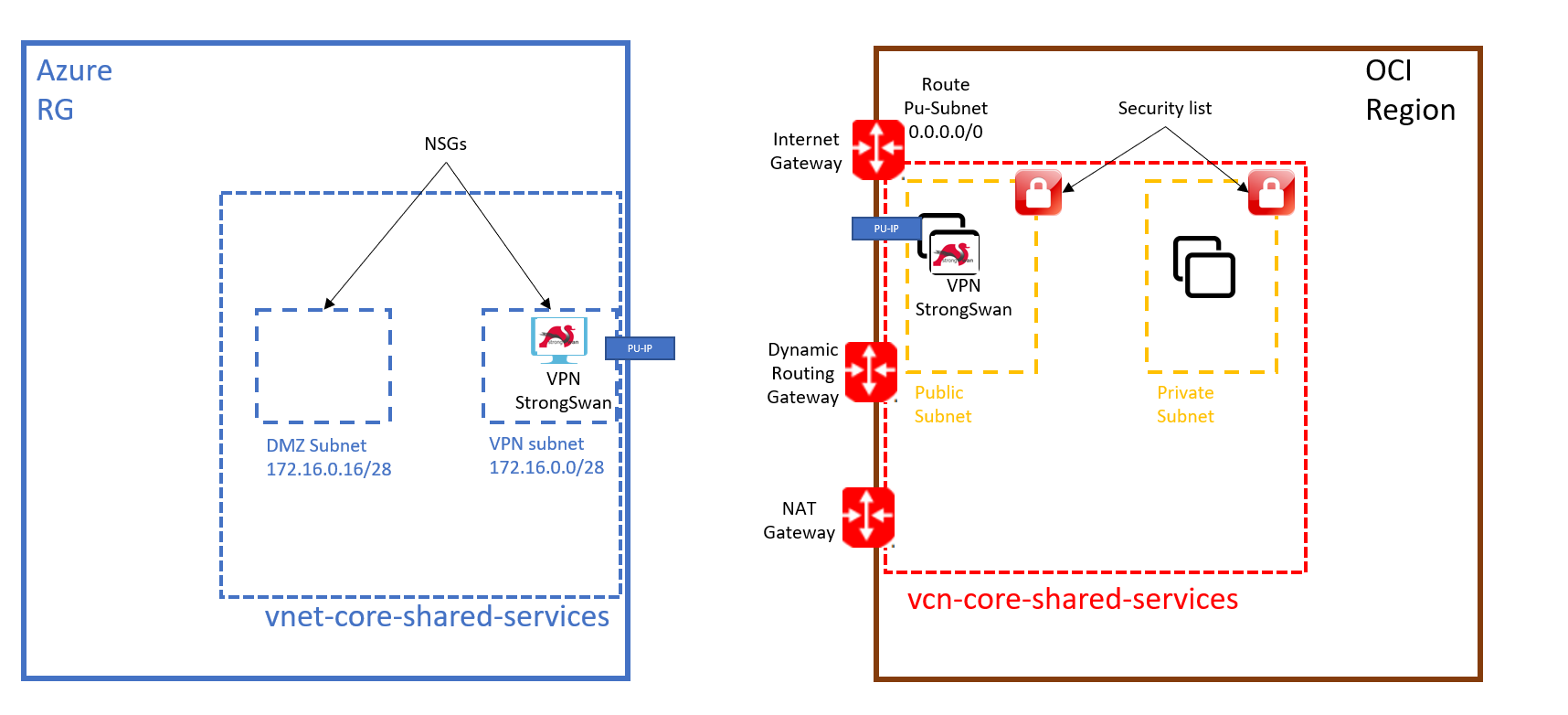

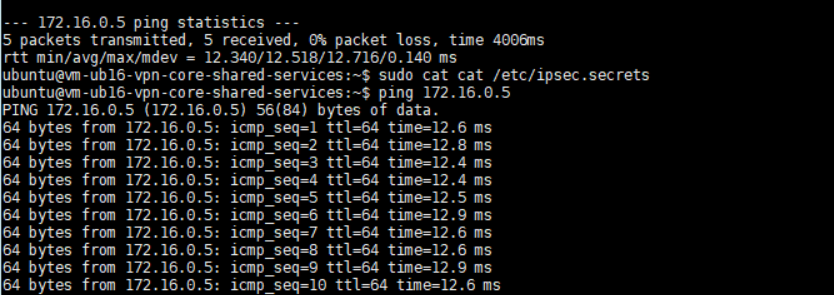
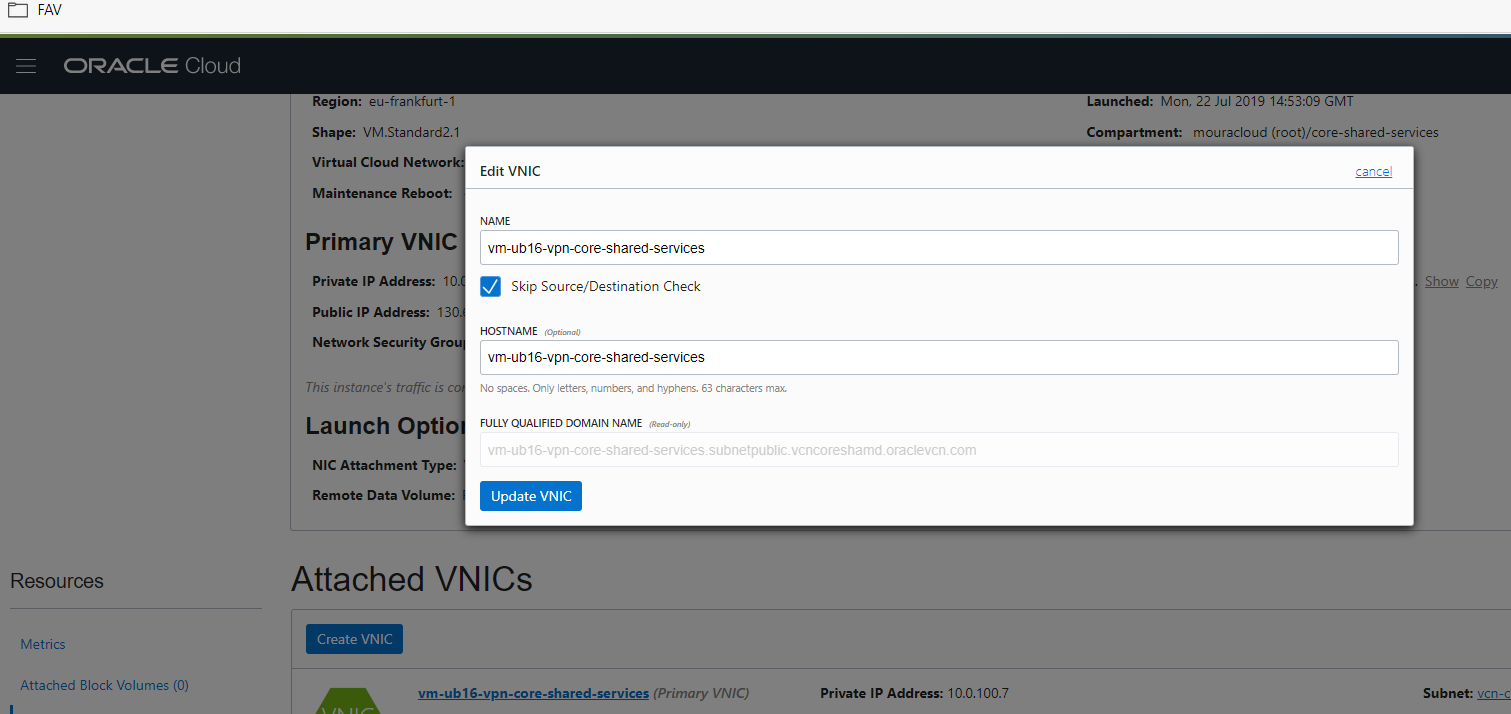


VPN Architecture Overview
Goal: Establish secure IPsec tunnel between:
- OCI Network: 10.0.100.0/24 (Azure endpoint: mouradcloudsecu.westeurope.cloudapp.azure.com)
- Azure Network: 172.16.0.0/24 (OCI endpoint: 130.61.50.28)
Installing Libreswan VPN
Libreswan is a robust IPsec implementation, easier to configure than Strongswan.
Connect to VPN VM:
ssh ubuntu@<vm-public-ip> -i ~/.ssh/oci-keyInstall Libreswan:
sudo apt-get update
sudo apt-get install libreswan -y
sudo systemctl enable ipsec
VPN Configuration Files
Azure Side (Site A) Configuration
Create /etc/ipsec.d/azure-oci.conf:
version 2.0

config setup
    uniqueids=yes
    strictcrlpolicy=no

conn azure-oci
    authby=secret
    left=%defaultroute
    leftid=mouradcloudsecu.westeurope.cloudapp.azure.com
    leftnexthop=172.16.0.1
    leftsubnet=172.16.0.0/24
    right=130.61.50.28
    rightsubnet=10.0.100.0/24
    rightnexthop=10.0.100.1
    ike=aes256-sha1;modp2048
    esp=aes256-sha1
    keyingtries=0
    ikelifetime=1h
    lifetime=8h
    dpddelay=30
    dpdtimeout=120
    dpdaction=restart
    auto=start
OCI Side (Site B) Configuration
Create /etc/ipsec.d/azure-oci.conf:
version 2.0

config setup
    uniqueids=yes
    strictcrlpolicy=no

conn azure-oci
    authby=secret
    left=%defaultroute
    leftid=130.61.50.28
    leftnexthop=10.0.100.1
    leftsubnet=10.0.100.0/24
    right=mouradcloudsecu.westeurope.cloudapp.azure.com
    rightsubnet=172.16.0.0/24
    rightnexthop=172.16.0.1
    ike=aes256-sha1;modp2048
    esp=aes256-sha1
    keyingtries=0
    ikelifetime=1h
    lifetime=8h
    dpddelay=30
    dpdtimeout=120
    dpdaction=restart
    auto=start
Setting Shared Secrets
Create /etc/ipsec.secrets on both sides:
%any %any : PSK "YOUR_SECURE_PRESHARED_KEY_HERE"Security Considerations:
- Use strong, randomly generated PSK (at least 32 characters)
- Use same PSK on both sides
- Store securely; never commit to version control
- Rotate periodically
- Consider using certificates instead of PSK for production
System Configuration
Edit /etc/sysctl.conf on both VPN endpoints:
# IP forwarding (essential for VPN gateway role)
net.ipv4.ip_forward = 1

# Accept source routing
net.ipv4.conf.all.accept_source_route = 0
net.ipv4.conf.default.accept_source_route = 0

# Accept redirects (generally not needed for VPN)
net.ipv4.conf.all.accept_redirects = 0
net.ipv4.conf.default.accept_redirects = 0

# Send redirects
net.ipv4.conf.all.send_redirects = 0
net.ipv4.conf.default.send_redirects = 0

# Reverse path filtering (disable for VPN scenarios)
net.ipv4.conf.all.rp_filter = 0
net.ipv4.conf.default.rp_filter = 0

# Per-interface settings
net.ipv4.conf.eth0.send_redirects = 0
net.ipv4.conf.eth0.rp_filter = 0
net.ipv4.conf.ens3.send_redirects = 0
net.ipv4.conf.ens3.rp_filter = 0
Apply changes:
sudo sysctl -pNAT Configuration
Enable masquerading for traffic traversing the VPN:
Azure VPN VM:
sudo iptables -t nat -A POSTROUTING -s 172.16.0.0/24 -d 10.0.100.0/24 -j MASQUERADEOCI VPN VM:
sudo iptables -t nat -A POSTROUTING -s 10.0.100.0/24 -d 172.16.0.0/24 -j MASQUERADEStarting the VPN
Execute on both VPN endpoints:
# Start/restart IPsec service
sudo ipsec start
sudo ipsec restart

# Load the connection
sudo ipsec auto --add azure-oci

# Initiate the connection
sudo ipsec auto --up azure-oci

# Check status
sudo ipsec status
Expected Output:
Total IPsec connections: 1
azure-oci (10.0.100.0/24===172.16.0.0/24); eroute owner: #1
    azure-oci:   IKEv1 proposal: AES_256-SHA1;MODP2048
    azure-oci:   ESP proposal: AES_256-SHA1
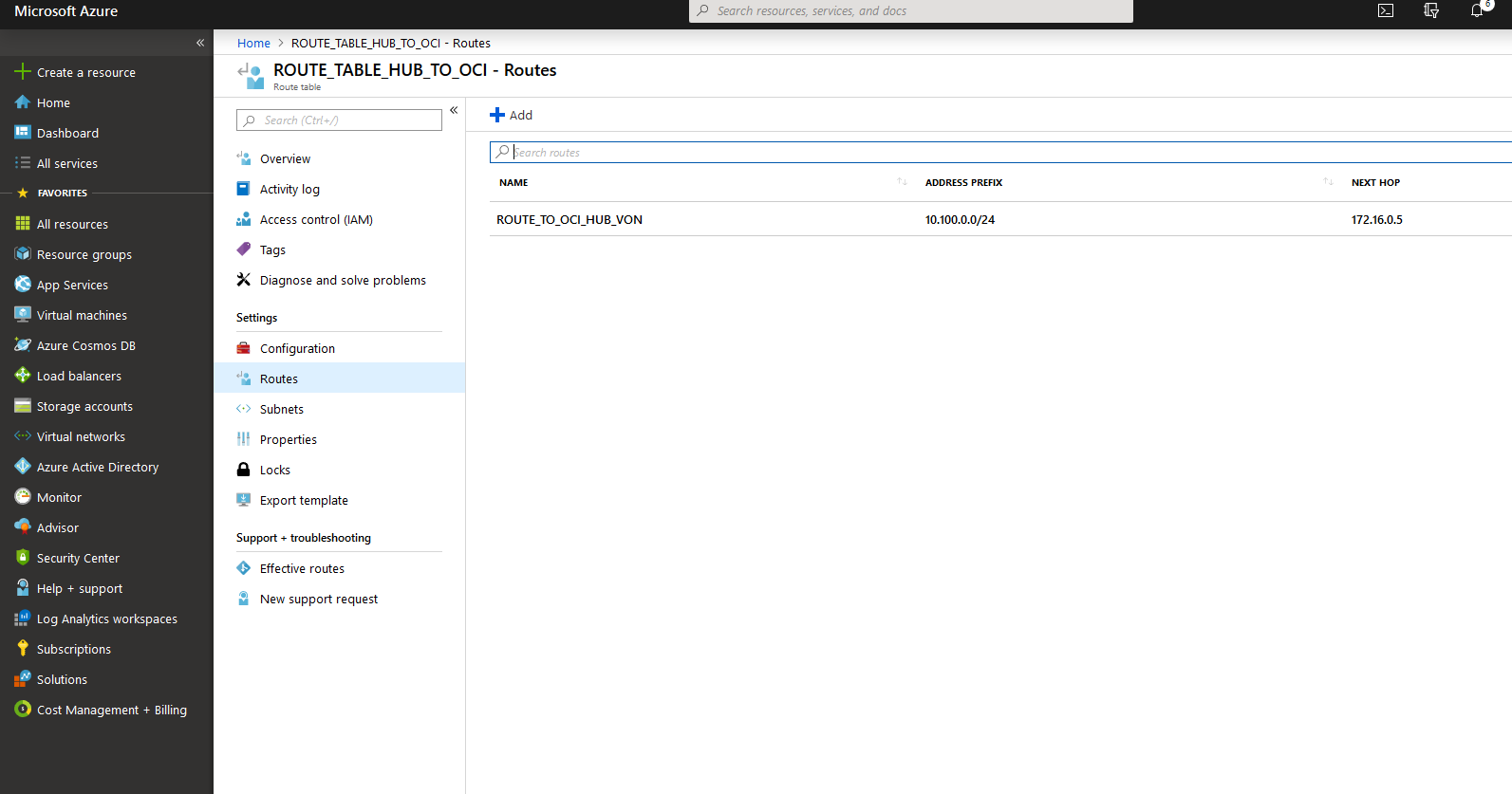
Azure-Side Static Route
Configure OCI as next hop from Azure VMs:
# Create route table
$routeTable = New-AzureRmRouteTable `
    -ResourceGroupName $ResourceGroupName `
    -Name "rt-to-oci" `
    -Location $location

# Add route to OCI network
$routeTable | Add-AzureRmRouteConfig `
    -Name "route-to-oci" `
    -AddressPrefix "10.0.100.0/24" `
    -NextHopType "VirtualAppliance" `
    -NextHopIpAddress "172.16.0.5" | `
    Set-AzureRmRouteTable

# Associate with subnet
$vnet = Get-AzureRmVirtualNetwork -ResourceGroupName $ResourceGroupName
$subnet = Get-AzureRmVirtualNetworkSubnetConfig -Name "default" -VirtualNetwork $vnet

Set-AzureRmVirtualNetworkSubnetConfig `
    -VirtualNetwork $vnet `
    -Name "default" `
    -AddressPrefix $subnet.AddressPrefix `
    -RouteTable $routeTable | Set-AzureRmVirtualNetwork
Part 5: Connectivity Testing
VPN Tunnel Status Verification
From OCI VPN VM:
sudo ipsec status
sudo ipsec trafficstatus
Expected Tunnel Status:
Total IPsec connections: 1
azure-oci (10.0.100.0/24===172.16.0.0/24); eroute owner: #1
    azure-oci: newest ISAKMP SA: #1; newest IPsec SA: #2;
    ...state: ESTABLISHED
Basic Connectivity Test (OCI to Azure)
From OCI VPN VM (10.0.100.5):
# Ping Azure VPN endpoint
ping 172.16.0.5

# Expected: Replies from 172.16.0.5
PING 172.16.0.5 (172.16.0.5) 56(84) bytes of data.
64 bytes from 172.16.0.5: icmp_seq=1 ttl=64 time=45.2 ms
64 bytes from 172.16.0.5: icmp_seq=2 ttl=64 time=43.8 ms
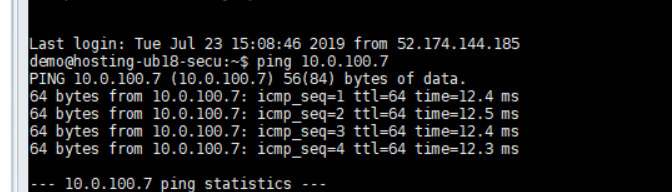
Azure to OCI Connectivity Test
From Azure VPN VM (172.16.0.5):
# Ping OCI VPN endpoint
ping 10.0.100.5

# Expected: Replies from 10.0.100.5
Advanced Routing Test
Verify traffic routes through VPN gateway to reach remote VMs:
Test Scenario:
- Source: OCI Internal VM (10.0.100.100)
- Destination: Azure Internal VM (172.16.0.7)
- Path: Should traverse through VPN gateway (10.0.100.5)
On OCI Internal VM:
# Configure static route to Azure network via VPN gateway
sudo ip route add 172.16.0.0/24 via 10.0.100.5

# Ping Azure internal VM through VPN gateway
ping 172.16.0.7

# Trace route
traceroute 172.16.0.7
Expected Traceroute Output:
traceroute to 172.16.0.7 (172.16.0.7), 30 hops max, 60 byte packets
 1  10.0.100.5 (10.0.100.5)  2.345 ms  2.312 ms  2.298 ms
 2  172.16.0.1 (172.16.0.1)  45.123 ms  44.987 ms  45.234 ms
 3  172.16.0.7 (172.16.0.7)  45.456 ms  45.512 ms  45.389 ms
Security List Verification
Ensure ICMP is allowed in security lists:
Azure NSG:
Allow ICMP from 10.0.100.0/24OCI Security List:
Allow ICMP from 172.16.0.0/24Monitoring VPN Performance
Check traffic statistics:
# View encrypted traffic
sudo ipsec trafficstatus

# Monitor in real-time
watch -n 1 'sudo ipsec trafficstatus'
Troubleshooting VPN Issues
VPN Not Connecting:
# Check logs
sudo tail -f /var/log/auth.log
sudo tail -f /var/log/syslog

# Verify PSK matches on both sides
grep PSK /etc/ipsec.secrets

# Test connectivity without IPsec
ping -c 1 <remote-vm-ip>
Traffic Not Passing Through Tunnel:
# Verify routing table
ip route show

# Check NAT rules
sudo iptables -t nat -L -v

# Verify security lists/NSGs
# Both sides must allow required protocols (500, 4500 UDP for IPsec)
Complete Architecture Diagram
┌─────────────────────────────────────────────────────────────────┐
│                      AZURE                                       │
│                   172.16.0.0/24                                 │
│                                                                  │
│  ┌────────────────────────────────────────────────────────────┐ │
│  │ Subscription / Resource Group                              │ │
│  │                                                             │ │
│  │  ┌─────────────────────────────────────────────────────┐  │ │
│  │  │  VNET: 172.16.0.0/24                               │  │ │
│  │  │                                                     │  │ │
│  │  │  ┌──────────────┐    ┌──────────────────────────┐  │  │ │
│  │  │  │  VPN VM      │    │ Internal VMs             │  │  │ │
│  │  │  │ 172.16.0.5   │◀───│ 172.16.0.7              │  │  │ │
│  │  │  │(Libreswan)   │    │ 172.16.0.10             │  │  │ │
│  │  │  └──────┬───────┘    └──────────────────────────┘  │  │ │
│  │  │         │ IPsec Tunnel                              │  │ │
│  │  │         │ UDP 500, 4500                             │  │ │
│  │  │         └────────────────────┐                      │  │ │
│  │  │ NSG: Allow IPsec traffic     │                      │  │ │
│  │  └─────────────────────────────┼──────────────────────┘  │ │
│  │                                 │                         │ │
│  └─────────────────────────────────┼─────────────────────────┘ │
│                                     │                           │
│         mouradcloudsecu.westeurope.cloudapp.azure.com           │
│                                     │                           │
└─────────────────────────────────────┼───────────────────────────┘
                                      │
          ╔═════════════════════════╗ │ ╔═════════════════════════╗
          ║  IPsec Encryption (SA) ║ │ ║ 10.0.100.0/24          ║
          ║  AES256-SHA1            ║─┼─║ OCI VCN                ║
          ║ Lifetime: 8h            ║ │ ║                        ║
          ╚═════════════════════════╝ │ ╚═════════════════════════╝
                                      │
┌─────────────────────────────────────┼───────────────────────────┐
│                                     │         OCI               │
│                  130.61.50.28       │                           │
│         (Public IP of VPN VM)       │                           │
│                                     │                           │
│  ┌──────────────────────────────────▼──────────────────────┐   │
│  │ VCN: 10.0.100.0/16                                      │   │
│  │                                                         │   │
│  │  ┌──────────────────────────────────────────────────┐  │   │
│  │  │  Public Subnet: 10.0.100.0/28                   │  │   │
│  │  │                                                 │  │   │
│  │  │  ┌─────────────────────┐  ┌────────────────┐  │  │   │
│  │  │  │  VPN VM             │  │  Jumpbox VM    │  │  │   │
│  │  │  │ 10.0.100.5          │  │ 10.0.100.4     │  │  │   │
│  │  │  │ (Libreswan)         │  │                │  │  │   │
│  │  │  └─────────────────────┘  └────────────────┘  │  │   │
│  │  │                                                 │  │   │
│  │  │  Security List: Allow 500, 4500 UDP, SSH, ICMP │  │   │
│  │  └─────────────────────┬──────────────────────────┘  │   │
│  │                        │                               │   │
│  │                        │ Routes internal traffic       │   │
│  │                        ▼                               │   │
│  │  ┌──────────────────────────────────────────────────┐  │   │
│  │  │  Private Subnet: 10.0.100.16/28                 │  │   │
│  │  │                                                 │  │   │
│  │  │  ┌──────────────────┐  ┌──────────────────┐   │  │   │
│  │  │  │  Internal VM     │  │  Test VM         │   │  │   │
│  │  │  │ 10.0.100.17      │  │ 10.0.100.18      │   │  │   │
│  │  │  │                  │  │                  │   │  │   │
│  │  │  │ Reaches Azure    │  │ Reaches Azure    │   │  │   │
│  │  │  │ through VPN      │  │ through VPN      │   │  │   │
│  │  │  └──────────────────┘  └──────────────────┘   │  │   │
│  │  │                                                 │  │   │
│  │  │  Security List: Allow internal traffic         │  │   │
│  │  └──────────────────────────────────────────────┘  │   │
│  │                                                    │   │
│  │  DRG (Dynamic Routing Gateway)                     │   │
│  │  Manages IPsec connection to Azure                │   │
│  │                                                    │   │
│  └────────────────────────────────────────────────────┘   │
│                                                             │
└─────────────────────────────────────────────────────────────┘

VPN Tunnel Flow:
1. Azure VM (172.16.0.7) sends packet to OCI VM (10.0.100.17)
2. Azure routing table directs to VPN VM (172.16.0.5)
3. VPN VM encrypts with IPsec (AES256-SHA1)
4. Encrypted packet transits internet to OCI VM (130.61.50.28)
5. OCI VPN VM (10.0.100.5) decrypts
6. Packet delivered to destination (10.0.100.17)
Best Practices Summary
Governance
- ✅ Use compartments for resource isolation
- ✅ Implement tag standards from day one
- ✅ Apply least-privilege IAM policies
- ✅ Separate operational users from administrators
- ✅ Enable audit logging for compliance
Networking
- ✅ Use hub-and-spoke for centralized management
- ✅ Implement security lists at subnet boundaries
- ✅ Use Internet Gateway + NAT Gateway for controlled internet access
- ✅ Monitor DRG traffic for connectivity issues
- ✅ Document your subnetting scheme
VPN & Connectivity
- ✅ Use strong PSK (32+ characters) or certificates
- ✅ Enable Perfect Forward Secrecy (PFS)
- ✅ Monitor VPN status regularly
- ✅ Test failover scenarios
- ✅ Keep IPsec logs for troubleshooting
- ✅ Implement Dead Peer Detection (DPD)
Security
- ✅ Enable boot volume encryption
- ✅ Encrypt data in transit (IPsec/TLS)
- ✅ Use security lists/NSGs to restrict traffic
- ✅ Disable unnecessary services
- ✅ Regular patching and updates
- ✅ Implement monitoring and alerting
Conclusion
This comprehensive guide demonstrates:
- Governance: Setting up tenancies, compartments, users, and policies
- Networking: Building a hub-and-spoke VCN with proper security boundaries
- Compute: Deploying VMs for VPN, administration, and testing
- Connectivity: Establishing hybrid cloud connectivity between OCI and Azure
- Testing: Verifying end-to-end connectivity across cloud providers
The resulting architecture provides a solid foundation for multi-cloud deployments, centralized management, and secure inter-cloud communication.
Key Resources:
Oracle Cloud Infrastructure provides powerful, flexible infrastructure for hybrid cloud architectures. This guide establishes the foundation for secure, scalable multi-cloud operations.