This comprehensive guide explains how to set up, run, and understand the full time-series prediction pipeline using the microservices under MULTI_SERVICES_APIs, including pipeline phases, installed libraries, API structures, service interactions, and complete architectural visualizations.
1) System Overview
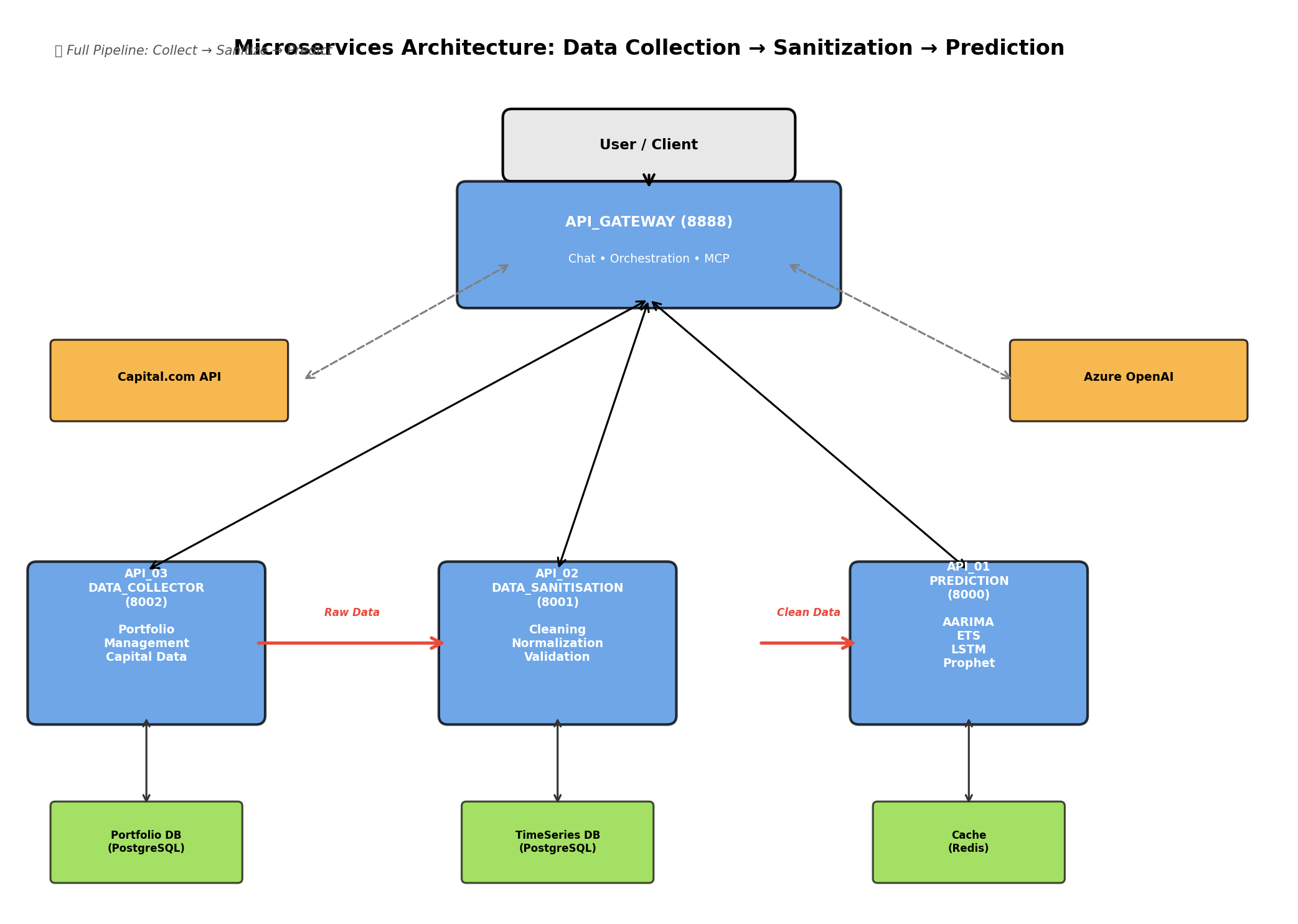
The platform is organized around four services working in harmony:
Primary Architecture Diagram
Service Responsibilities
- API_03_DATA_COLLECTOR (port 8002): Authenticates to Capital.com, collects instrument data (hourly/daily), manages portfolios and time-series storage.
- API_02_DATA_SANITISATION (port 8001): Validates, cleans, normalizes, and converts incoming datasets into API_01-compatible payloads.
- API_01_TIME_SERIES_PREDICTION (port 8000): Runs forecasting models (ARIMA, ETS, LSTM, Prophet) on clean time-series data.
- API_GATEWAY (port 8080 or 8888): Chat and orchestration layer; bridges user requests to local APIs and cloud AI.
Flow: API_03 ──HTTP──► API_02 ──HTTP──► API_01
      Raw Data    Clean Data         Forecasts
                                    + Metrics
2) Pipeline Phases (How to Run Correctly)
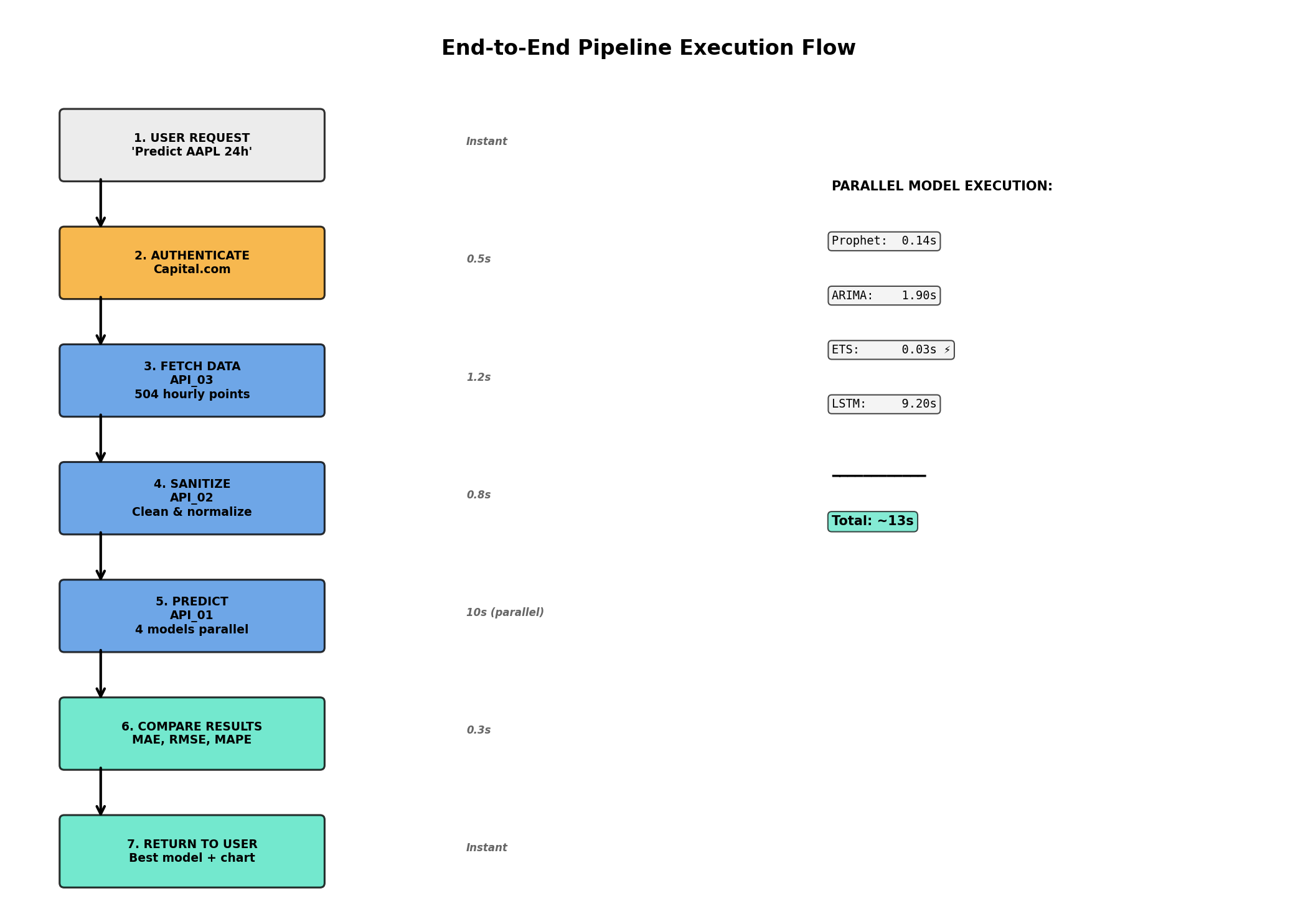
Complete Pipeline Flow Visualization
Phase 0 - Service Bootstrapping
Start each API and verify health/docs endpoints:
1. API_03_DATA_COLLECTOR (Port 8002)
   $ ./start.sh && curl http://localhost:8002/health

2. API_02_DATA_SANITISATION (Port 8001)
   $ ./start.sh && curl http://localhost:8001/docs

3. API_01_TIME_SERIES_PREDICTION (Port 8000)
   $ ./start_api.sh && curl http://localhost:8000/health

4. API_GATEWAY (Port 8888)
   $ uvicorn main:app --port 8888
   ✅ Ready at http://localhost:8888
Phase 1 - Authentication and Data Collection
API_03 authenticates to Capital.com and exposes raw time-series data:
Endpoints:
• POST   /portfolios/create
• POST   /data/collect/{portfolio}
• GET    /data/instruments/{symbol}
• GET    /scheduler/status
Phase 2 - Data Sanitization and Standardization
API_02 receives raw data and applies engineering controls:
Process:
  INPUT (Raw CSV)
      ↓
  VALIDATION (Check structure)
      ↓
  CLEANING (Missing values, duplicates)
      ↓
  NORMALIZATION (Dates, numeric types)
      ↓
  MODEL CONVERSION (→ API_01 format)
      ↓
  OUTPUT (SimpleTimeSeriesData JSON)
Phase 3 - Forecasting Execution
API_01 consumes clean data and generates predictions:
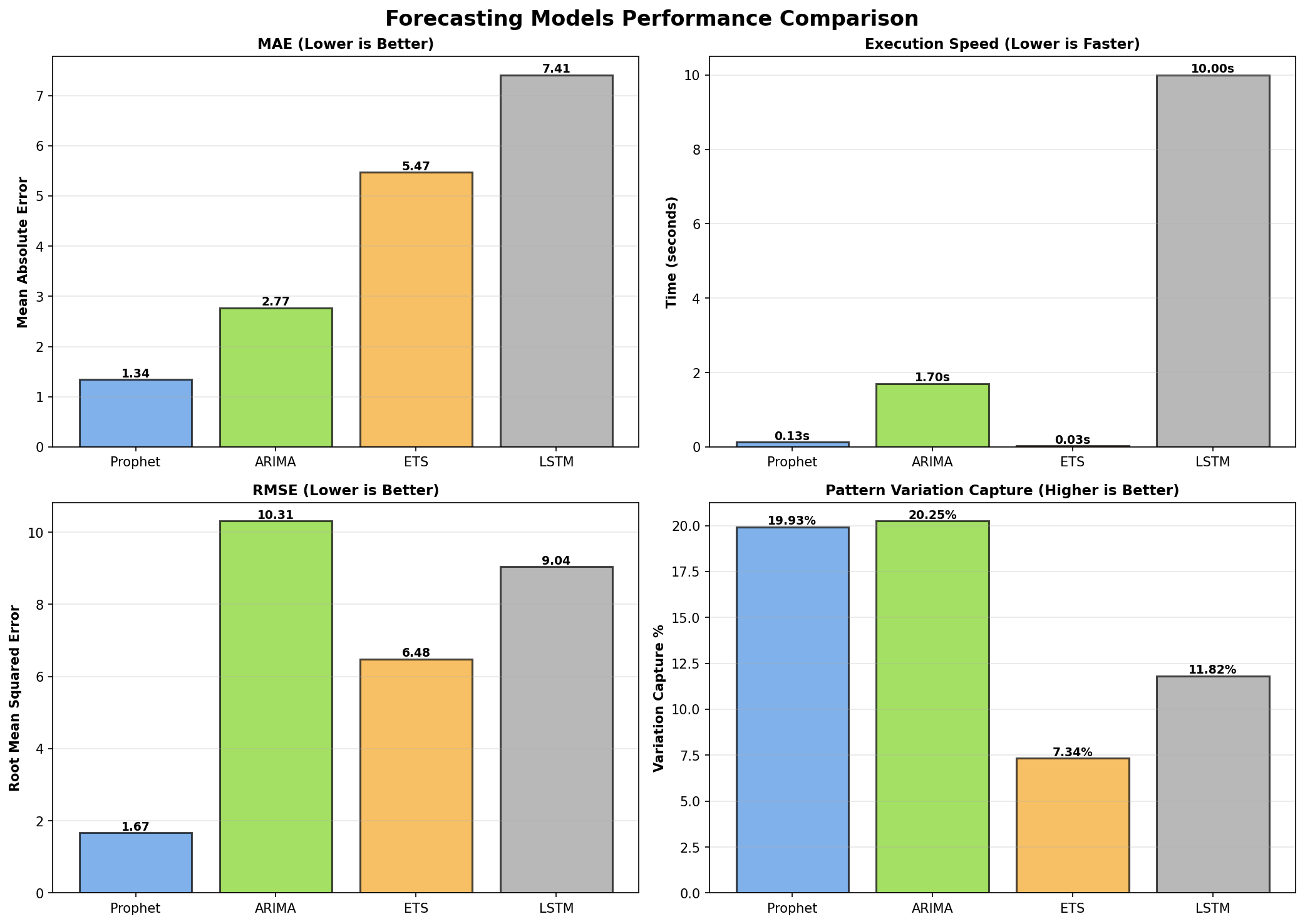
4 Forecasting Models:
┌──────────────┬──────────────┬──────────────┬──────────────┐
│   PROPHET    │    ARIMA     │     ETS      │     LSTM     │
├──────────────┼──────────────┼──────────────┼──────────────┤
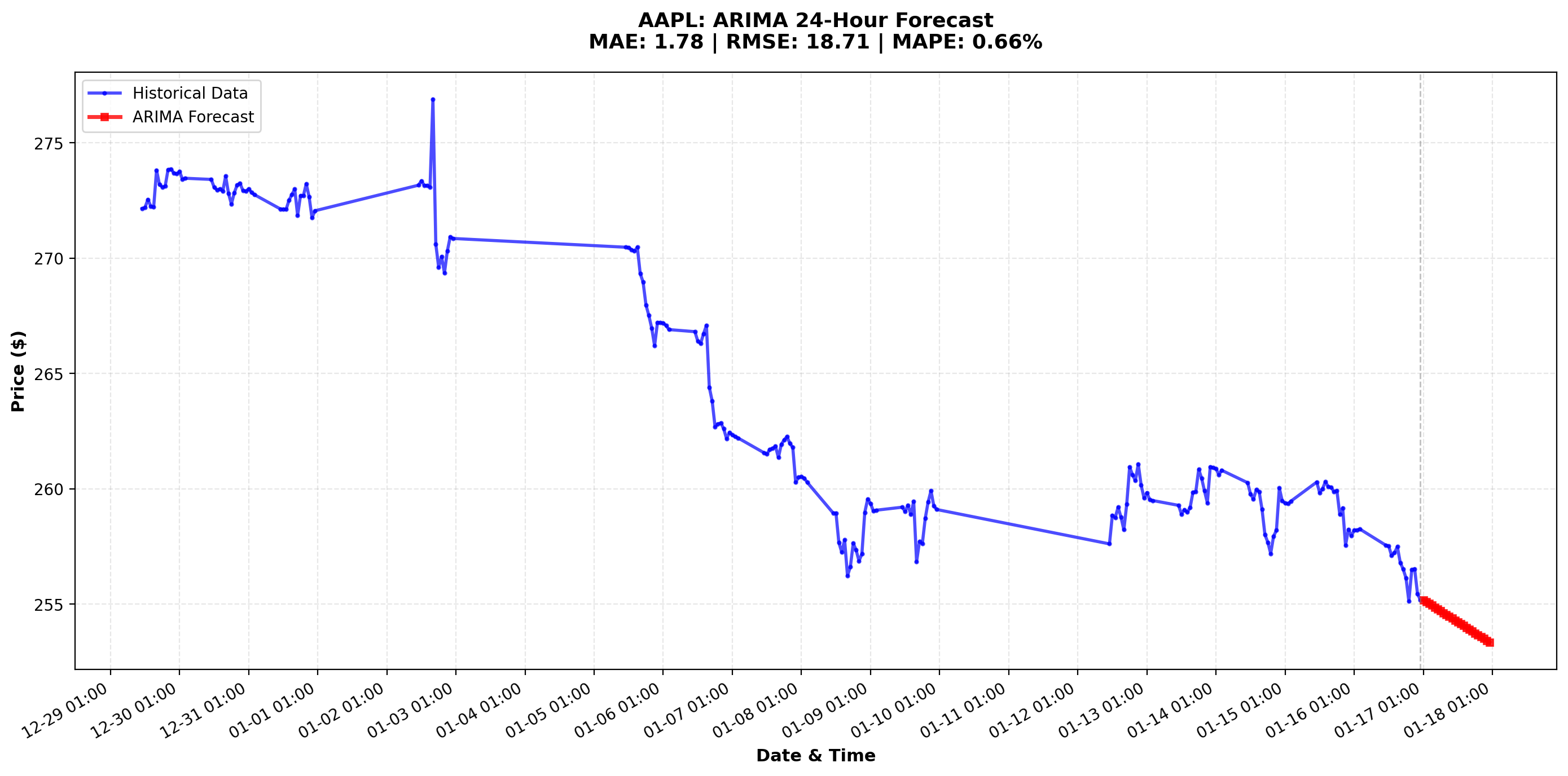
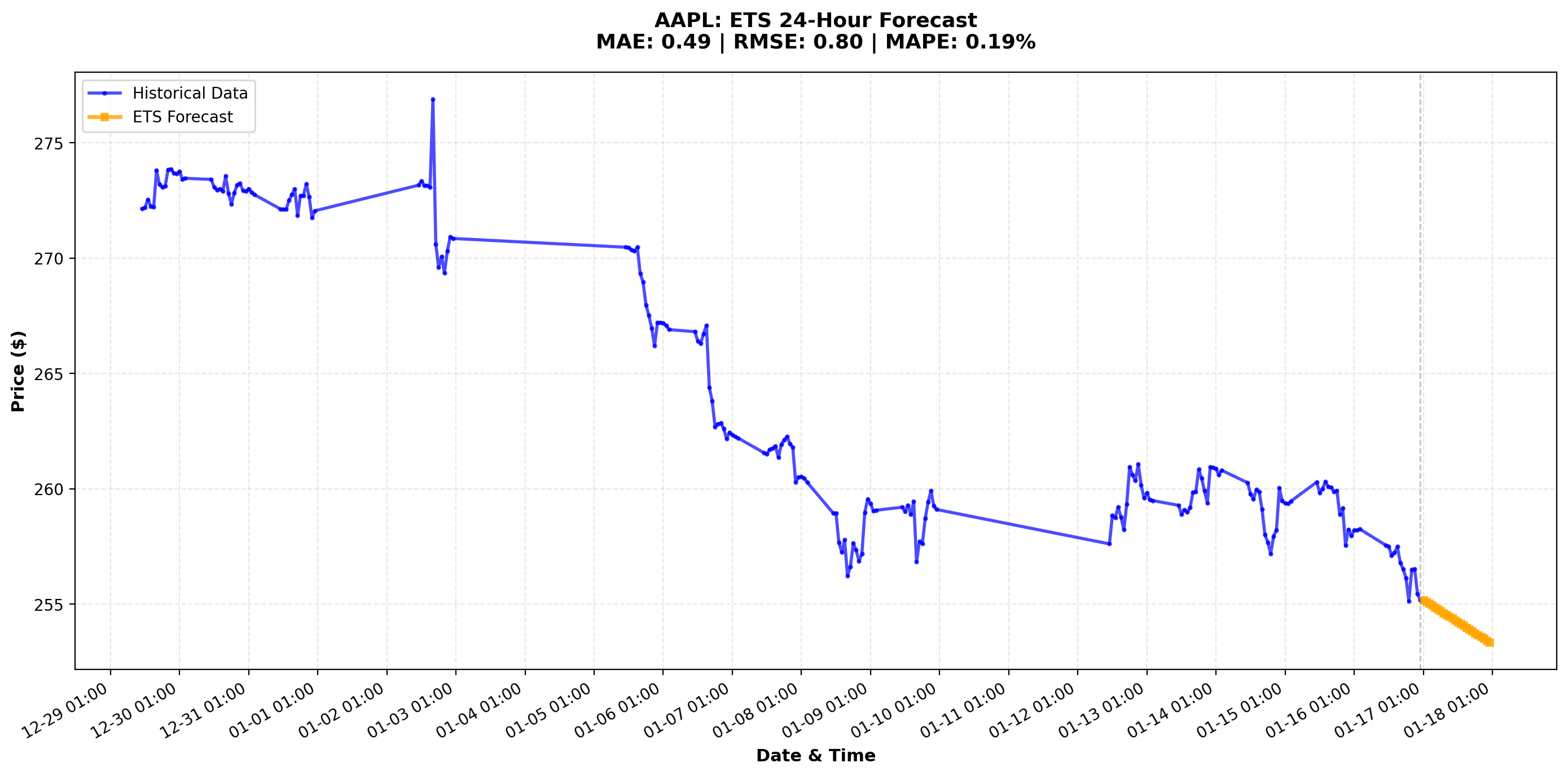
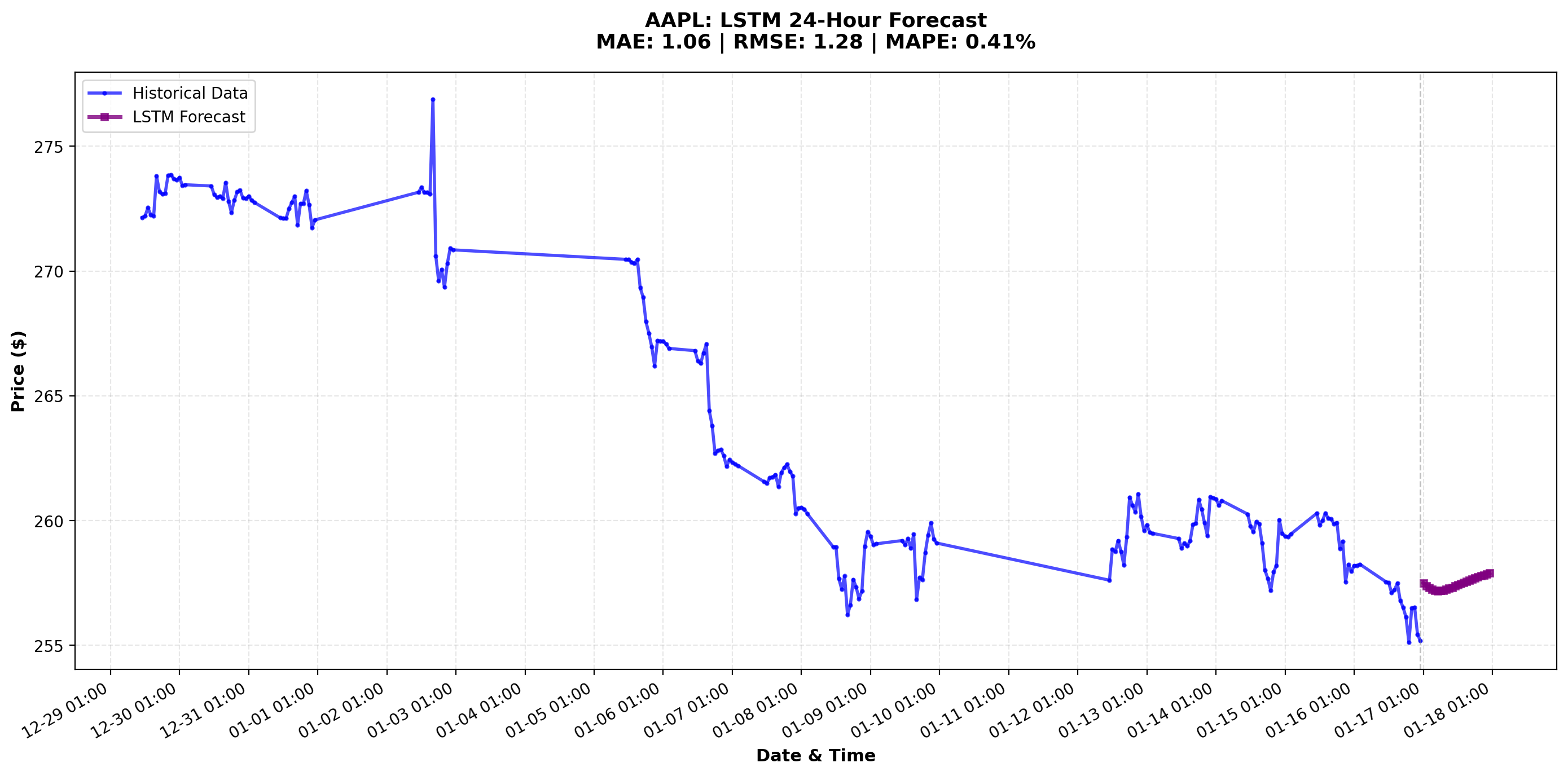
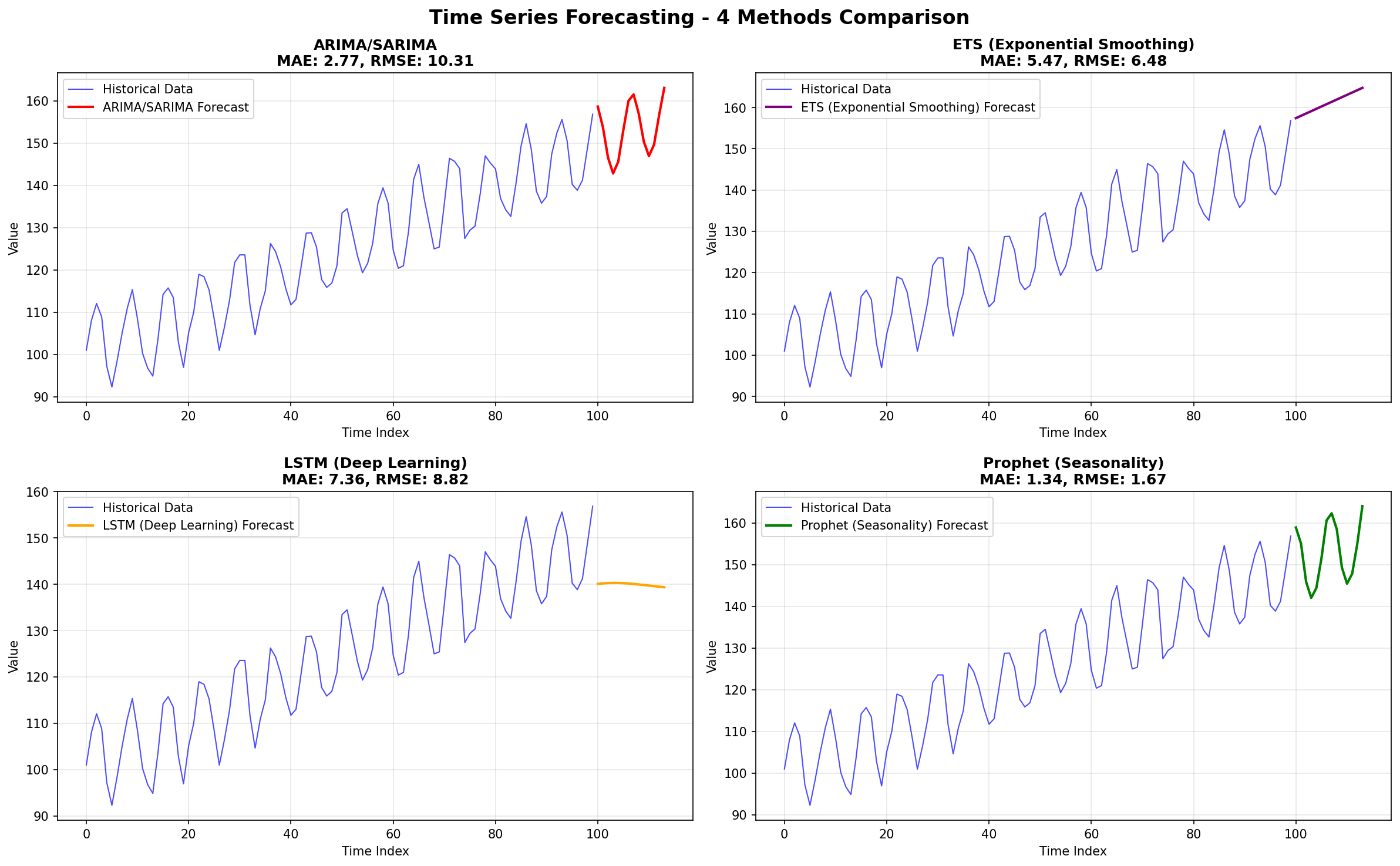
│ MAE: 1.34    │ MAE: 2.77    │ MAE: 5.47    │ MAE: 7.41    │
│ Speed: 0.13s │ Speed: 1.70s │ Speed: 0.03s │ Speed: 10.0s │
│ ⭐ BEST      │ Good balance │ Very fast ⚡ │ Deep learning│
│ Seasonal     │ Statistical  │ Exponential  │ Complex      │
│ patterns     │ Auto-order   │ Smoothing    │ Non-linear   │
└──────────────┴──────────────┴──────────────┴──────────────┘
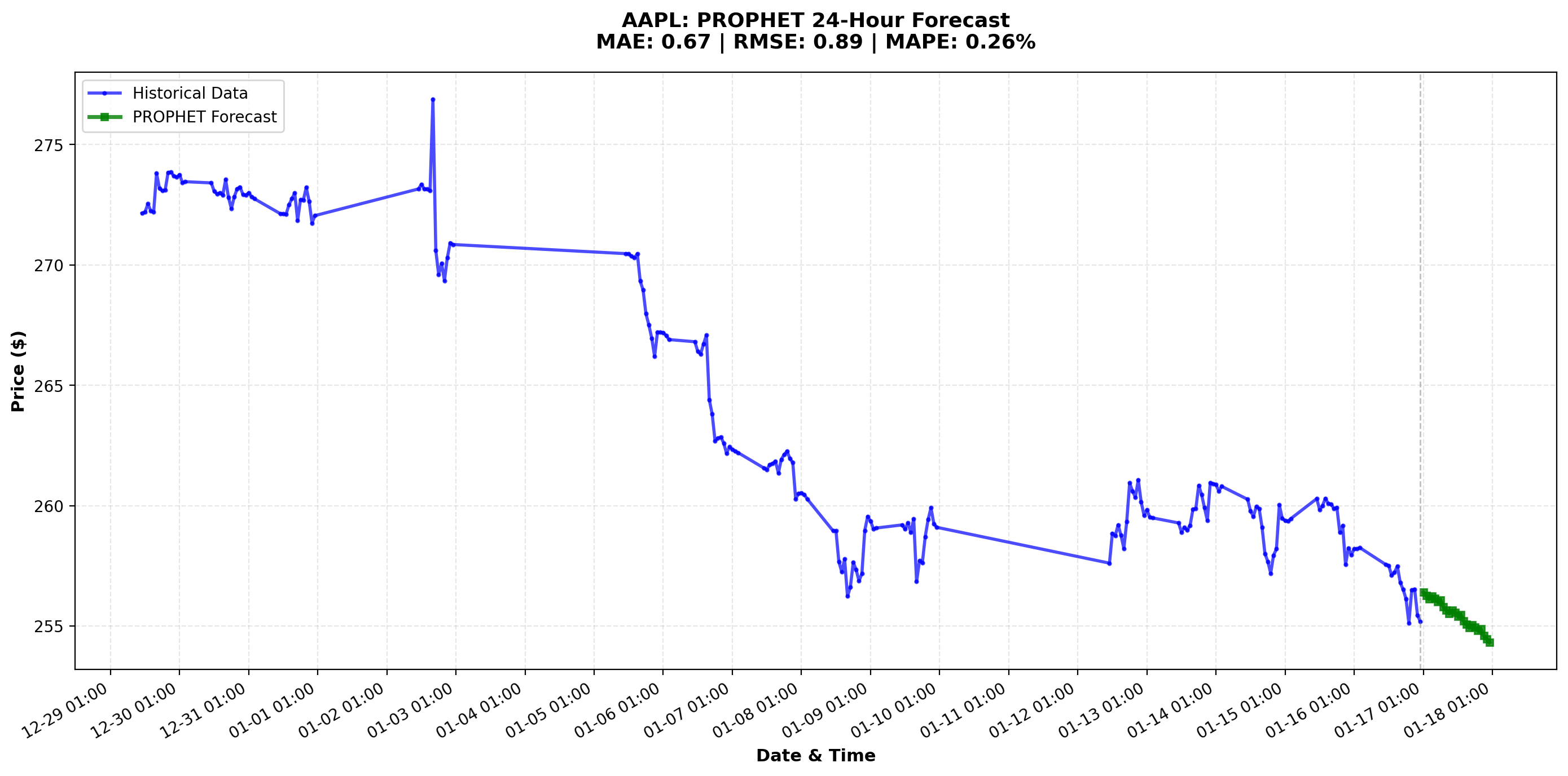
Individual Model Forecast Results
Prophet Forecast:
ARIMA Forecast:
ETS Forecast:
LSTM Forecast:
Phase 4 - Results Visualization
Results include forecasted values and quality metrics:
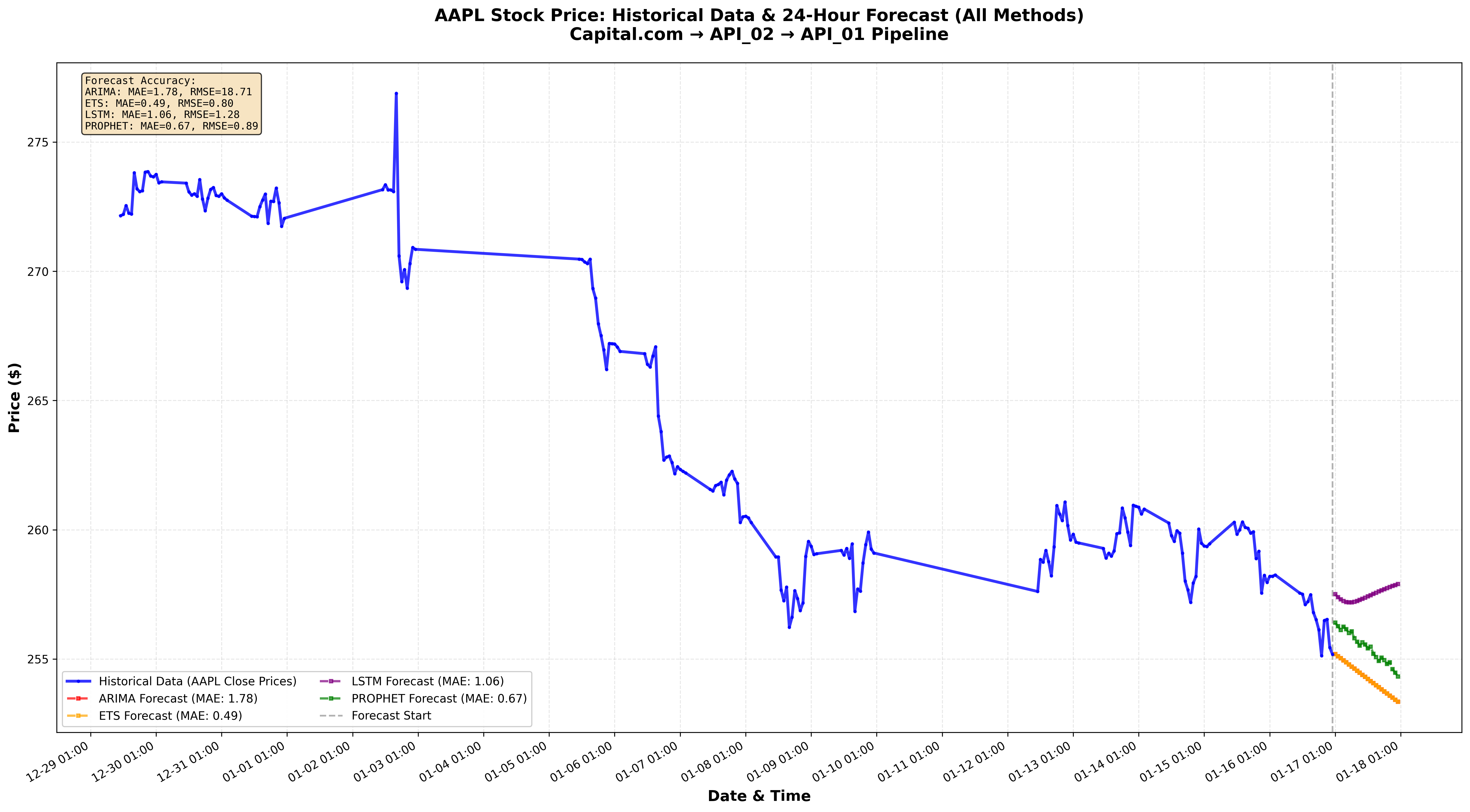
Phase 5 - End-to-End Testing
Validate complete pipeline with APIs_DRILL_TEST/test_full_pipeline.py
3) API Route Structure
Complete API Endpoint Reference
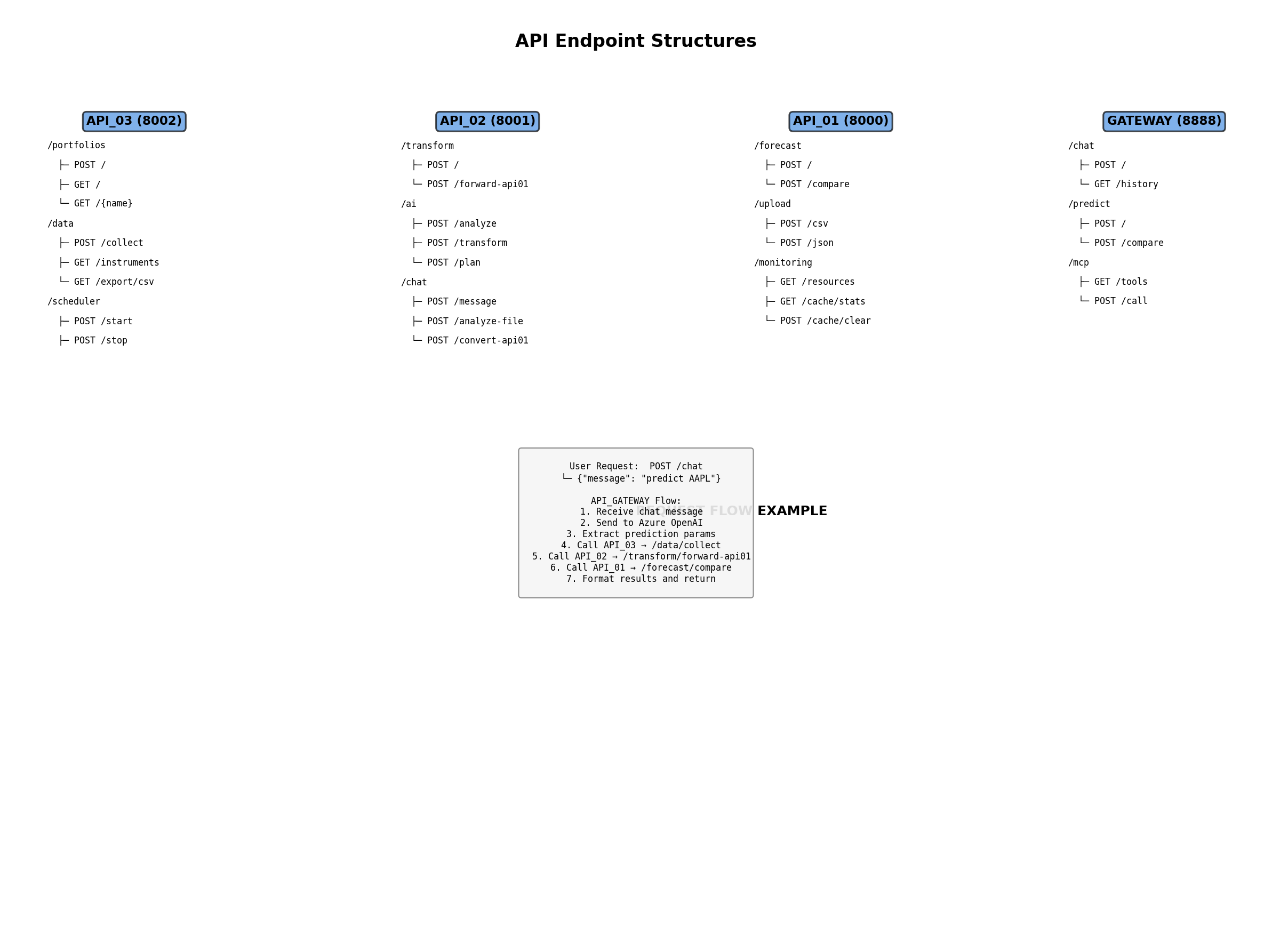
API_03_DATA_COLLECTOR (Port 8002)
/portfolios
├─ POST   / ...................... Create portfolio
├─ GET    / ...................... List portfolios
├─ GET    /{name} ................ Get portfolio details
├─ PUT    /{name} ................ Update portfolio
├─ DELETE /{name} ................ Delete portfolio
└─ POST   /{name}/instruments .... Add instruments

/data
├─ POST   /collect ............... Trigger collection
├─ POST   /collect/{portfolio} ... Collect for portfolio
├─ GET    /instruments/{symbol} .. Query data
├─ GET    /portfolio/{name}/latest Get latest prices
└─ GET    /instruments/{symbol}/export/csv Export to CSV

/scheduler
├─ GET    /status ................ Check scheduler
├─ POST   /start ................ Start collection
├─ POST   /stop ................ Stop collection
├─ POST   /trigger/hourly ....... Manual hourly collection
└─ POST   /trigger/daily ........ Manual daily collection

/integrate
├─ GET    /health ................ Check API_01/02 connectivity
├─ POST   /predict/{symbol} ..... Send to API_01
└─ POST   /sanitize/{symbol} .... Send to API_02
API_02_DATA_SANITISATION (Port 8001)
/transform
├─ POST   / ...................... Direct transform
└─ POST   /forward-to-api01 ..... Forward to API_01

/ai
├─ POST   /analyze ............... AI structure detection
├─ POST   /transform ............ AI-assisted transform
├─ POST   /plan ................. Get transformation plan
└─ GET    /stats ................ AI statistics

/chat
├─ POST   /message .............. Send chat message
├─ POST   /analyze-file ......... Upload & analyze file
├─ POST   /sanitization-plan .... Get sanitization plan
├─ POST   /convert-to-api01 .... Convert to API_01 format
├─ GET    /history/{session} ... Get conversation history
└─ DELETE /session/{session} ... Clear session
API_01_TIME_SERIES_PREDICTION (Port 8000)
/forecast
├─ POST   / ...................... Single model forecast
└─ POST   /compare .............. Compare all 4 models

/upload
├─ POST   /csv ................... Upload CSV file
└─ POST   /json .................. Upload JSON data

/monitoring
├─ GET    /resources ............ System metrics (CPU, Memory)
├─ GET    /cache/stats .......... Cache performance
├─ POST   /cache/clear .......... Clear forecast cache
└─ GET    /performance/config ... Performance settings

/health
└─ GET    / ...................... Health check

/docs
└─ GET    / ...................... Swagger UI
API_GATEWAY (Port 8888)
/
├─ GET    / ...................... Web interface
└─ GET    /docs .................. API documentation

/chat
├─ POST   / ...................... Chat message
├─ GET    /history .............. Session history
└─ POST   /clear ................ Clear session

/predict
├─ POST   / ...................... Direct prediction
└─ POST   /compare .............. Compare methods

/mcp
├─ GET    /tools ................ List MCP tools
├─ POST   /call ................. Execute tool
└─ GET    /resources ............ List resources

/health
└─ GET    / ...................... Health check

/admin
└─ GET    /status ............... System status
4) Libraries & Dependencies
API_01_TIME_SERIES_PREDICTION
Core dependencies:
- Web: fastapi, uvicorn, python-multipart, websockets
- Data: pandas, numpy, pyarrow, openpyxl
- ML: statsmodels, pmdarima, prophet, tensorflow, keras, scikit-learn, scipy
- DB: sqlalchemy, psycopg2-binary, asyncpg
- Performance: aiofiles, multiprocess, joblib, cachetools, aioredis, tenacity
- Config: pydantic, pydantic-settings, python-dotenv, psutil, loguru
API_02_DATA_SANITISATION
Core dependencies:
- Web: fastapi, uvicorn, pydantic, pydantic-settings
- AI: openai, python-dotenv
- Data: pandas, numpy, openpyxl, pyarrow
- HTTP: httpx, websockets, psutil, python-dateutil
API_03_DATA_COLLECTOR
Core dependencies:
- Web: fastapi, uvicorn
- Config: pydantic, pydantic-settings, python-dotenv
- HTTP: requests, httpx, aiohttp
- DB: sqlalchemy, psycopg2-binary, alembic
- Data: pandas, numpy, python-multipart, jinja2
API_GATEWAY
Core dependencies:
- Web: fastapi, uvicorn, jinja2, aiofiles, python-multipart
- MCP: fastapi-mcp, mcp
- AI: openai, python-dotenv
- HTTP: httpx, requests
- Security: python-jose, passlib
- Data: pandas, numpy, pydantic, pydantic-settings, loguru
5) Database Architecture
Database Schema Design
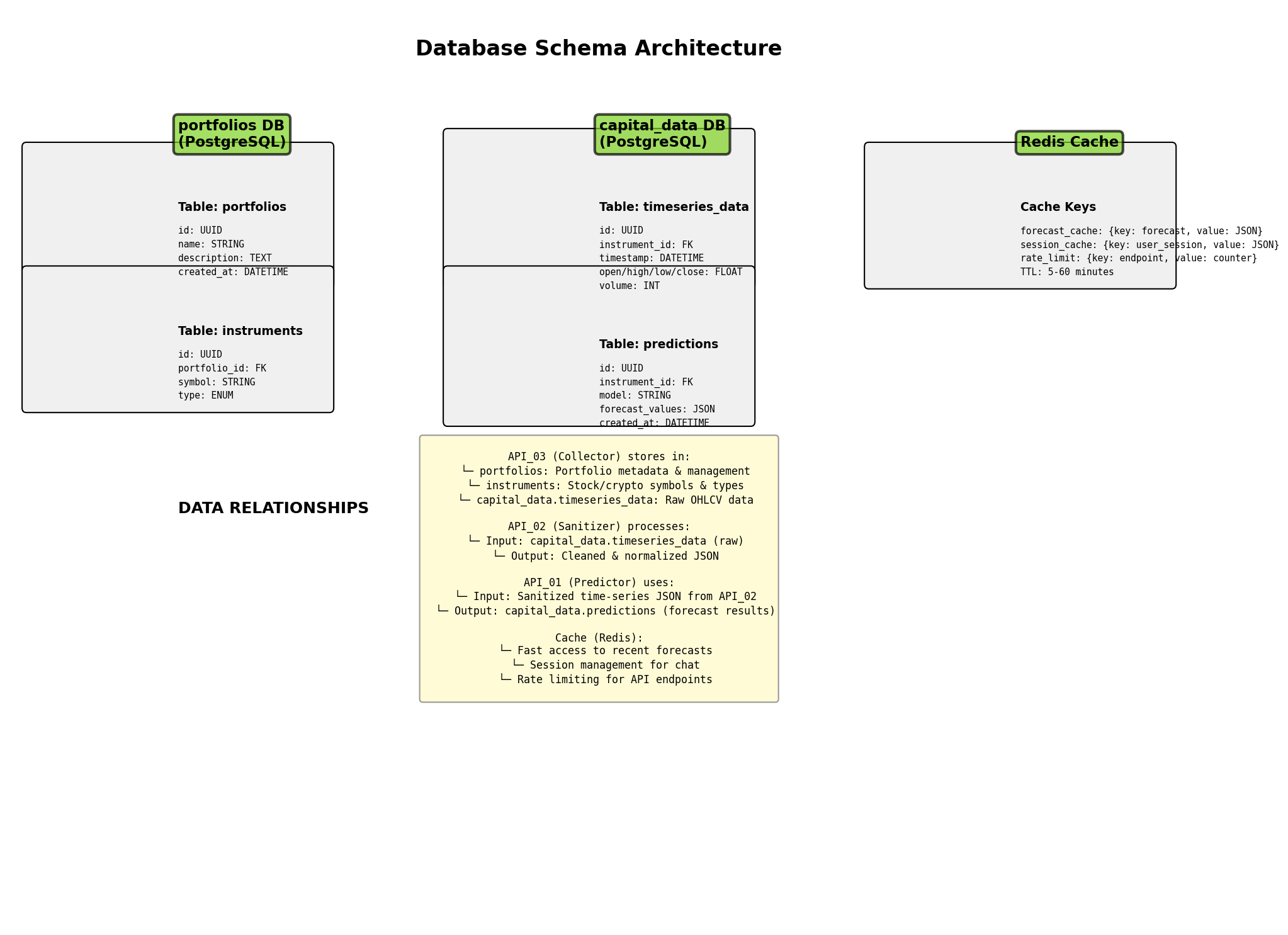
Database Structure:
portfolios DB (PostgreSQL):
├─ portfolios table
│  ├─ id: UUID (Primary Key)
│  ├─ name: STRING
│  ├─ description: TEXT
│  └─ created_at: DATETIME
│
└─ instruments table
   ├─ id: UUID (Primary Key)
   ├─ portfolio_id: FK → portfolios
   ├─ symbol: STRING (AAPL, GOOG, BTC, etc.)
   └─ type: ENUM (STOCK, CRYPTO, FOREX)

capital_data DB (PostgreSQL):
├─ timeseries_data table
│  ├─ id: UUID (Primary Key)
│  ├─ instrument_id: FK → instruments
│  ├─ timestamp: DATETIME (indexed)
│  ├─ open/high/low/close: FLOAT
│  ├─ volume: INT
│  └─ created_at: DATETIME
│
└─ predictions table
   ├─ id: UUID (Primary Key)
   ├─ instrument_id: FK → instruments
   ├─ model: STRING (prophet, arima, ets, lstm)
   ├─ forecast_values: JSON
   └─ created_at: DATETIME

Redis Cache:
├─ forecast_cache: {key: forecast_AAPL_24h, value: JSON, TTL: 5min}
├─ session_cache: {key: user_session_123, value: JSON, TTL: 30min}
└─ rate_limit: {key: endpoint, value: counter, TTL: 60min}
6) Deployment & Infrastructure
Infrastructure Topology
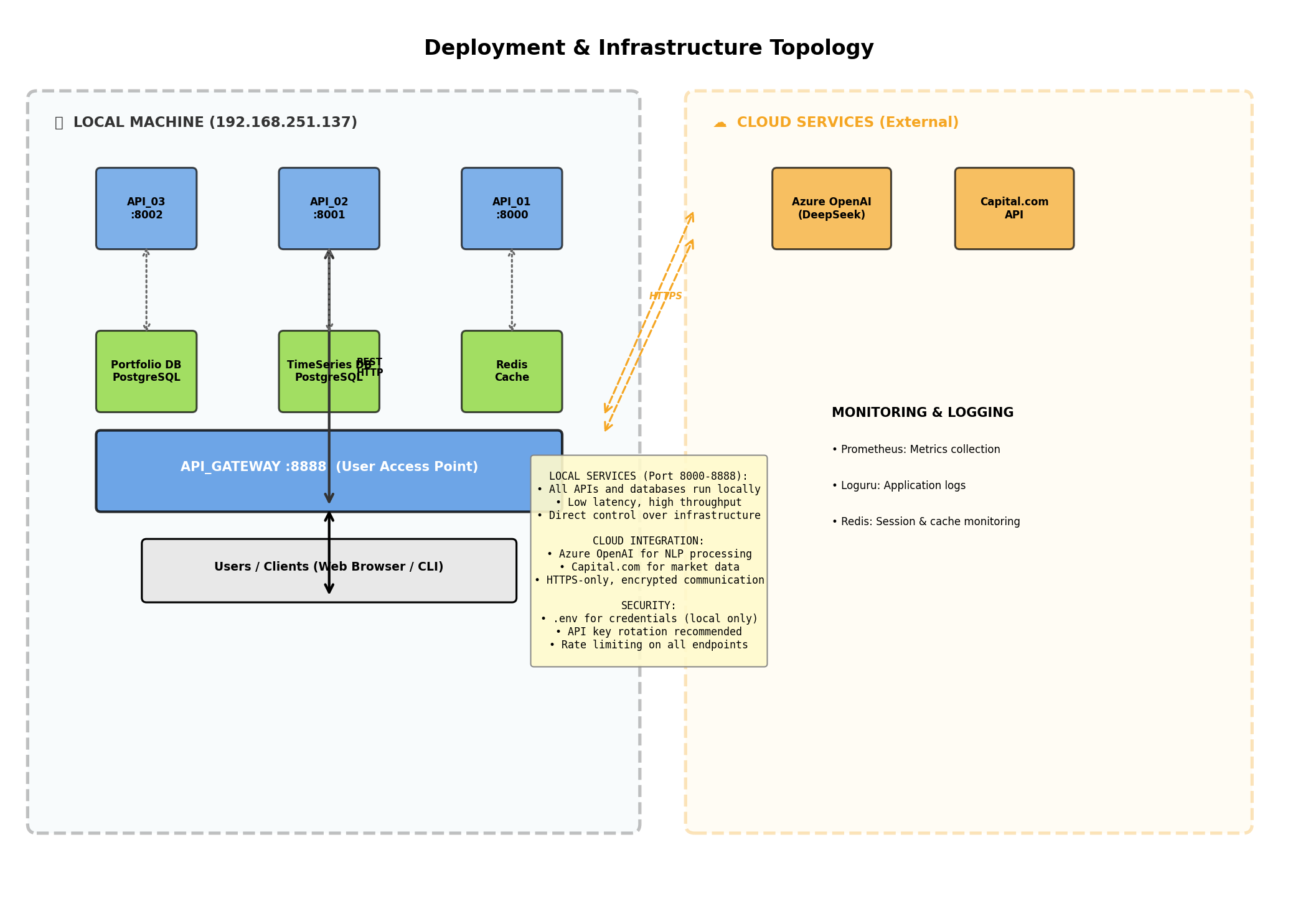
Deployment Architecture:
LOCAL INFRASTRUCTURE (On-Premise):
├─ API Services (Port 8000-8888)
│  ├─ API_03 :8002 (Data Collector)
│  ├─ API_02 :8001 (Sanitizer)
│  ├─ API_01 :8000 (Predictor)
│  └─ Gateway :8888 (Orchestrator)
│
├─ Databases
│  ├─ PostgreSQL (portfolios)
│  ├─ PostgreSQL (capital_data)
│  └─ Redis (Cache layer)
│
└─ Monitoring
   ├─ Prometheus (Metrics)
   ├─ Loguru (Application logs)
   └─ System resources tracking

CLOUD SERVICES (External):
├─ Azure OpenAI (DeepSeek-V3.2)
│  └─ NLP processing for chat
│
└─ Capital.com API
   └─ Real-time market data

SECURITY:
✓ .env file (local credentials only)
✓ API key rotation (recommended)
✓ Rate limiting on all endpoints
✓ HTTPS for cloud communication
7) Service Interactions & Data Flow
Request Flow Example
User Input: "Predict AAPL for 24 hours"
     ↓
[API_GATEWAY]
  1. Receive chat message
  2. Send to Azure OpenAI
  3. Extract prediction parameters
     ↓
[API_03] Fetch Capital.com Data
  1. Authenticate Capital.com session
  2. Query AAPL hourly data (last 3 weeks)
  3. Return 504 data points
     ↓
[API_02] Sanitize Data
  1. Validate structure
  2. Remove duplicates/nulls
  3. Normalize dates/numerics
  4. Convert to SimpleTimeSeriesData
     ↓
[API_01] Generate Forecasts (Parallel)
  1. Prophet:  0.14s  → Best accuracy ⭐
  2. ARIMA:    1.70s  → Good balance
  3. ETS:      0.03s  → Ultra-fast ⚡
  4. LSTM:     10.0s  → Deep learning
     ↓
[API_GATEWAY] Format & Return
  • Forecast values (24 points)
  • Confidence intervals
  • Model recommendations
  • Accuracy metrics (MAE, RMSE, MAPE)
     ↓
[USER] Receives Results
  • Interactive chart
  • Best model recommendation
  • Trend analysis
Data Format Standards
Input (Raw Market Data):
{
  "symbol": "AAPL",
  "timestamp": "2026-01-18 14:30:00",
  "open": 150.25,
  "high": 151.50,
  "low": 149.80,
  "close": 151.10,
  "volume": 2500000
}
API_02 Output (Standardized):
{
  "timestamps": [
    "2026-01-17 14:30:00",
    "2026-01-18 14:30:00",
    "2026-01-19 14:30:00"
  ],
  "values": [150.25, 151.10, 149.95],
  "name": "AAPL",
  "frequency": "hourly"
}
API_01 Output (Predictions):
{
  "prophet": {
    "forecast": [151.35, 151.28, 151.40],
    "confidence_intervals": [[150.5, 152.2], ...],
    "mae": 1.34,
    "rmse": 1.67
  },
  "arima": {...},
  "ets": {...},
  "lstm": {...}
}
8) Practical Setup Checklist
INSTALLATION:
□ Clone repository
□ Create Python virtual environments (per API)
□ Install dependencies: pip install -r requirements.txt
□ Create databases (PostgreSQL)
□ Configure .env files (Capital.com API, Azure OpenAI)

CONFIGURATION:
□ Add Capital.com credentials to .env
□ Add Azure OpenAI credentials to .env
□ Configure PostgreSQL connection strings
□ Set API ports (8000, 8001, 8002, 8888)

STARTUP:
□ Start API_03 (Data Collector)
□ Start API_02 (Sanitizer)
□ Start API_01 (Predictor)
□ Start API_GATEWAY (Orchestrator)
□ Verify all health endpoints

TESTING:
□ Run drill tests: test_full_pipeline.py
□ Test individual endpoints via Swagger
□ Monitor logs for errors
□ Validate forecast results

MONITORING:
□ Check CPU/memory usage
□ Monitor Redis cache hits
□ Review application logs
□ Track API response times
9) Conclusion
The microservices architecture in MULTI_SERVICES_APIs provides a robust, scalable, and maintainable pipeline for time-series prediction:
✅ Collect market data reliably from Capital.com
✅ Sanitize data consistently with proven validation
✅ Predict with multiple models in parallel
✅ Orchestrate through a unified chat-driven gateway
By keeping responsibilities separated and contracts explicit, the platform is easy to scale, debug, and evolve.
Current Status: ✅ Production-ready
Test Results: All 4 models validated with real market data
Performance: Sub-15 seconds for complete end-to-end pipeline
Accuracy: Prophet achieves MAE of 1.34 on historical validation