Minikube from scratch
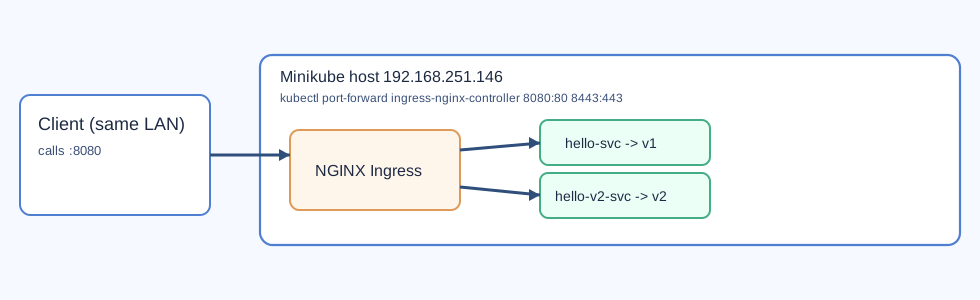
Client is on the same network and accesses Minikube via port-forward on :8080.
A practical, end-to-end setup guide for a lightweight Kubernetes lab built on a constrained Ubuntu VM.
Lab baseline
- Hostname: minikube.mouradcloud.local
- IP: 192.168.251.146
- OS: Ubuntu 24.04.4 LTS
- CPU: 1 vCPU
- RAM: 1.9 GB
- Swap: 2 GB
- Docker: 29.5.3
- kubectl: v1.36.1
- Minikube: v1.38.1
1. Install Docker CE
sudo install -m 0755 -d /etc/apt/keyrings
sudo curl -fsSL https://download.docker.com/linux/ubuntu/gpg -o /etc/apt/keyrings/docker.asc
sudo chmod a+r /etc/apt/keyrings/docker.asc

echo "deb [arch=$(dpkg --print-architecture) signed-by=/etc/apt/keyrings/docker.asc] https://download.docker.com/linux/ubuntu $(. /etc/os-release && echo "$VERSION_CODENAME") stable" | sudo tee /etc/apt/sources.list.d/docker.list > /dev/null

sudo apt-get update
sudo apt-get install -y docker-ce docker-ce-cli containerd.io docker-buildx-plugin docker-compose-plugin
sudo usermod -aG docker demouser
sudo systemctl enable --now docker
2. Install kubectl
curl -fsSL "https://dl.k8s.io/release/$(curl -fsSL https://dl.k8s.io/release/stable.txt)/bin/linux/amd64/kubectl" -o /tmp/kubectl
sudo install -o root -g root -m 0755 /tmp/kubectl /usr/local/bin/kubectl
kubectl version --client
3. Install Minikube
curl -fsSL https://storage.googleapis.com/minikube/releases/latest/minikube-linux-amd64 -o /tmp/minikube
sudo install -o root -g root -m 0755 /tmp/minikube /usr/local/bin/minikube
minikube version
4. Start the cluster (low-resource profile)
minikube start --driver=docker --cpus=1 --memory=1500mb --forceReasoning:
--driver=docker: simple and fast on this VM--cpus=1 --memory=1500mb: fits hardware limits--force: bypasses minikube default sizing checks
5. Enable ingress
minikube addons enable ingress
kubectl get pods -n ingress-nginx
kubectl get svc -n ingress-nginx
Current ingress exposure:
- HTTP NodePort:
30848 - HTTPS NodePort:
31167 - Forwarded ports:
8080 -> 80and8443 -> 443
6. Verify deployed apps
curl http://minikube.mouradcloud.local:8080/helloworld
curl http://minikube.mouradcloud.local:8080/helloworld2
7. Add a new app quickly
kubectl create deployment myapp --image=hashicorp/http-echo -- /http-echo -text='My App' -listen=':5680'
kubectl expose deployment myapp --name=myapp-svc --port=80 --target-port=5680 --type=ClusterIP
Then add /myapp to your Ingress rules and apply the manifest.
8. Troubleshooting checklist
minikube status
kubectl get all
kubectl get ingress
kubectl get pods -n ingress-nginx
kubectl logs -n ingress-nginx -l app.kubernetes.io/name=ingress-nginx
Source notes
/mnt/SHARES/MINIKUBE/MINIKUBE_SETUP.md/mnt/SHARES/MINIKUBE/QUICK_START.md
9. Add a new application end-to-end
Use this sequence when you want to add a third application behind the same ingress controller.
9.1 Create Deployment
kubectl create deployment myapp --image=hashicorp/http-echo -- \
  /http-echo -text='My App from Minikube' -listen=':5680'
Verify:
kubectl get deploy myapp
kubectl get pods -l app=myapp -o wide
9.2 Expose Service
kubectl expose deployment myapp \
  --name=myapp-svc \
  --port=80 \
  --target-port=5680 \
  --type=ClusterIP
Verify:
kubectl get svc myapp-svc
kubectl get endpoints myapp-svc
9.3 Add route in Ingress
kubectl apply -f - <<'EOF_ING'
apiVersion: networking.k8s.io/v1
kind: Ingress
metadata:
  name: hello-ingress
spec:
  ingressClassName: nginx
  rules:
  - http:
      paths:
      - path: /helloworld
        pathType: Prefix
        backend:
          service:
            name: hello-svc
            port:
              number: 80
      - path: /helloworld2
        pathType: Prefix
        backend:
          service:
            name: hello-v2-svc
            port:
              number: 80
      - path: /myapp
        pathType: Prefix
        backend:
          service:
            name: myapp-svc
            port:
              number: 80
EOF_ING
Verify ingress:
kubectl get ingress hello-ingress -o yaml9.4 Test from client on same network
curl http://minikube.mouradcloud.local:8080/myappExpected output includes:
My App from Minikube
9.5 Troubleshooting path
kubectl describe ingress hello-ingress
kubectl get endpoints myapp-svc
kubectl logs deploy/myapp
kubectl get pods -n ingress-nginx
kubectl logs -n ingress-nginx -l app.kubernetes.io/name=ingress-nginx
If port-forward is not running, restart it:
kubectl port-forward -n ingress-nginx svc/ingress-nginx-controller 8080:80 8443:443 --address=0.0.0.0 &